19
3-9 FUNCTION SELECTING MODE (FUNCTION MODE)
• There are the following selective functions.
F-01: Original value F-12: Initialize
F-02: Actual Load Calibration F-13: BV Select
F-03: Sensitivity Registering Calibration F-14: Operation Pattern
F-04: Numeric Value Registering Calibration *F-15: RS-1
F-05: Self-Check *F-16: RS-2
F-06: Analog Output Scale *F-17: Device ID
F-07: Smoothing F-20: TEDS Read Operation
F-08: Additional Value F-21: TEDS Read Items
F-09: Auto Zero Compensation F-22: Zero When Reading TEDS
F-10: Hysteresis F-25: Level Test Signal
*F-11: BCD Output Logic
*: Setting is available when optional function is added.
3-9-1 Selecting Function
1) Cancelling Setting [LOCK] State
To cancel the [LOCK] state ([LOCK] LED is lit), press the HOLD + FUNCTION keys for 2 seconds at the
same time. Then, the [LOCK] LED lights out.
2) Selecting Functions
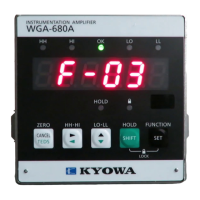
• Press the FUNCTION key for 2 seconds in measuring state to be in function selecting mode. Then,
function ‘F-01’ is displayed on the indicator to enable the selection of the desired function.
• Press the → key or SHIFT + ← keys and select any of the functions from ‘F-01’ to ‘F-25.’
• Press the SET key to determine the selected function and to enable the setting change.
• Press the CANCEL key in function selecting mode to return to the measuring state.
3-9-2 Key Operation in Setting Mode
• Select the function selecting mode and press the SET key. Then, changing the function is enabled.
• To change the set value, operate as follows.
Move digit: Press the → or SHIFT + ← keys.
Change numeric value: Press the ↑ or SHIFT + ↓ keys.
Determine changed value: Press the SET key.
Then, the changed value is determined and stored in the internal memory.
• When it is not required to set the numeric value, “…..” is displayed. With this state, press the SET key to
enable the selected function.
• Press the CANCEL key in the setting mode to return to the function selecting mode.



 To Next Page