14
Reference 1: When setting the rated output, etc. the Status Indicator operates as the minimum digit
indicator.
Reference 2: Assume weight is measured with a load cell. Since notation of the load cell rated capacity
is Newton [N], the rated capacity is converted into weight unit [kg].
Rated capacity [N]
Rated capacity [kg] =
Gravity acceleration [m/s
2
] of the location in use
3-4-2 Sensitivity Registering Calibration Function
This is a function that calibrates data by registering rated output of a transducer without applying the actual
load.
Use a transducer having ‘rated capacity: 1 kHz’ and ‘rated output: 2.004 mV/V.’ An example shall be explained
to have the indicator display ‘1.000’ when 1-kN load is applied.
1) Conducting Digital Zero
Set the transducer to no load state Press the ZERO key to conduct the digital Zero function and to set the
indication to ‘0.’
2) Changing to Sensitivity Registering Calibration Mode
Press the FUNCTION key more than 2 seconds. Function ‘F-01’ is displayed to be in function selecting
mode.
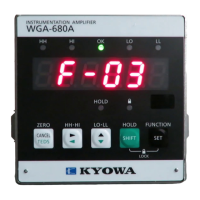
Press the → key to have the indicator display ‘F-03 and press the SET key.
Then, the sensitivity registering calibration is set.
3) Setting Rated Output of the Transducer
The currently set rated output value is displayed and the highest-order digit flickers.
Press the → or ↑ key to set the rated output of the transducer in ‘mV/V’ unit.
<Example> Set the indicated value to ‘2.0040’ and press the SET key.
At this time, the Status Indicator operates as the minimum digit indicator.
4) Setting Indicated Value
The currently set display rated capacity is displayed and the highest-order digit flickers.
Press the → or ↑ key to set the rated capacity of the transducer by ignoring the decimal point.
<Example> Set the indicated value to ‘1000’ and press the SET key.
5) Setting Decimal Point Position
The current decimal point position flickers.
<Example> Set the indicated value to ‘100.0’ and press the SET key.
6) Calibration End
Function ‘F-03’ is displayed. Press the CANCEL key.
Then, the measurement starts with the registered calibration value.



 To Next Page