88 / 134 ECO Gold 09/2021
13.4 Setting the display brightness
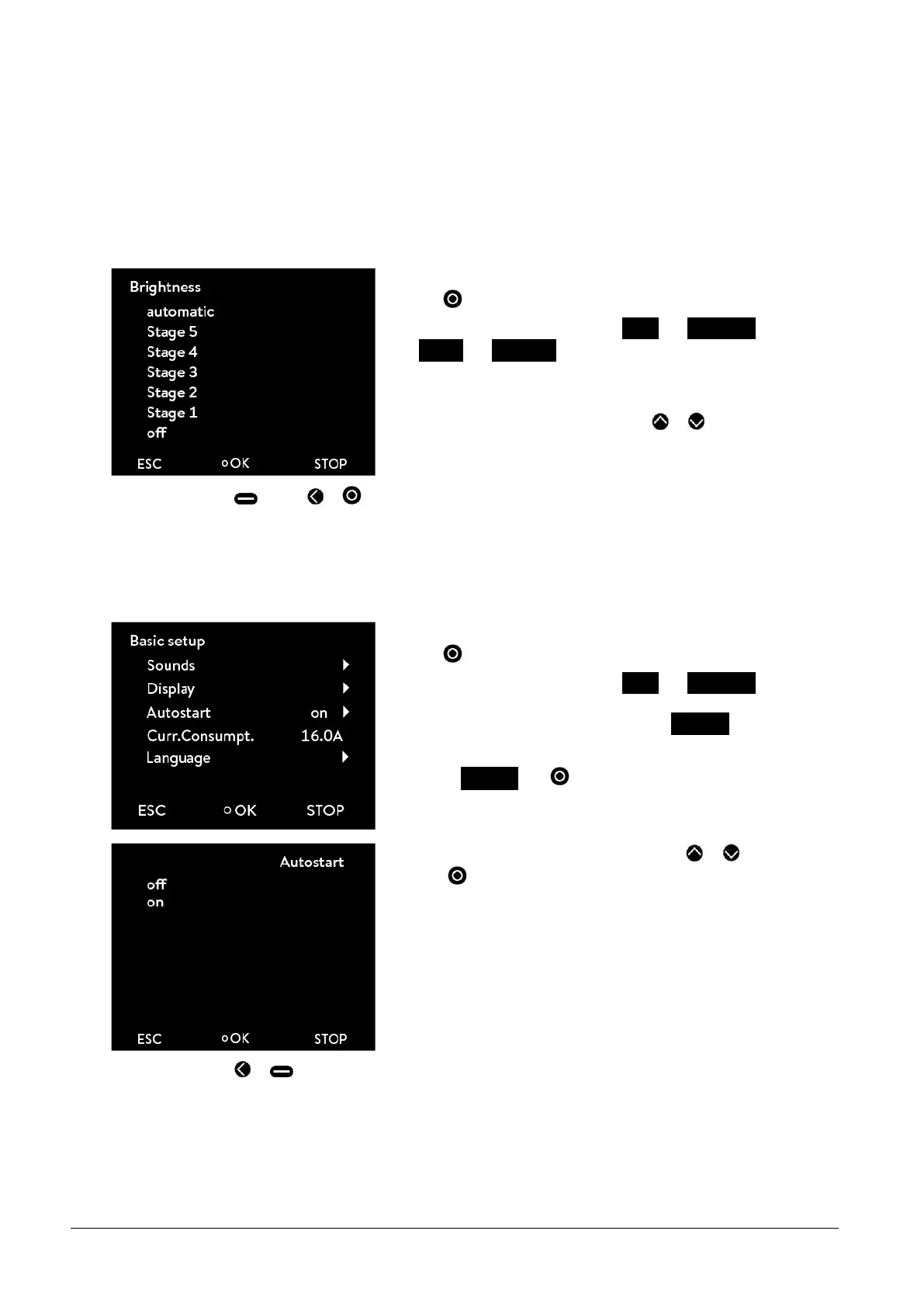
The ECO range of thermostats have a sensor which automatically adapts the display brightness according to the ambi-
ent light level. However, the automatic adaptation can be deactivated and the brightness set manually.
Access to the main menu level is obtained by pressing the enter
key .
Selection and confirmation of Setup Basic setup
Display Brightness.
The adjacent menu window appears.
Select "automatic", "level" or "off" with or . The selected level
is immediately active without confirmation.
-
By pressing (ESC), or you are returned to the menu level without any change.
13.5 Defining the starting mode (Autostart)
Generally, it is required that the thermostat starts operating again after a power interruption. For reasons of safety, for
example, you can insert a manual activation step.
Access to the main menu level is obtained by pressing the enter
key .
Selection and confirmation of Setup Basic setup.
The adjacent menu window appears. As well as Autostart the current
setting is stated. This is "off" or "on"
Select Autostart with .
Select the operating status "off" or "on" with or and confirm
with .
If "off" is selected, standby operation is activated after a mains inter-
ruption.
With the setting "on" the device continues running straight after the
mains interruption.
-
By pressing or (ESC) you are returned to the menu level without any change.



 To Next Page