102 / 134 ECO Gold 09/2021
17.2 Creating and editing a program
In the following functions are explained below:
Creating and editing a program.
Insert or append a new segment.
Delete a segment.
Note:
New segments and be inserted and existing ones changed, also the currently active segment, even when a pro-
gram is currently being executed. Furthermore, except for the currently active segment, all segments can be de-
leted at any time.
Changes to the currently running segment are possible. The segment is continued as though the change has been
valid since the start of the segment.
If the new segment time is shorter than the already expired segment time,
then the program skips to the next segment.
If a segment time is required > 999h: 59min, then this time must be spread over several consecutive segments.
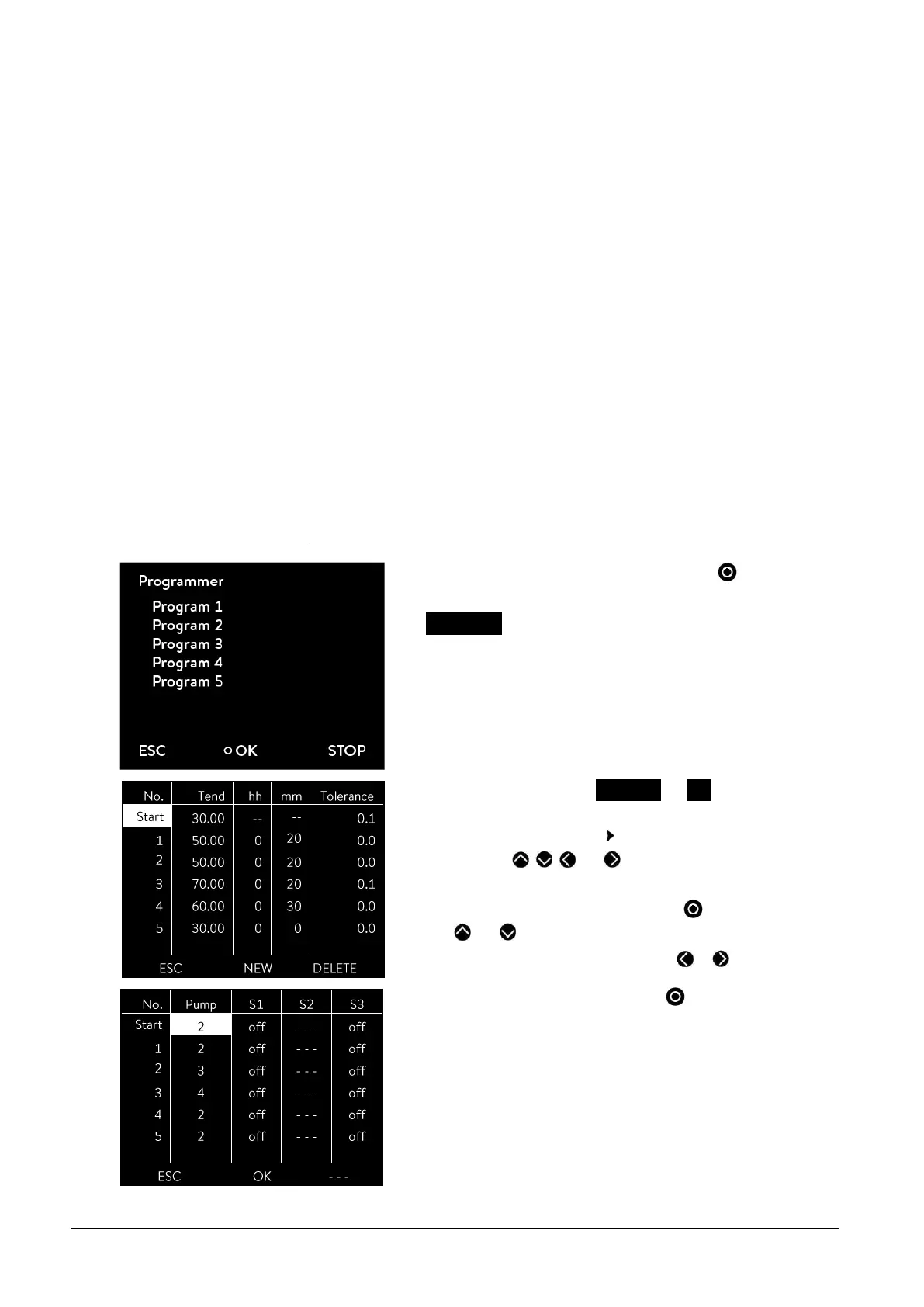
Creating and editing a program:
Compare the programming example ( 17.1)
- Access to the menu level is obtained by pressing .
- The adjacent menu window appears by selecting and confirming
Programmer.
- By selecting and confirming Program 1 Edit you obtain access to
the editor view of the programmer. To view the complete window in-
formation go to the right with .
- With the keys , , and you obtain access to the individual
segments.
- The appropriate parameter is selected with and can be changed
with and .
- Single figures can be selected by pressing or .
- Confirm your choice with the enter key .
- You can now select the next segment to be changed using the control
keys.



 To Next Page