PAGE 12
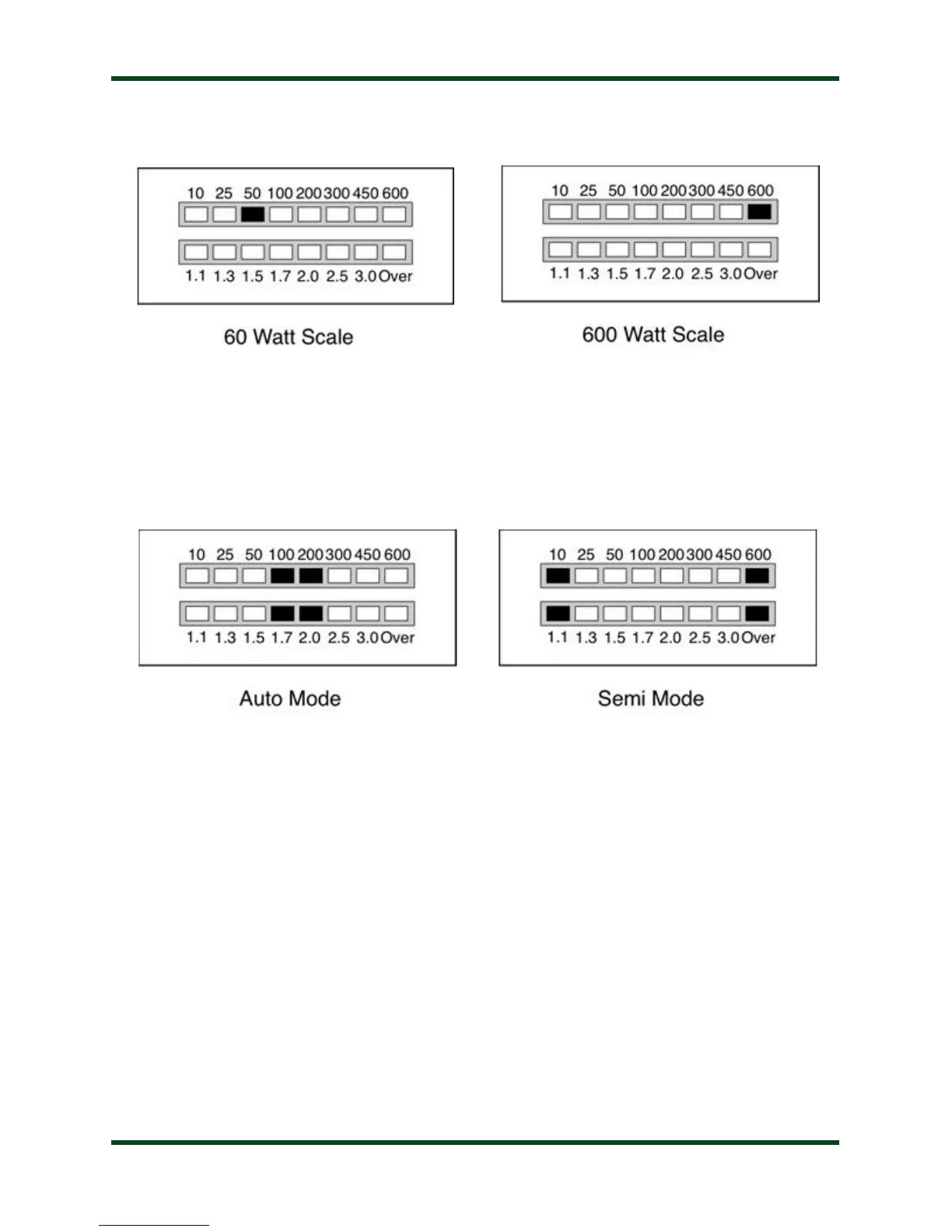
Wattmeter Scale: The Power LED bargraph displays either 0 to 60 watts or 0 to 600 watts
full scale. To toggle between these two scales, press Func -> L Up. The LED marked “50” or
“600” will light momentarily to indicate the newly selected scale.
Automatic Tuning Mode: The AT-600Pro may be set for either semi-automatic tuning or
fully automatic tuning. In semi-automatic tuning mode, a tuning cycle will not begin unless
specifically requested by pressing the Tune button. In fully automatic tuning mode, a tuning
cycle will begin any time there is RF present and the SWR exceeds a pre-set level. The default
setting is fully automatic tuning mode.
To toggle between semi- and fully automatic modes, press Func -> C Dn. The LED display
will show one of the two patterns to indicate which mode has been selected:
Automatic Tune SWR Threshold: When the AT-600Pro is in fully automatic tuning mode,
an automatic tuning cycle will begin any time RF is present and the SWR has exceeded a set
threshold. This threshold is user-programmable to any value between 1.1:1 and 3.5:1. To set the
automatic tune SWR threshold, press Func -> L Dn repeatedly (press Func, then L Dn; Func,
then L Dn, and so on...) to cycle through all the options. The SWR threshold will be displayed
on the SWR scale momentarily.



 To Next Page