ON
SD
1
2
3
4
ON
SD
1
2
3
4
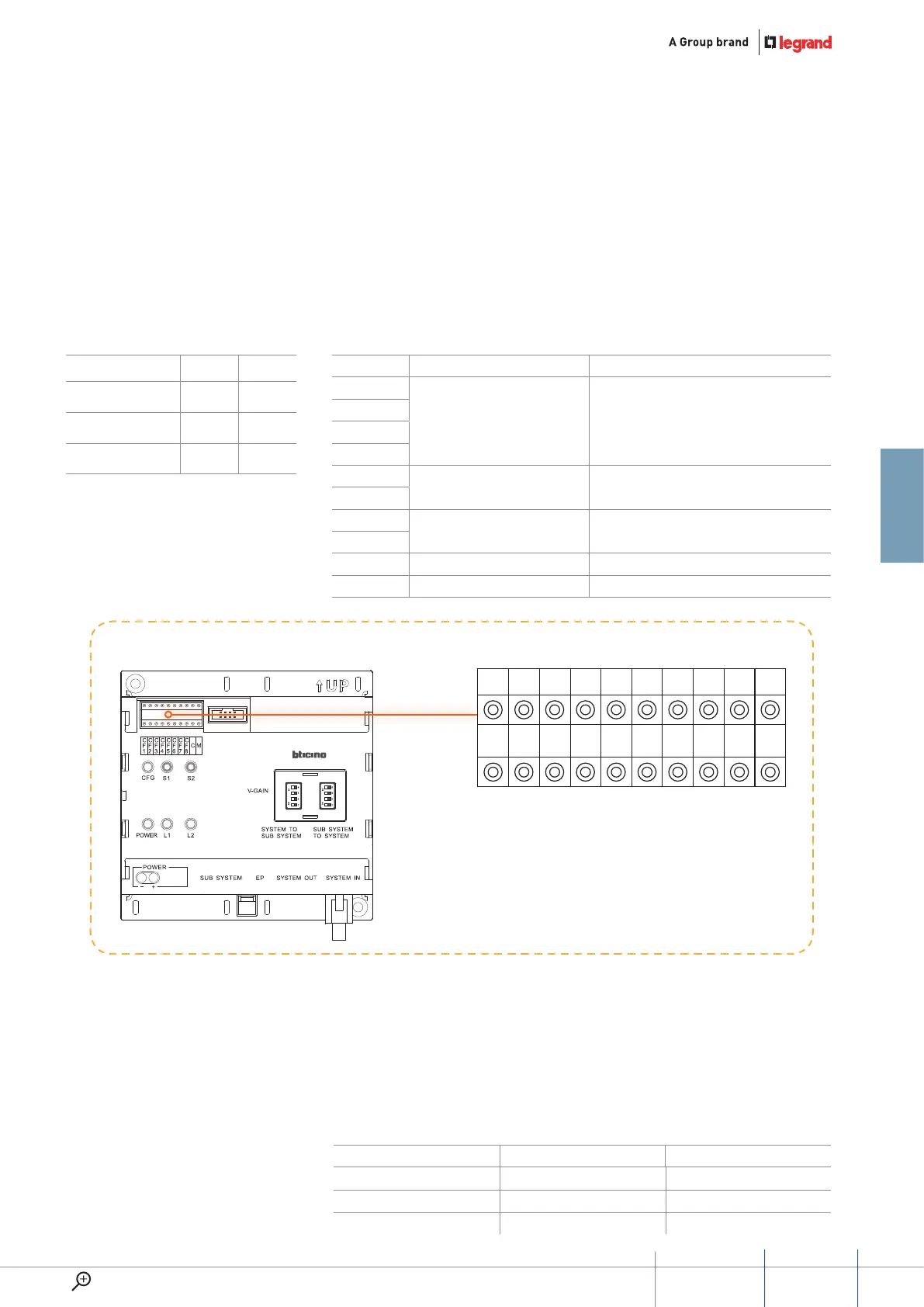
CF1 CF2 CF3 CF4 CF5 CF6 CF7 CF8 C M
N N N N #F #F #I #I C M
323003
riser shunT configuraTion
Possible riser shunt configuration
procedure.
Mode 1 Mode 2
Resistor conguration √ √
Keyboard conguration √ √
Use RS232 conguration × ×
poSition Mode 1 Mode 2
CF1
NNNN NNNN
CF2
CF3
CF4
CF5
#FF is 20(default).
No need for conguration
#FF
(#II setup using same value for all system riser shunts)
CF6
CF7
#II is 4(default).
No need for conguration
#II
(#II setup using same value for all system riser shunts)
CF8
C C C
M M M
meaning of each
configuraTor socKeT pin
NNNN: number of riser shunts.
#FF: typical floor number for riser.
#II: typical number of handsets
Riser shunt conguration position
Accessory configuration examples
for each floor.
#Min handset: the lowest handset.
address managed by this riser shunt.
#Max handset: the highest handset
address managed by this riser shunt.
configuration Bit definition reMark
CF11 CF12 First EP number in this riser From 1 to 80
CF13 CF14 Riser EP quantity of riser
CF15 CF16 Riser switchboard number From 1 to 15
C: the Switchboard number that is
the first priority for this riser.
If the number of the Switchboard
is more than 9 (from 10 to 15), this
parameter can only be set using the
riser shunt keyboard or the SF2.
M: System configuration Mode.
If the selected configuration Mode
is Mode 1 or Mode 2, this parameter
is 0. If this configurator is set using
number 2, it means that this riser
shunt is only used inside the riser
to extend the maximum number of
handsets (from 400 to 800).
If 323011 is present in the system or
switchboard is install in the riser than
an additional configuration is needed
for riser shunt as below listed:
configuration can only be set by SF2
software or by keyboard.
47
GUIDED45 SyStEm
WWW.LEGRAND.COM


 To Next Page