8
Adjusting the Output Capacity
Due to the seam form, the output capacity and the pre-heating period can be matched to
each other.
• Pre-adjustment at the display
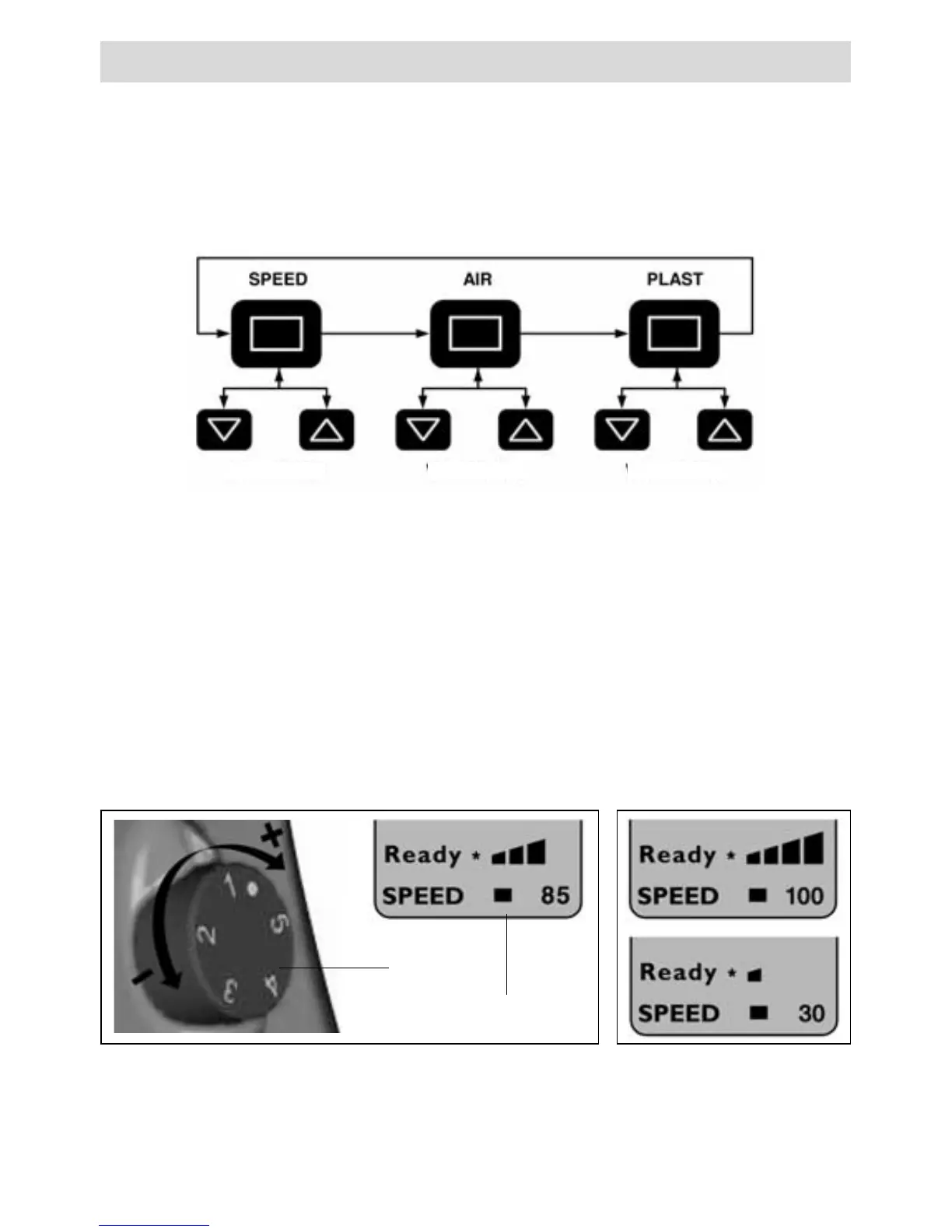
– By pressing the select key (28), set the cursor to the «SPEED» position.
– Specify the maximum output value (30 to 100) via the up key (29) or down key (27)
(indication via the bar display for drive (22).
• Fine-adjustment during the welding procedure
– By turning the potentiometer (3), the output capacity of the maximal set output value
(e.g. 85) can be reduced to the minimum.
The output capacity depends on the thickness of the welding wire. If the welding output is too
high with the output display “30” and the potentiometer is set to “minimum”, the next smallest
welding rod thickness must be selected.
Operating
Setting parameters in the operating window
The cursor (31) shows which parameters can be set. After switching on, the cursor is on
the «SPEED» position.
In the operating window, the following parameters can be selected with the Select key (28)
and changed in their values with the Up key (29) and Down key (27).
3
22
Example
Set value Set value Set value







 To Next Page