9
Setting the PLAST and AIR temperatures
• Set the cursor to the «PLAST» or «AIR» position by pressing the Select key (28).
• Set the temperature value with the Up (29) or Down (27) keys.
Monitoring the welding parameters
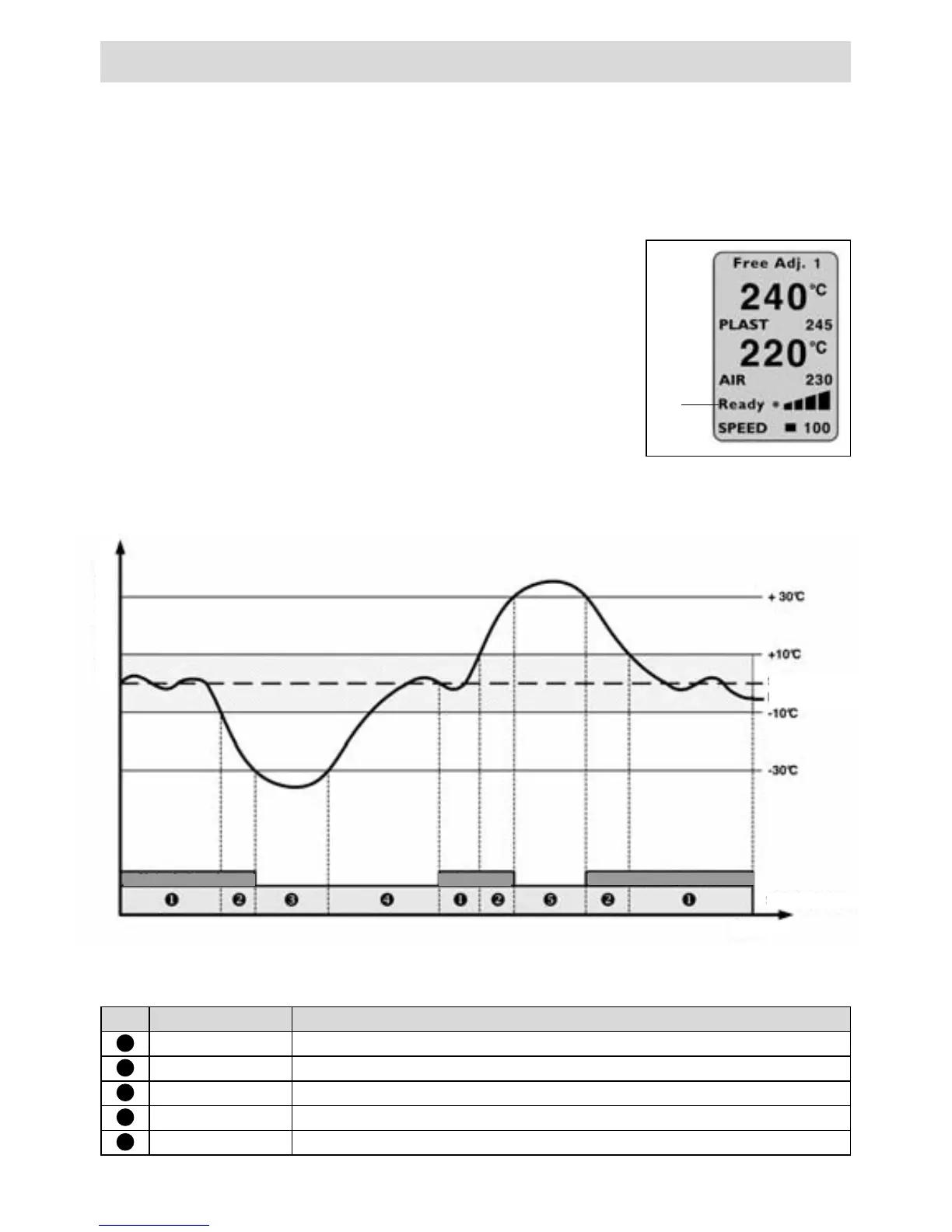
The set and actual values of the AIR and PLAST tempe-
ratures are continuously monitored. If the actual value
deviates from the respective set value (value outside the
tolerance band), this is indicated on the status display
(30) with a status change. If necessary, the drive motor is
temporarily disabled until the welding parameters are
once again within the prescribed tolerance band. The
possible status displays and the tolerance bands may be
seen in the following graph and table.
Operating
No.
Status display
Status properties
1
Ready* Ready to weld
2
M enabled Deviation of the welding parameters > 10°C
3
Heat
Deviation of the welding parameters > -30°C, drive motor disabled
4
220s Warm-up lock time of 220 sec., drive motor disabled
5
Too hot
Deviation of the welding parameters > +30°C, drive motor disabled
30
Temperature display
Reference value
Actual value
Displayed state
Time
Motor enabled
Motor enab.
Motor enabled







 To Next Page