20
The maximum logging duration is determined by the
battery life (24hrs.) and the memory. Data being logged is
an average over the sample period.
Using this information the maximum logging period can be
calculated. For example, if logging the second Watts
screen which shows 5 parameters, with a logging interval
of 10 seconds, the maximum logging period would be:
Analyst 2050
1000 x 10 seconds = 2 hrs 46 mins
Analyst 2060
2000 x 10 seconds = 5 hrs 33 mins.
3.9.2 ENABLE LOG
This enables the logging session. The low battery symbol
flashes if there is insufficient battery life to complete the
logging session defined in the SET TIME menu.
When internal logging is enabled the logging will
commence within 5 seconds of selecting the
measurement screen with the rotary switch and
key. All data displayed on the selected screen will be
logged. ‘MEMORY’ flashes if there is insufficient memory
to complete the logging session defined in the SET TIME
menu. Once logging has commenced an on screen timer
counts down the remaining logging period. Logging will
terminate if the screen display is changed through moving
the rotary switch or pressing the key before the
end of the logging session.
If PC logging is enabled, all measurements appearing on
the instruments display will be logged to the PC. Logging
will not terminate if the screen is changed.
3.9.3 DISPLAY DATA
This menu allows the user to recover data from the
internal memory. On entry to this menu a list of the
parameters which have been logged are displayed. The
key increments through the list, and the
key selects ONE parameter for display. For example:
ARMS, A Av, A Pk, A CF
3.9.4 EXIT returns to the previous menu.
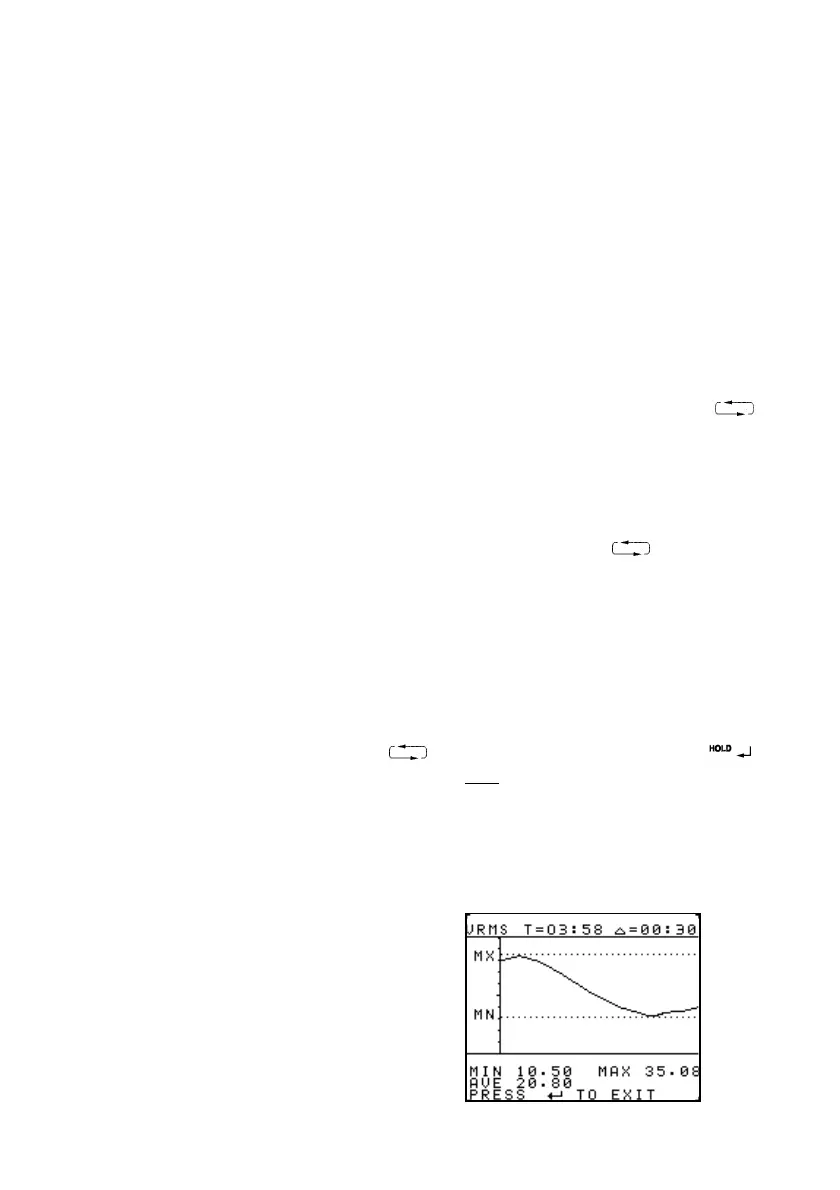
On the chart display screen the single parameter is shown
vs time, and an EXIT is displayed on the screen allowing
the user to return to the logging parameter select menu.


 To Next Page