14
3.3 Current measurement
• Remove any Voltage test leads from the
instrument.
• Move the rotary switch to A position.
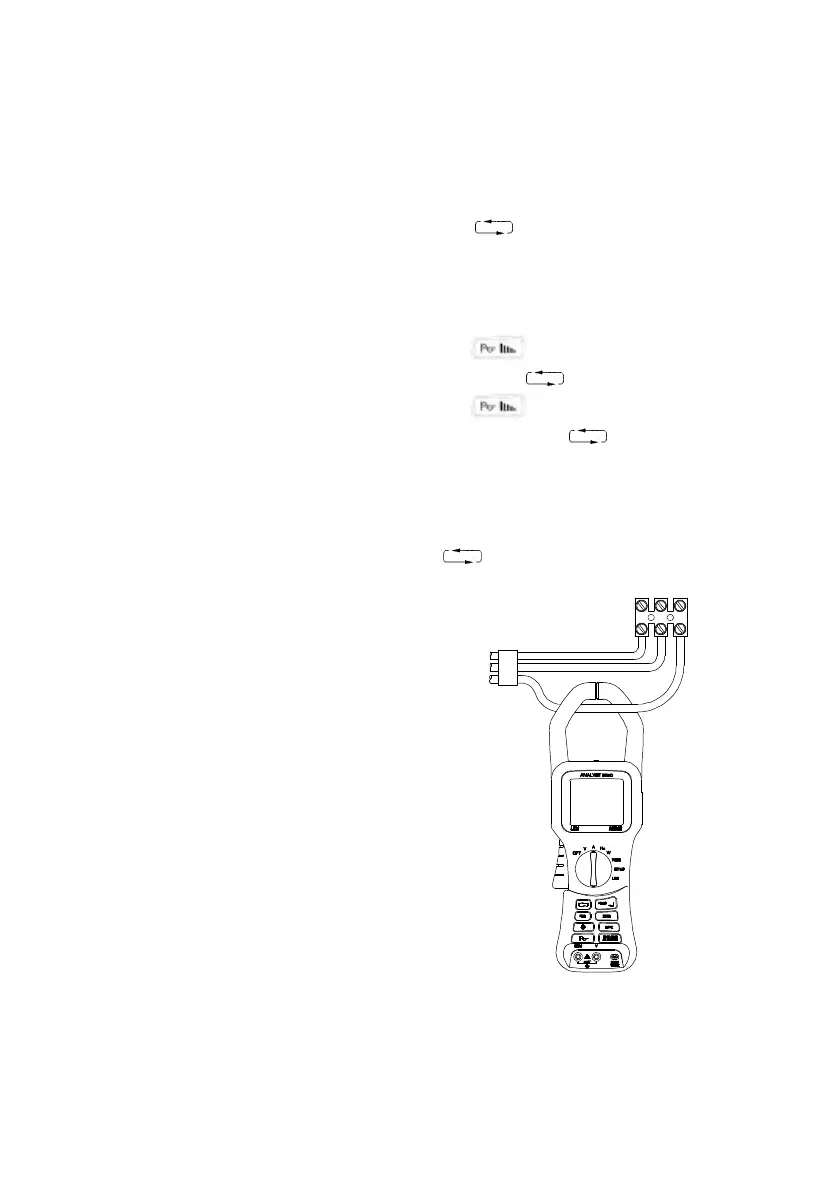
• Press the trigger to open the jaws and clamp around
the current carrying conductor as shown in Fig. 3.
• Read the display. A “-“ polarity indicates a DC current
flowing in a direction opposite to the arrow on the
instrument case.
• Use the key to change the parameters
displayed.
Screen 1 = A RMS (AC + DC) A DC
Screen 2 (2050) = A RMS,A Av,A Pk,A CF,A Hz
Screen 2 (2060) = A RMS,A Av,A Pk,A CF,A Rpl
• Use the HOLD key to freeze the display.
• Use the key to display the waveform of the
current and the key to change the timebase.
• Use the key to display the harmonic content
of the current and the key to select individual
harmonics (2060 only)
• Use the 8888 key to return to the digital display.
• Use the ZERO key to zero the display if necessary or
if relative readings are required.
• Use the REC key to enter the RECORD mode. Use
the key to show the MAX, MIN, AVE values of
the screen readings. Press the REC key to exit.
Fig. 3
Current Measurement


 To Next Page