15
3.4 Measurement of Watts / VA / PF / kWHr
(Single Phase)
• Move the rotary switch to the W position.
• Insert the test leads into the sockets on the front of
the instrument. Connect the red lead to the V terminal,
and the black lead to the COM terminal.
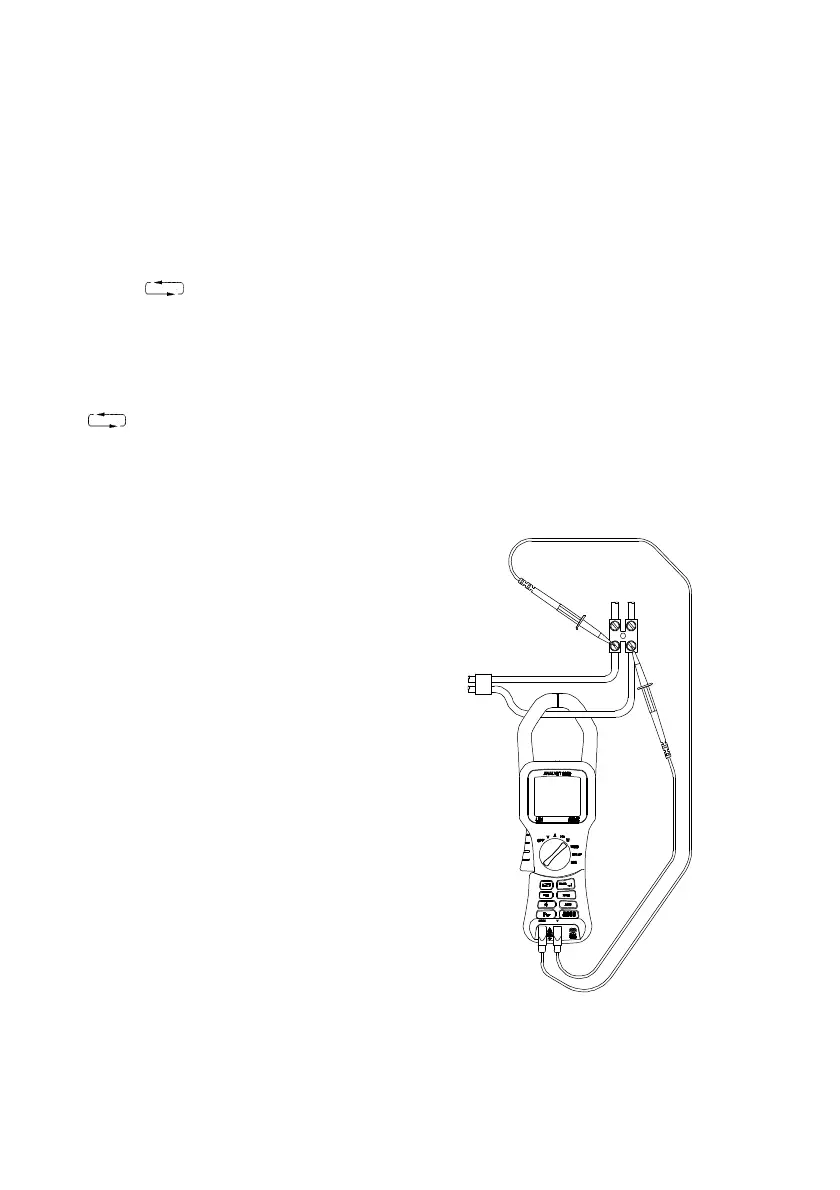
• Press the trigger to open the jaws, and clamp them on
the current carrying conductor, as shown in
Fig. 4.
• Read the display. See section 4.2 for details on the
sign conventions
• Use the key to change the parameters
displayed.
Screen 1 = kW, kVA, kVAR, PF, kWHr
Screen 2 = kW, V RMS, A RMS, PF, AHr
• Use the HOLD key to freeze the display.
• Use the REC key to enter RECORD mode. Use the
key to show the MAX, MIN, AVE displays of
the screen readings. Press the REC key again to exit.
Fig. 4
Single Phase Watts Measurement


 To Next Page