16
3.5 Measurement of Watts / VA / PF / kWHr in a
balanced system (3 Phase)
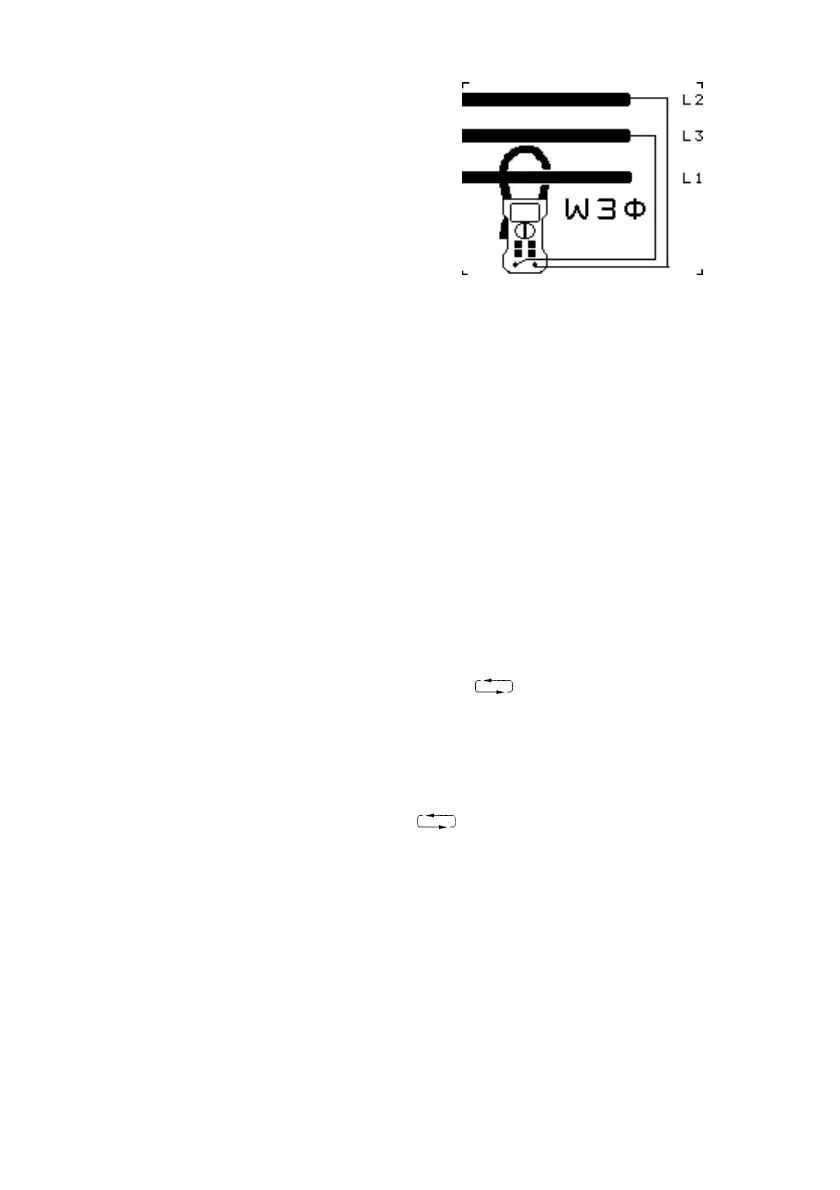
Fig. 5
Watts 3∅ Configuration
• Move the rotary switch to the W3∅ position.
• A screen prompt, Fig. 5, indicates the above method
of connection.
• Insert the test leads into the sockets on the front of
the instrument. Connect the red lead to the V terminal
and the black lead to the COM terminal.
• Apply the test leads to the circuit under test:
Red lead to Phase L2
Black lead to Phase L3
• Press the trigger to open the jaws and clamp them
around the current carrying Phase L1, as shown in
Fig. 5.
• Read the display. See section 4.2 for details on the
sign conventions
• Use the key to change the parameters
displayed.
Screen1 = kW, kVA, kVAR, PF, kWHr
Screen2 = kW, V RMS, A RMS, PF, AHr
• Use the HOLD key to freeze the display.
• Use the REC key to enter RECORD mode. Use the
key to show the MAX, MIN, AVE displays of
the screen readings. Press the REC key again to exit
this mode.
W3∅ gives the total power based on a balanced system.


 To Next Page