24
Even though the “AUTO” SETTING’S HOME ROLL AND PITCH POSITIONS will keep the boat level side to side
and running at its most efficient pitch angle, there will be times that the water conditions may be choppy or coming
at the boat at an angle and the boat will run more comfortably if it wasn’t level or running at its most efficient
running angle. During these adverse water conditions, the Auto Glide provides you with the option of storing three
additional automatic HOME ROLL AND PITCH POSITIONS
that might make the boat run more comfortably.
B. “FAV 1” ,“FAV 2” and “HOLD” AUTOMATIC SETTINGS:
The Auto Glide has three additional AUTOMATIC SETTINGS; FAV 1, FAV 2 and HOLD. Each of these settings
can save HOME ROLL AND PITCH POSITIONS that are different from the “AUTO” SETTING’S HOME ROLL
AND PITCH POSITIONS. The “FAV 1” and “FAV 2” alternative HOME ROLL AND PITCH POSITIONS are
permanently saved in the Auto Glide and are available to you anytime you press the “FAV 1” or “FAV 2”
BUTTONS on the Key Pad. The “HOLD” alternative HOME ROLL AND PITCH POSITION is only temporarily
saved in the Auto Glide and will be erased whenever you press any other button on the Key Pad or turn “OFF”
your motor(s).
1. SAVING “FAV 1” and “FAV 2” HOME ROLL AND PITCH POSITIONS:
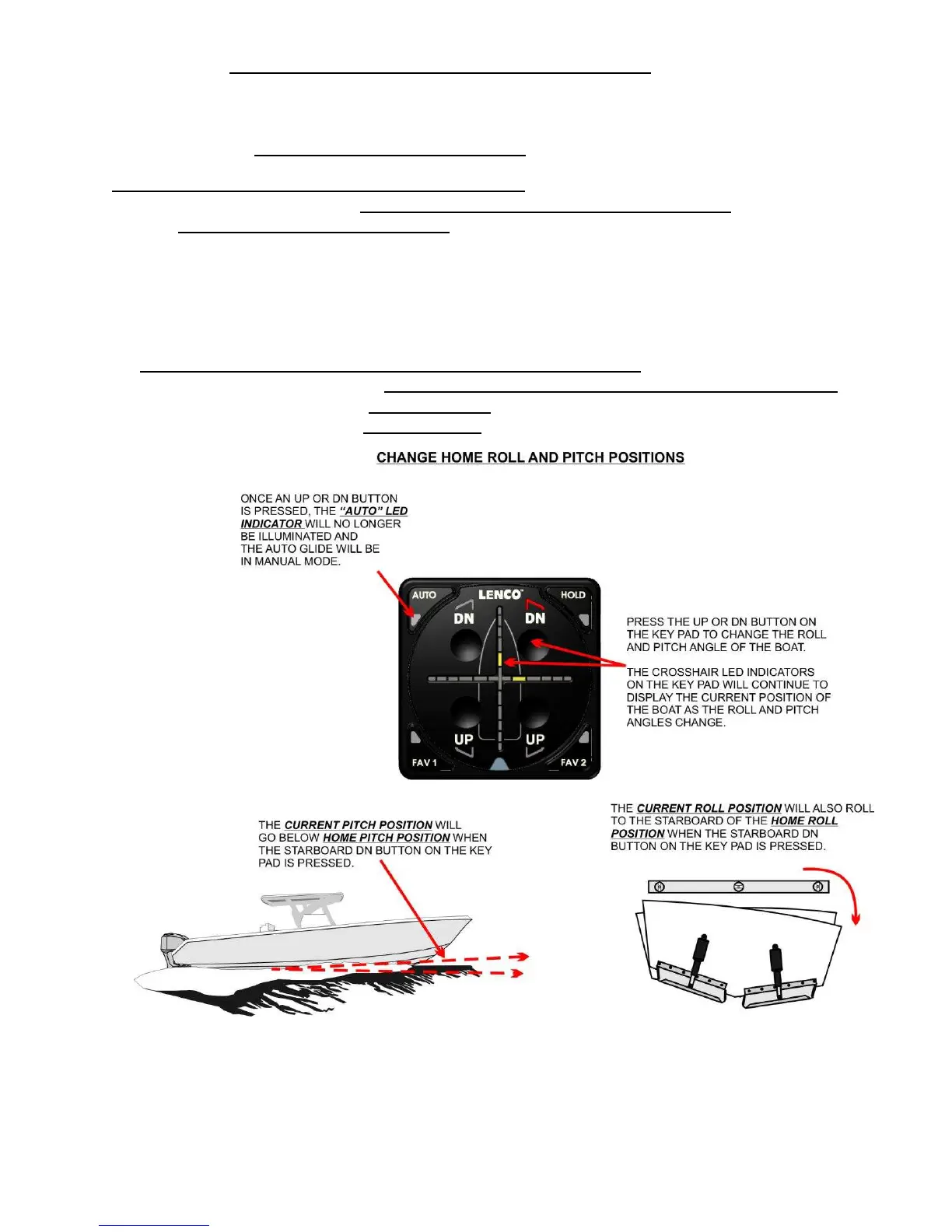
Before you can save an alternative HOME ROLL AND PITCH SETTINGS for “FAV 1” and “FAV 2”, you
must first place the Auto Glide in MANUAL MODE,
by pressing any of the four UP/DN buttons on the Key
Pad. This puts the Auto Glide in MANUAL MODE and you are now in control of the trim tabs.


 To Next Page