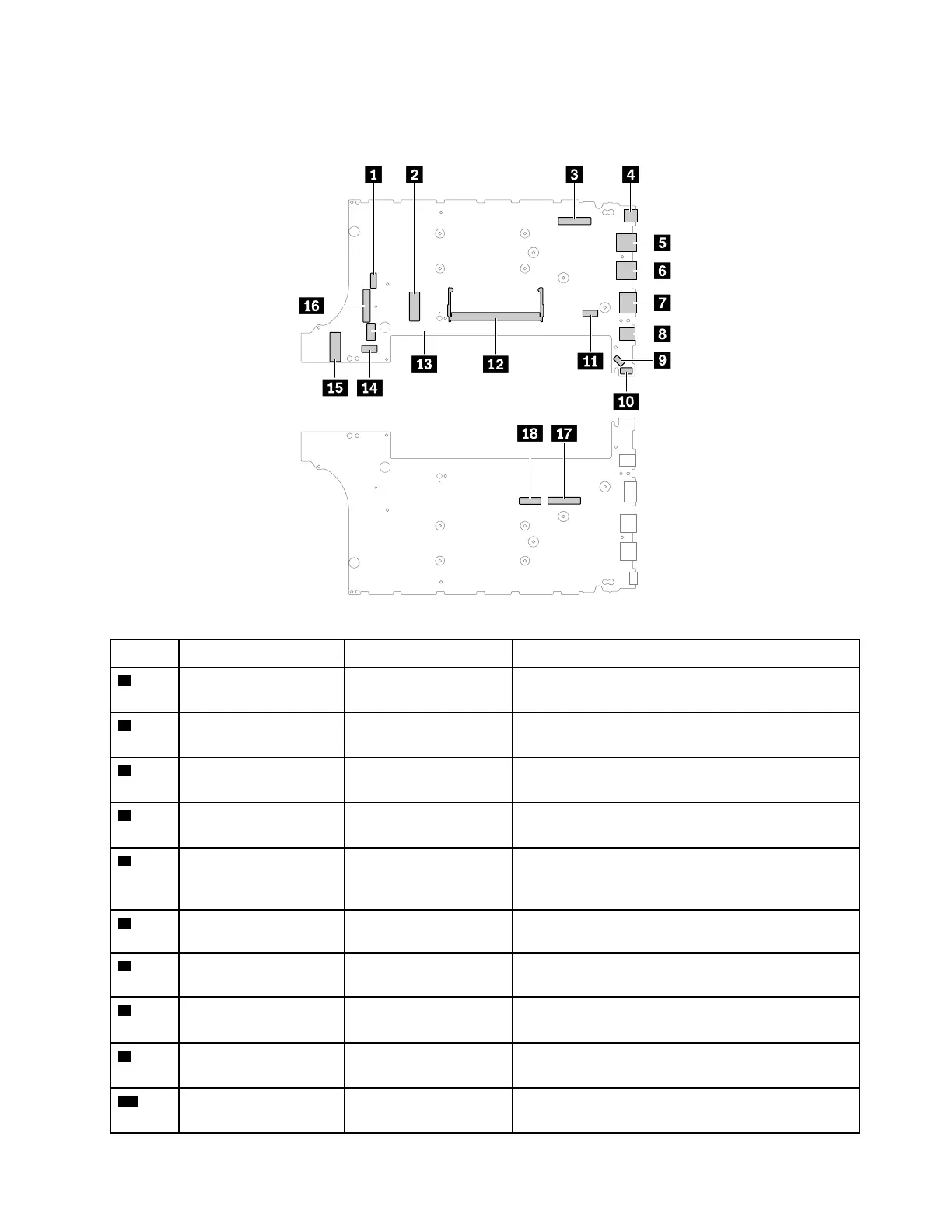
Note: Depending on your computer model, some connectors or cables might not be available.
System board connectors and cables
Table 12. System board
Item
Connector (location)
Internal cable required
Cable connection
1
Thermal fan connector
(internal)
No The thermal fan assembly comes with cable.
Connect the cable to this connector.
2
Wireless-LAN card slot
(internal)
No Insert the wireless-LAN card into this slot.
3
LCD connector
(internal)
LCD cable Connect one end to the LCD panel and the other end
to this connector.
4
USB-C connector
(external)
No
Connect a USB-C compatible device to this
connector.
5
Always On USB 3.1
connector Gen 1
(external)
No Connect USB-compatible devices to this connector.
6
USB 3.1 connector Gen
1
No
Connect USB-compatible devices to this connector.
7
HDMI connector
(external)
No
Connect a compatible digital audio device or video
monitor to this connector.
8
Audio connector
(external)
No Connect headphones or a headset with 3.5-mm
(0.14-inch) 4-pole plug to this connector.
9
Coin-cell battery
connector (internal)
Coin-cell battery cable The coin-cell battery comes with cable. Connect the
cable to this connector.
10
Speaker assembly
connector (internal)
Speaker assembly cable The speaker assembly comes with cable. Connect
the cable to this connector.
Chapter 6. Locations 57















 To Next Page