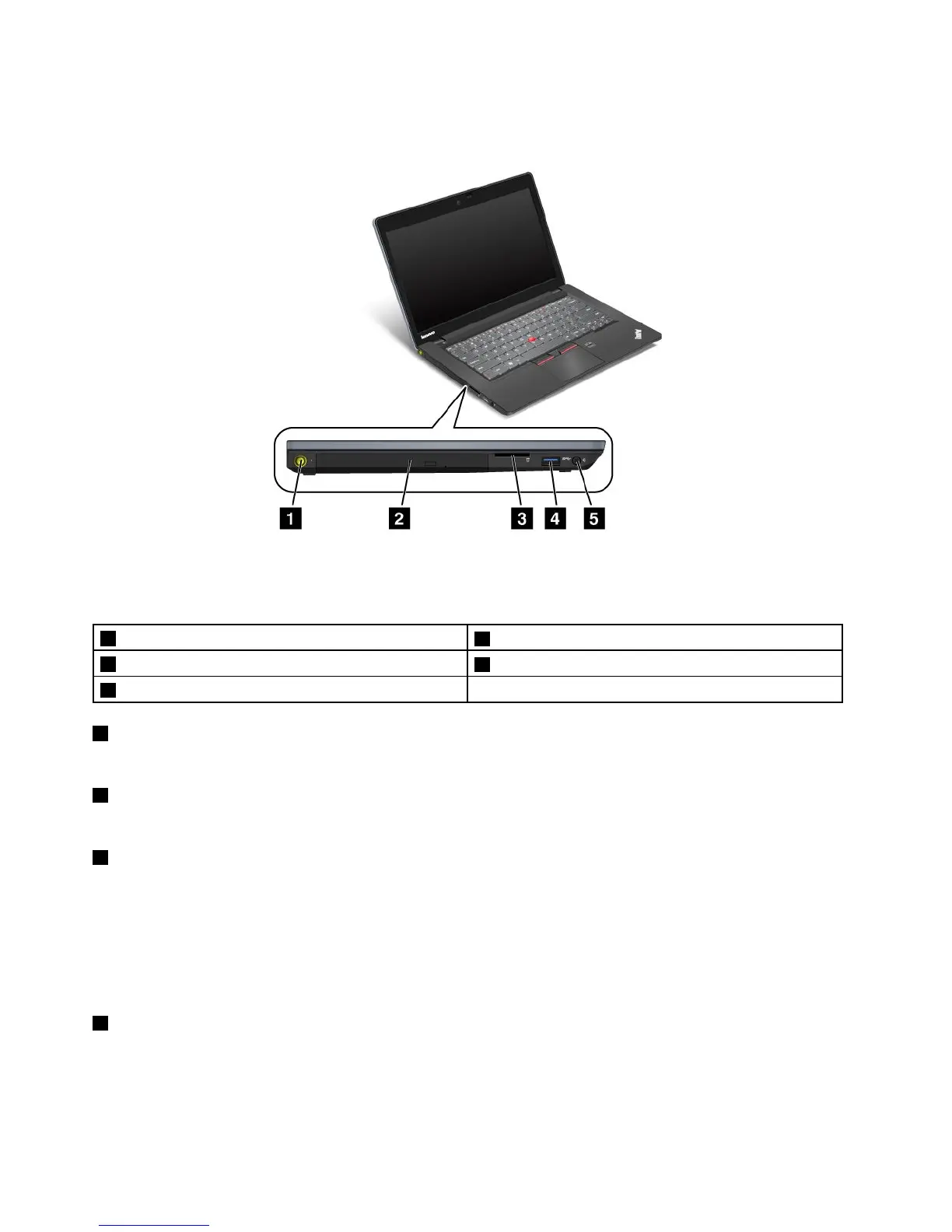
Left-sideview
Figure3.ThinkPadS430left-sideview
Note:Yourcomputerkeyboardmightlookdifferentfromtheillustrationabove.
1Powerjack
2Opticaldrive
3Mediacardreaderslot
4USB3.0connector
5Comboaudiojack
1Powerjack
Connecttheacpoweradaptertothepowerjacktoprovideacpowertothecomputerandchargethebattery.
2Opticaldrive
Theopticaldrivereadsorburnsopticaldiscs.Formoreinformation,see“Usingtheopticaldrive”onpage40.
3Mediacardreaderslot
Themediacardreaderslotsupportsthefollowingcards:
•SecureDigital(SD)card
•SecureDigitalHigh-Capacity(SDHC)card
•SecureDigitaleXtended-Capacity(SDXC)card
•MultiMediaCard(MMC)
4USB3.0connector
TheUSB3.0connectorisusedforconnectingdevicescompatiblewithaUSBinterface,suchasaUSB
printeroradigitalcamera.
Notes:
6UserGuide










 To Next Page