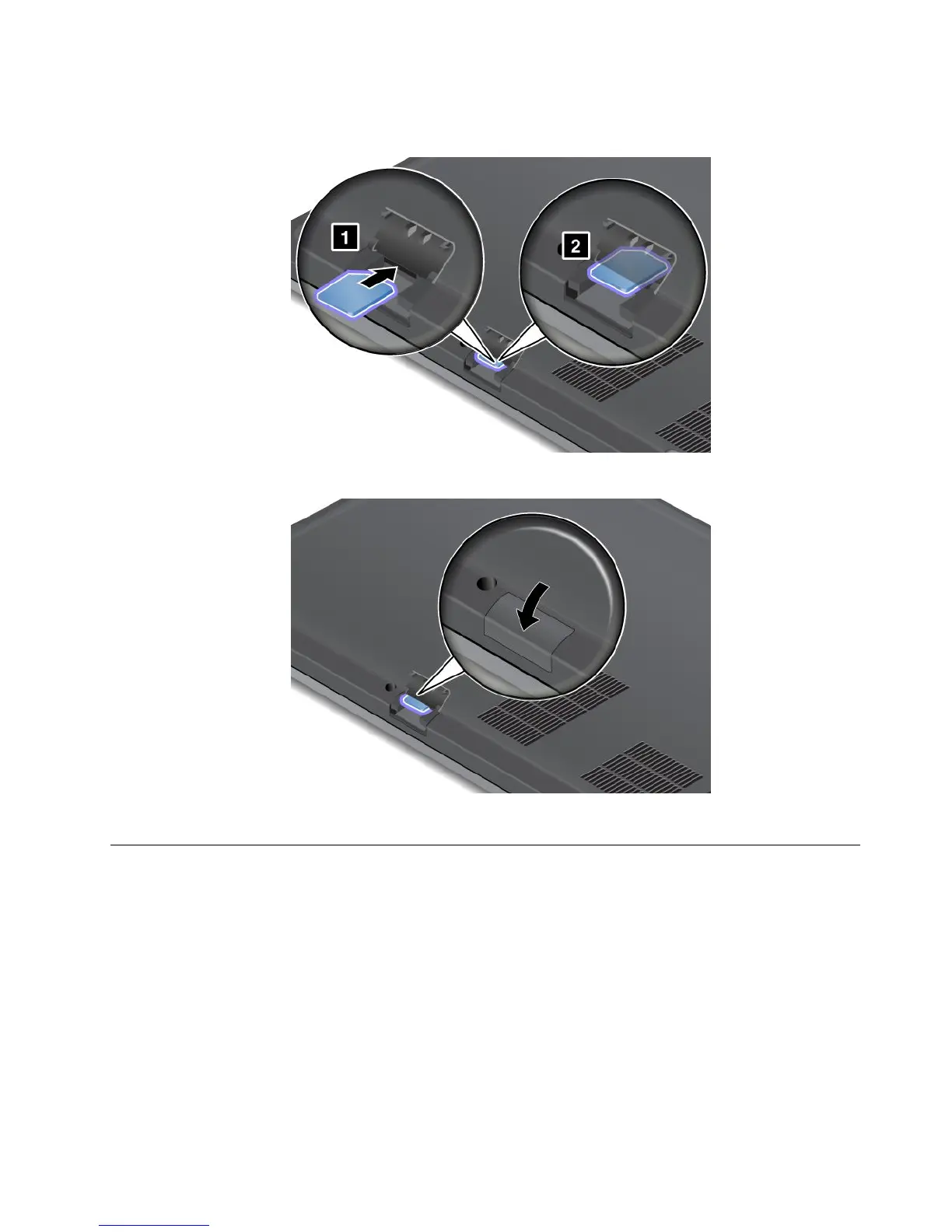
5.Holdthenewcardwiththemetalcontactfacingdownwards.Then,insertthecardrmlyintotheslot
untilyouhearaclick.
6.ClosetheSIMcarddooruntilitsnapsintoposition.
7.Turnthecomputeroveragain.Connecttheacpoweradapterandallcables.
Replacingtheharddiskdriveorsolidstatedrive
Beforeyoustart,printtheseinstructions.
Attention:Theharddiskdriveisverysensitive.Incorrecthandlingcancausedamageandpermanentloss
ofdata.Observethefollowingguidelines:
•Replacetheharddiskdriveorsolidstatedriveonlyifyouupgradeitorhaveitrepaired.Theconnectors
andslotoftheharddiskdriveorsolidstatedrivearenotdesignedforfrequentchanges,ordriveswapping.
•Donotdroptheharddiskorsolidstatedriveorsubjectittophysicalshocks.Puttheharddiskdriveor
solidstatedriveonamaterial,suchassoftcloth,thatabsorbsanyphysicalshocks.
•Donotapplypressuretothecoveroftheharddiskdriveorsolidstatedrive.
•Donottouchtheconnector.
Chapter6.Replacingdevices69










 To Next Page