EasyManua.ls Logo

Lenze i550 - User Manual

Lenze i550
48 pages
Print Icon
To Next Page IconTo Next Page
Loading...
Operating instructions i550 cabinet frequency inverter | 1
© 11/2021 · EN · www.Lenze.com
Contents
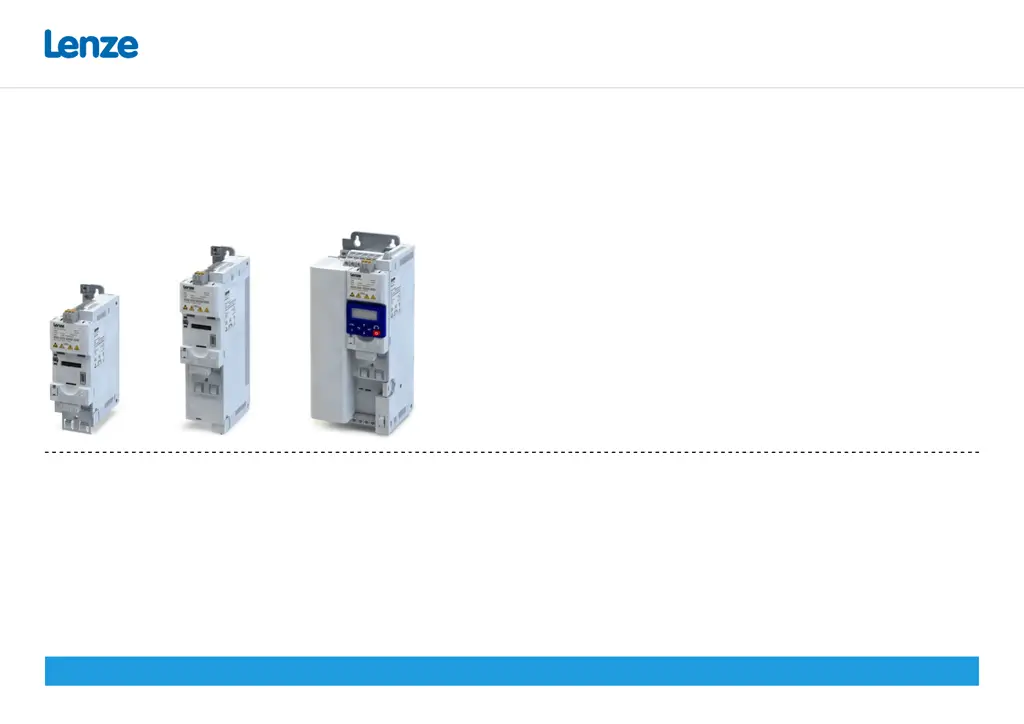
i550 cabinet frequency inverter
0.25 ... 132 kW
Operating instructions

Other manuals for Lenze i550

Questions and Answers

  • A
    Anthony MoralesAug 30, 2025
    Why does my Lenze i550 Inverter show a mains phase fault and how to fix it?
    • R
      richardleonAug 30, 2025
      If your Lenze Inverter is showing a mains phase fault, you should: * Check wiring of the mains connection. * Check fuses.
  • M
    Melissa JohnsonSep 7, 2025
    What to do if my Lenze i550 Inverter shows a continuous overcurrent?
    • M
      murrayjohnSep 7, 2025
      If your Lenze Inverter indicates a continuous overcurrent, take these steps: * Inspect the motor and wiring for any short circuits. * Examine the brake resistor and its wiring. * Verify the motor circuit configuration (delta or star connection). * Confirm that the motor data settings are correct.
  • J
    jacquelinebaldwinAug 29, 2025
    What to do if my Lenze i550 Inverter shows continuous overcurrent?
    • T
      Tyler DavidsonAug 29, 2025
      If your Lenze Inverter displays a continuous overcurrent error, you should: * Check motor and wiring for short circuit. * Check brake resistor and wiring. * Check motor circuit (delta connection, star connection). * Check setting of the motor data.
  • R
    Regina LawrenceSep 18, 2025
    What causes high device utilization on Lenze Inverter?
    • M
      Melissa BarrettSep 18, 2025
      High device utilization (Ixt) on your Lenze Inverter can occur due to several reasons. Check the drive dimensions. Reduce the maximum overload current of the inverter (P324.00). If you have high mass inertias, reduce the maximum overload current of the inverter (P324.00) to 150 %.
  • M
    Michelle GomezSep 8, 2025
    How to troubleshoot a short circuit or earth leakage on the motor side of a Lenze i550?
    • C
      Chelsea ThompsonSep 9, 2025
      To troubleshoot a short circuit or earth leakage on the motor side: * Check the motor cable. * Consider the length of the motor cable. * Use a shorter or lower-capacitance motor cable.
  • S
    Sergio BenitezSep 12, 2025
    What should I do if the heatsink fan on my Lenze i550 is having issues?
    • S
      Sonia MaldonadoSep 12, 2025
      If there are issues with the heatsink fan: * Clean the fan and ventilation slots. * If required, replace the fan. Note that the fans can be unlocked via locking hooks before removal.
  • K
    Kelly FoxSep 17, 2025
    Why does Lenze i550 show a mains phase fault?
    • K
      Kyle MendezSep 18, 2025
      A mains phase fault in your Lenze Inverter can be caused by issues with the power supply. Check the mains connection wiring and inspect the fuses to ensure they are working correctly.
  • D
    Dylan CrawfordAug 27, 2025
    What to do if my Lenze i550 shows motor overtemperature?
    • J
      Jay SalasAug 27, 2025
      If your Lenze Inverter indicates motor overtemperature, you should: * Check drive sizing. * Check motor thermal sensor and wiring (X109/T1 and X109/T2).
  • M
    Morgan DavisAug 26, 2025
    What causes i²*t overload (thermal state) in Lenze Inverter and how to fix it?
    • T
      thomastoddAug 26, 2025
      If your Lenze Inverter is showing an i²*t overload (thermal state) error, you should: * Check drive sizing. * Check machine/driven mechanics for excessive load. * Check setting of the motor data. * Reduce values for slip compensation (P315.01, P315.02) and oscillation damping (P318.01, P318.02).
  • J
    Jeffrey SanchezAug 25, 2025
    What to do if my Lenze i550 Inverter displays a warning for DC bus overvoltage?
    • J
      Jordan JohnstonAug 26, 2025
      If your Lenze Inverter shows a warning for DC bus overvoltage, you should: * Reduce dynamic performance of the load profile. * Check mains voltage. * Check settings for braking energy management. * Connect brake resistor to the power unit and activate the integrated brake chopper. (P706.01 = 0: Brake resistance).

Summary

General Information

Hardware Overview of the Inverter

Overview of the inverter's physical components and connections.

Application as Directed

Specifies the intended use and limitations of the product.

Device-Specific Standards and Directives

Lists relevant safety and technical standards the product adheres to.

Relevant Standards and Directives for the Operator

Outlines operator responsibilities regarding standards and directives.

Commissioning Requirements

Details requirements for safe and compliant product commissioning.

PROFINET Licence Information

Information on the PROFINET firmware and its licensing.

Product Identification

Explains how to identify different product variants and their coding.

Numeric Notation

Defines the use of decimal separators in the documentation.

Design of Safety Instructions

Explains the meaning and importance of safety instruction symbols and levels.

Safety Instructions

Basic Safety Precautions

Essential safety precautions to prevent injury and damage.

Residual Hazards

Identifies hazards that remain after safety measures are applied.

Technical Data

Standards and Operating Conditions

Specifies approvals, standards, and environmental operating conditions.

Mechanical Installation

Important Installation Notes

Crucial considerations before and during mechanical installation.

Shield Connection Sheet Mounting

Instructions for attaching the shield connection sheet to the mounting plate.

Dimensions and Assembly

Provides dimensional data and assembly requirements for the inverters.

Electrical Installation

Preparation for IT System Connection

Specific preparation steps for connecting to an IT system.

Connection Diagram

Illustrates exemplary wiring for all voltage and power classes.

EMC-Compliant Installation

Guidelines for ensuring electromagnetic compatibility during installation.

1-Phase Mains Connection 120 V

Technical data and fusing for 1-phase, 120V connections.

1-Phase Mains Connection 230;240 V

Technical data and fusing for 1-phase, 230/240V connections.

3-Phase Mains Connection 230;240 V

Technical data and fusing for 3-phase, 230/240V connections.

3-Phase Mains Connection 400 V (0.37-7.5 kW)

Technical data and fusing for 3-phase, 400V connections.

3-Phase Mains Connection 400 V (7.5-132 kW)

Technical data and fusing for 3-phase, 400V connections.

3-Phase Mains Connection 480 V (0.37-7.5 kW)

Technical data and fusing for 3-phase, 480V connections.

3-Phase Mains Connection 480 V (7.5-132 kW)

Technical data and fusing for 3-phase, 480V connections.

Brake Resistor Connection

Instructions and recommendations for connecting a brake resistor.

Control Terminals X3

Details on the function and connection of control terminals.

Relay Output X9

Information on the relay output terminals and their specifications.

PTC Input X109

Details on the PTC input for motor temperature monitoring.

Networks Configuration

Configuration for various network communication protocols.

Functional Safety Requirements

Critical safety information and requirements for functional safety.

Safe Torque Off (STO) Function

Explanation and implementation of the Safe Torque Off (STO) function.

Commissioning

Initial Switch-On Procedure

Steps for the first-time power-up and initial checks.

Important Commissioning Notes

Key considerations and warnings during the commissioning process.

Keypad Module Functions

Explains the operation of the keypad and its keys for parameter control.

Keypad Control Activation

How to activate and use keypad control for motor operations.

Quick Commissioning via Terminal Control

A streamlined process for commissioning using terminal controls.

Extended Terminal Control Wiring

Detailed wiring and parameter configuration for terminal control.

Key Parameters Overview

Overview of key parameters and their grouping for efficient setup.

Favorites (Group 0)

Commonly used parameters configurable as favorites for quick access.

Basic Setting (Group 2)

Essential parameters for basic configuration and operation.

Motor Control (Group 3)

Parameters related to motor identification, calibration, and data.

Additional Functions (Group 7)

Parameters for loading default settings and saving user data.

Troubleshooting

Error Message Display

How to interpret and display error messages on the keypad.

Error Codes and Remedies

A comprehensive list of error codes, their descriptions, classifications, and remedies.

LED Status Indicators

Explains the meaning of the status LEDs for the inverter.

Support and Further Information

Information on how to obtain further support and product details.

Disposal

Lenze i550 Specifications

General IconGeneral
Protection ClassIP20
Overload Capacity150% for 60 seconds
SafetySTO (Safe Torque Off)
Voltage Range380 V to 480 V
Control TypeVector control, V/f control
Communication InterfacesCANopen, EtherCAT, PROFINET, Ethernet/IP
Mains Voltage3-phase 380 V to 480 V
Input Voltage3-phase 380 V to 480 V
Output Voltage0 to Mains Voltage
Frequency Range0 Hz to 300 Hz
Protection FeaturesOvercurrent, overvoltage, undervoltage, short circuit, overtemperature
Ambient Temperature-10°C to 50°C

Related product manuals