Leuze electronic Device parameters and interfaces
Leuze electronic BPS 8 43
TNT 35/7-24V
8.1.3 BPS Configuration Tool software
8.1.3.1 Installing the "BPS Configuration Tool" software
!
Insert the installation CD into your drive
(also available as download on the Internet under www.leuze.de).
!
Call up the installation file (e.g. Setup.exe)
!
Select the language for your installation.
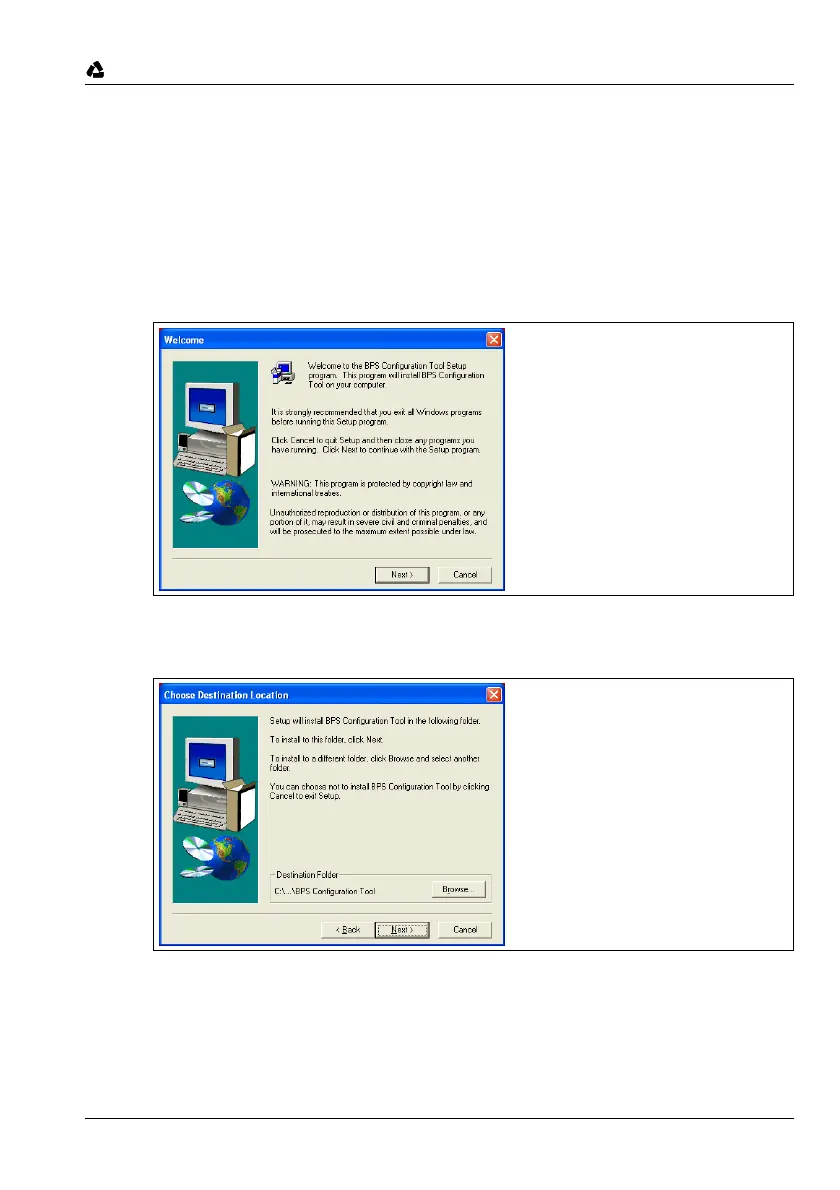
The following window appears:
Figure 8.3: Installation window
!
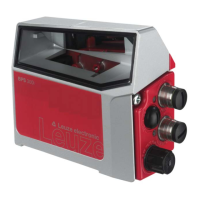
Confirm the following licence agreement and select the installation path in the following
window:
Figure 8.4: Installation directory
!
Confirm your entry with Next, then follow the installation routine.
For further details please refer to online help of the "BPS Configuration Tool" software.
!
After the successful installation, double-click on the BPS Configuration Tool icon to
activate the configuration program.


 To Next Page