23
8.2 Video
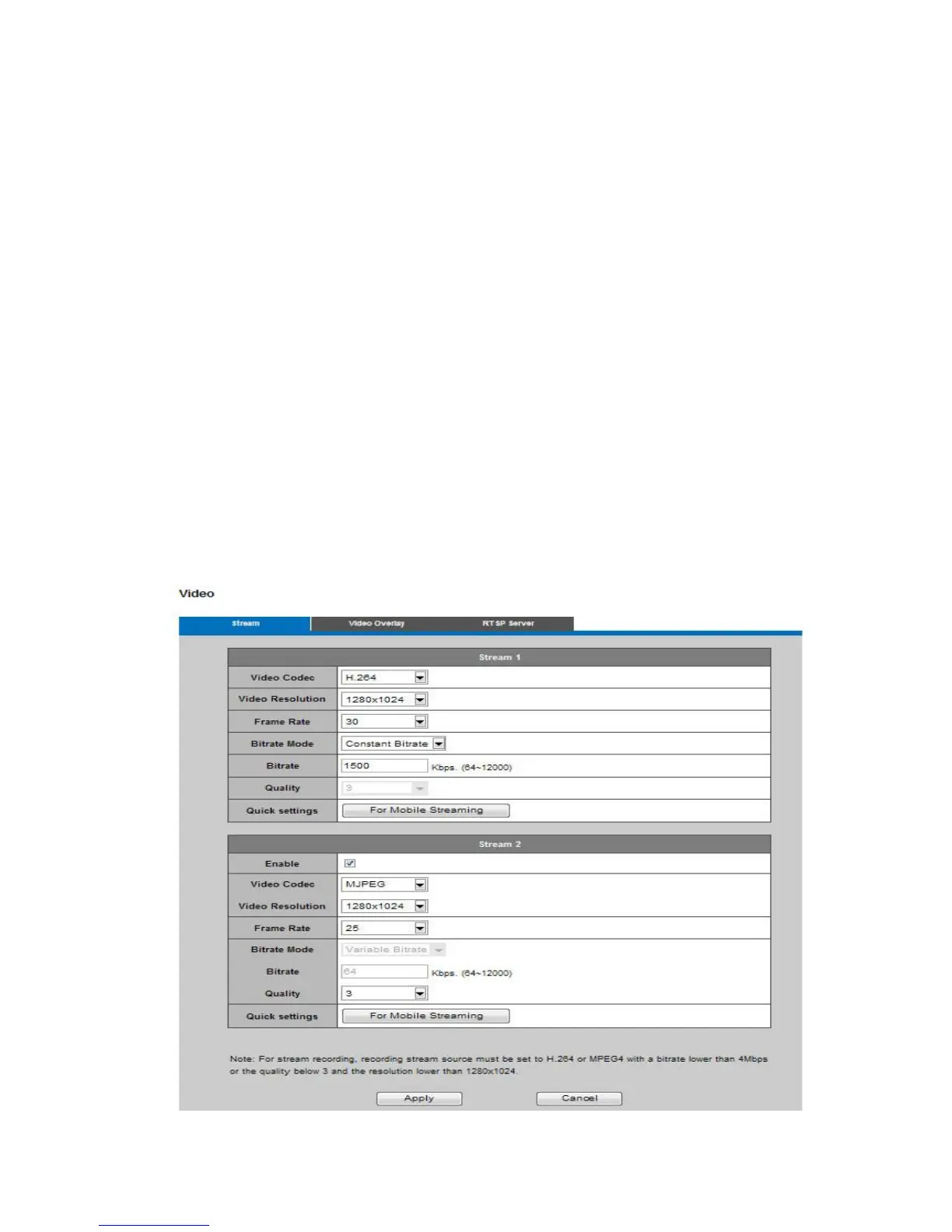
The Network Camera offers two separate streams for different viewing options.
Stream 1& Stream 2
Video Codec : The Network Camera offers three choices of video codec standards for real-time
viewing: H.264, MPEG-4 and MJPEG.
Video Resolution : Select from the drop-down menu to choose the best resolution recording
settings.
Frame Rate : Select the frame rate from the drop down list, choosing from the range of 1 to 30 fps.
Set the frame rate higher for a smoother video quality.
Video quality and bitrate : Users can either choose "quality" or "bitrate" to control the video quality
with H.264 and MPEG4 video codec. Only "quality" can be chosen when MJPEG video codec is
selected. Set the bitrate higher for a better video quality, but note that a higher bitrate will use higher
network bandwidth.
The video quality can be set between Level 1-Level 6, with Level 6 providing the best image quality.
HTTP Transport
If MJPEG is used for Video Codec, users must enable HTTP Transport protocol for video
communication.
Click Apply or Cancel to take effect.














 To Next Page