36
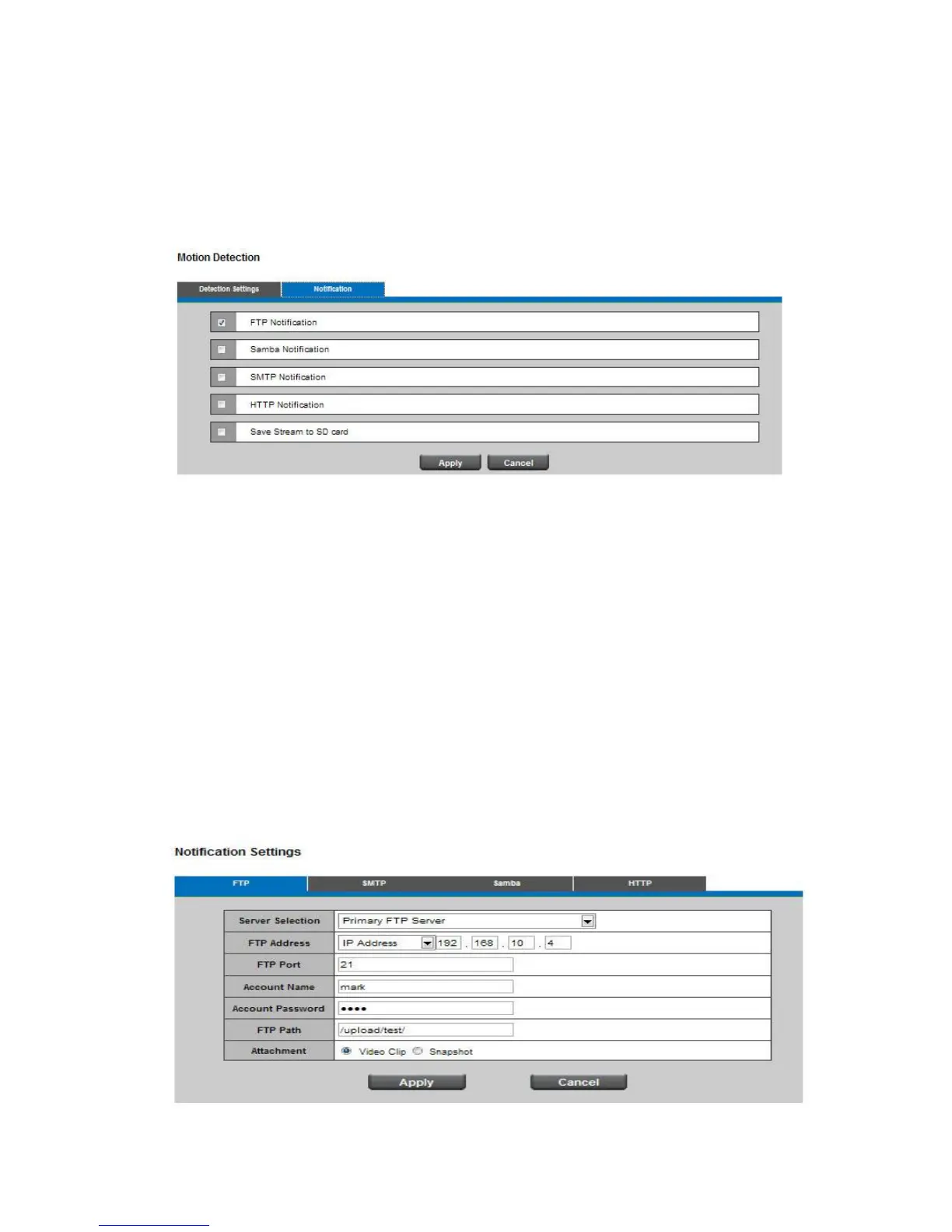
Notification
To react in response to particular events. A typical application is that when motion is detected, the
Network Camera sends buffered images to a FTP server, SMTP or Samba as notifications. In this
page, you can specify which notification messages will be sent when a trigger is activated.
Click Apply or Cancel to take effect.
11.2 Notification Settings
When an event is triggered, the user can specify what kind of action will be performed. The actions
include sending a video clip to an email address, FTP site, or Samba. There are two choices of media
types available: video clip and snapshot.
FTP
File Transfer Protocol (FTP) is used as an application component to automatically transfer files for
program internal functions. Select "Primary FTP Server" from the Server Selection drop down menu
to send media files to a FTP server when an event is triggered. Enter the FTP IP address or
hostname. By default, the FTP port server is set to 21. Enter the account name, password and FTP
Path to configure the settings.
Click Apply or Cancel to take effect.














 To Next Page