Chapter 3 Basic Settings Page 20
In AP mode, LEVELONE 150MBPS WIRELESS POE AP must establish connection
with another wireless device before it is set to Router mode. To access the unit in
Router mode via wired port, please type the WAN IP address to enter the web page for
WAN is on wired port and LAN is on wireless port. Or, you can access device through
the wireless device connected with the CPE.
In wireless client mode, users can access the CPE via its wired port, for WAN is on
wireless port and LAN is on wired port when device is set to Router mode.
Bridge mode and AP Repeater mode are similar to AP mode when device is set to
Router mode; WAN is on wired port and LAN is on wireless port. Thus users must also
connect the CPE with another wireless device before it is set to Router mode and
access the CPE via the connected wireless device.
Time Settings
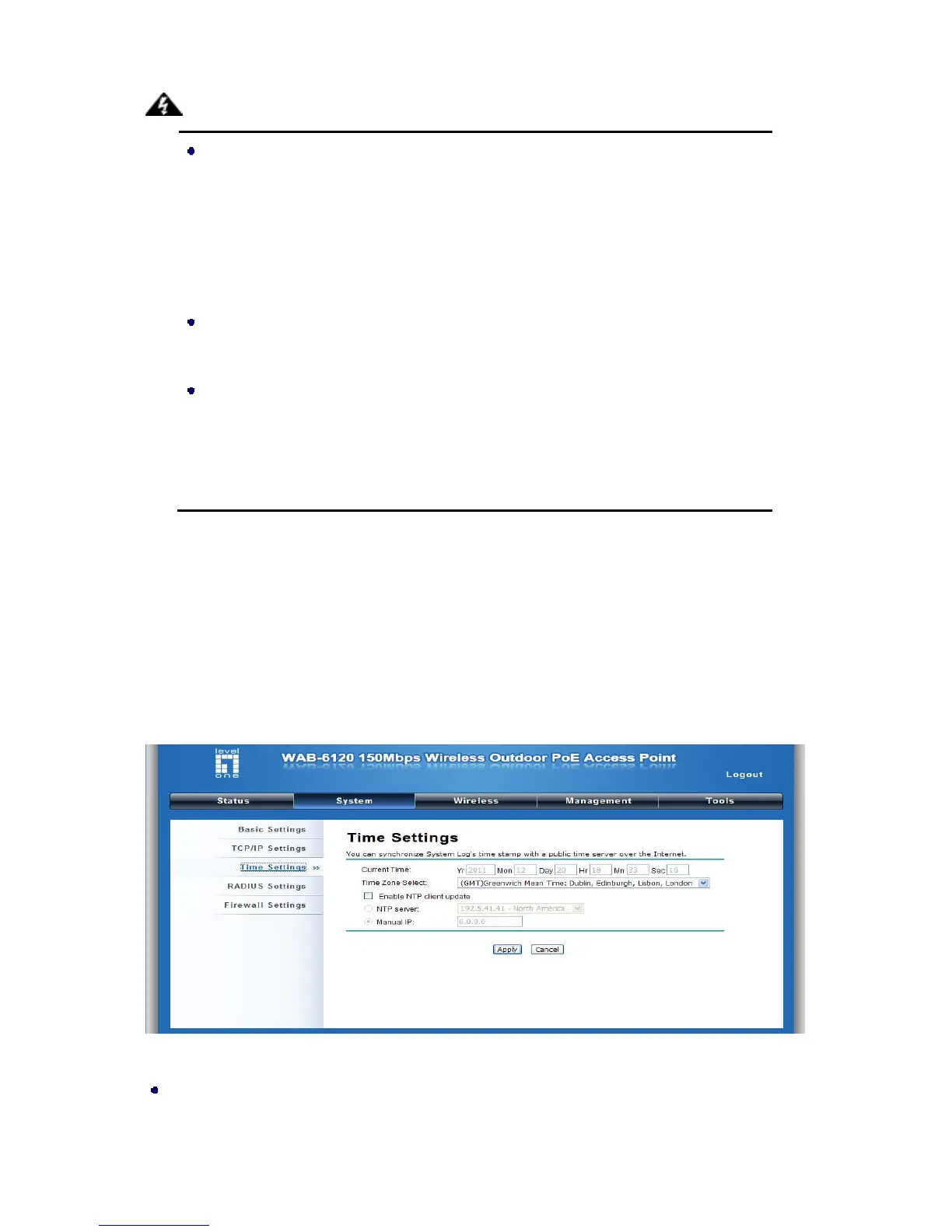
Compliant with NTP, the LEVELONE 150MBPS WIRELESS POE AP is capable of keeping its time in
complete accord with the Internet time. Make configuration in “Time Settings” from “System”. To use
this feature, check “Enable NTP Client Update” in advance.
Figure 17 Time Settings
Current Time
Display the present time in Yr, Mon, Day, Hr, Min and Sec.
Warning:















 To Next Page