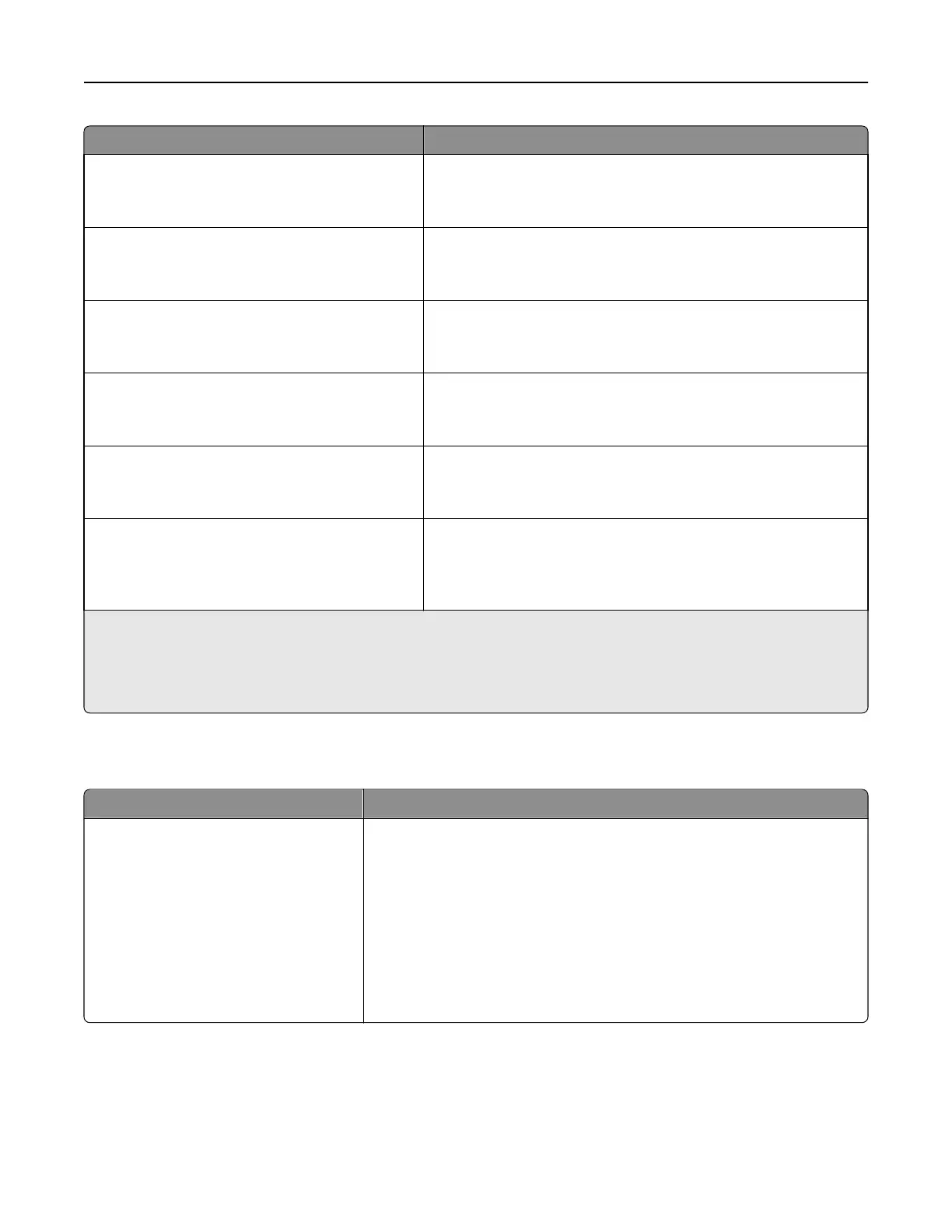
Use To
Letterhead Loading
Duplex
Off
Determine and set two‑sided printing for all print jobs that specify
Letterhead as the paper type.
Preprinted Loading
Duplex
Off
Determine and set two‑sided printing for all print jobs that specify
Preprinted as the paper type.
Colored Loading
Duplex
Off
Determine and set two‑sided printing for all print jobs that specify
Colored as the paper type.
Light Loading
Duplex
Off
Determine and set two‑sided printing for all print jobs that specify
Light as the paper type.
Heavy Loading
Duplex
Off
Determine and set two‑sided printing for all print jobs that specify
Heavy as the paper type.
Custom [x] Loading
Duplex
Off
Determine and set two‑sided printing for all print jobs that specify
Custom [x] as the paper type.
Note: Custom [x] Loading is available only when the custom type is
supported.
Notes:
• Duplex sets the printer default to two‑sided printing for every print job unless one‑sided printing is selected from
Printing Preferences or the Print dialog.
• Off is the factory default setting for all the menus.
Custom Types menu
Menu item Description
Custom Type [x]
Paper
Card Stock
Transparency
Glossy
Rough/Cotton
Labels
Vinyl Labels
Envelope
Associates a paper or specialty media type with a factory default Custom
Type [x] name or a user‑defined Custom Name created from the Embedded
Web Server or from MarkVision
TM
Professional
Notes:
• Paper is the factory default setting.
• The custom media type must be supported by the selected tray or
multipurpose feeder in order to print from that source.
Understanding the printer menus 97



 To Next Page