44
CUSTOMIZING SETTINGS
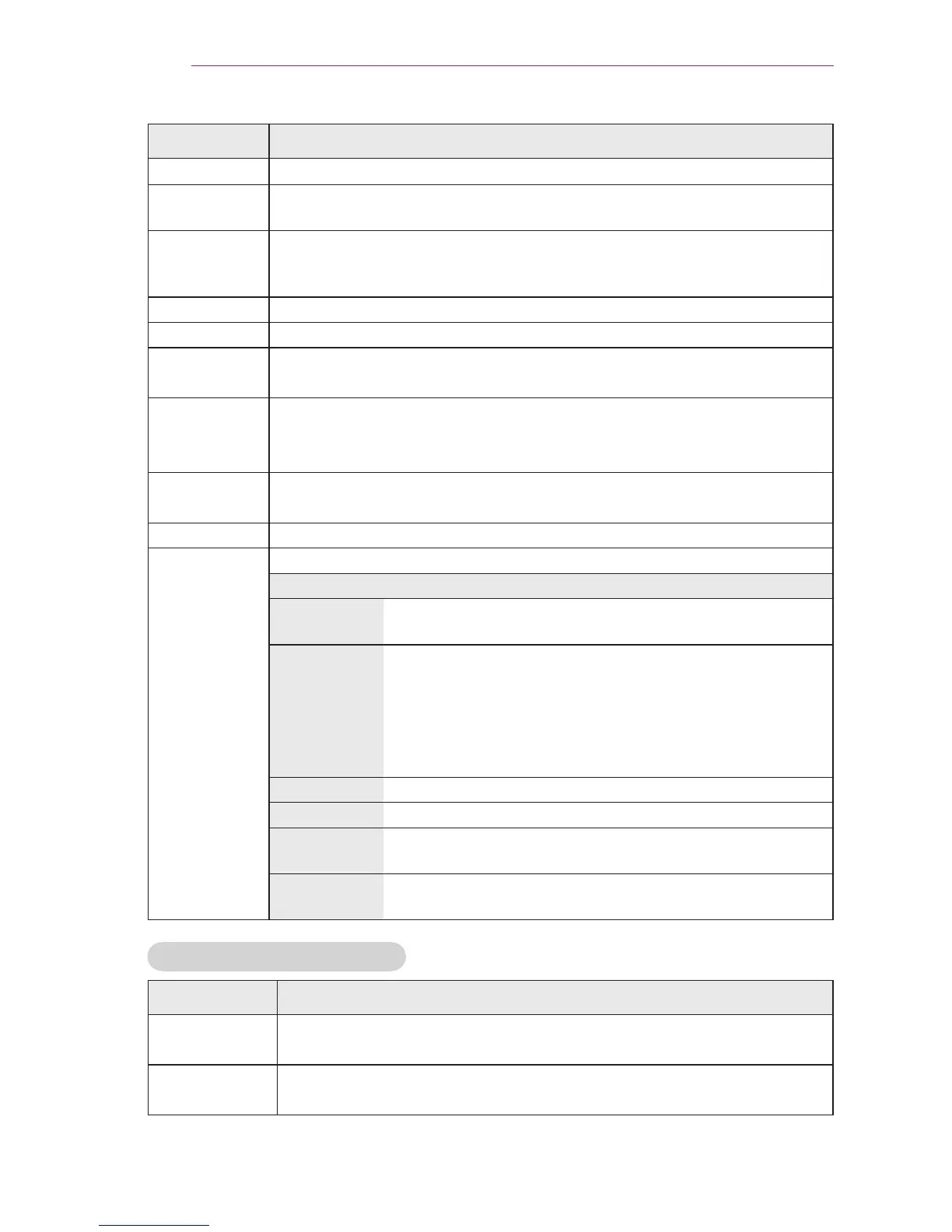
Item Description
Contrast Increases or decreases the gradient of the video signal.
Brightness Adjusts the base level of the video signal to make the image brighter
or darker.
Sharpness Adjusts the level of sharpness in the edge between the light and dark
areas of the picture. The lower the level is, the softer the image looks.
Horizontal and Vertical Sharpness are available only Expert1/2.
Color Adjusts the intensity of all colors.
Tint Adjusts the balance between red and green levels.
Picture
Option
Sets optional settings.
Advanced
/Expert
Control
Customizes the advanced settings.
Picture
Reset
Restores each mode's options to the factory default.
Aspect Ratio Changes the aspect ratio.
Screen
(RGB-PC)
Adjusts the picture quality for RGB-PC input.
Item
Resolution
Available resolutions are 768 (1024 x 768 / 1280 x 768,
60 Hz) and 1050 (1400 x 1050 / 1680 x 1050, 60 Hz).
Auto
Cong.
Provides optimized picture quality by automatically
calibrating mismatched horizontal width and a shaky
picture caused by conicts between the internal settings
of the projector and various PC graphic signals.
y
You can also use the AUTO button on the remote
control.
Posição Moves the image up/down/left/right.
Ratio Changes the aspect ratio.
Phase Makes the picture look clear by removing horizontal
noise.
Initial
Settings
Restores all the settings to the factory default.
Advanced / Expert Control
Item Description
Dynamic
Contrast
Adjusts contrast to keep it at the best level for the brightness of the
screen.
Dynamic
Color
Adjusts screen colors so that they look natural.



 To Next Page