ENGLISH
15
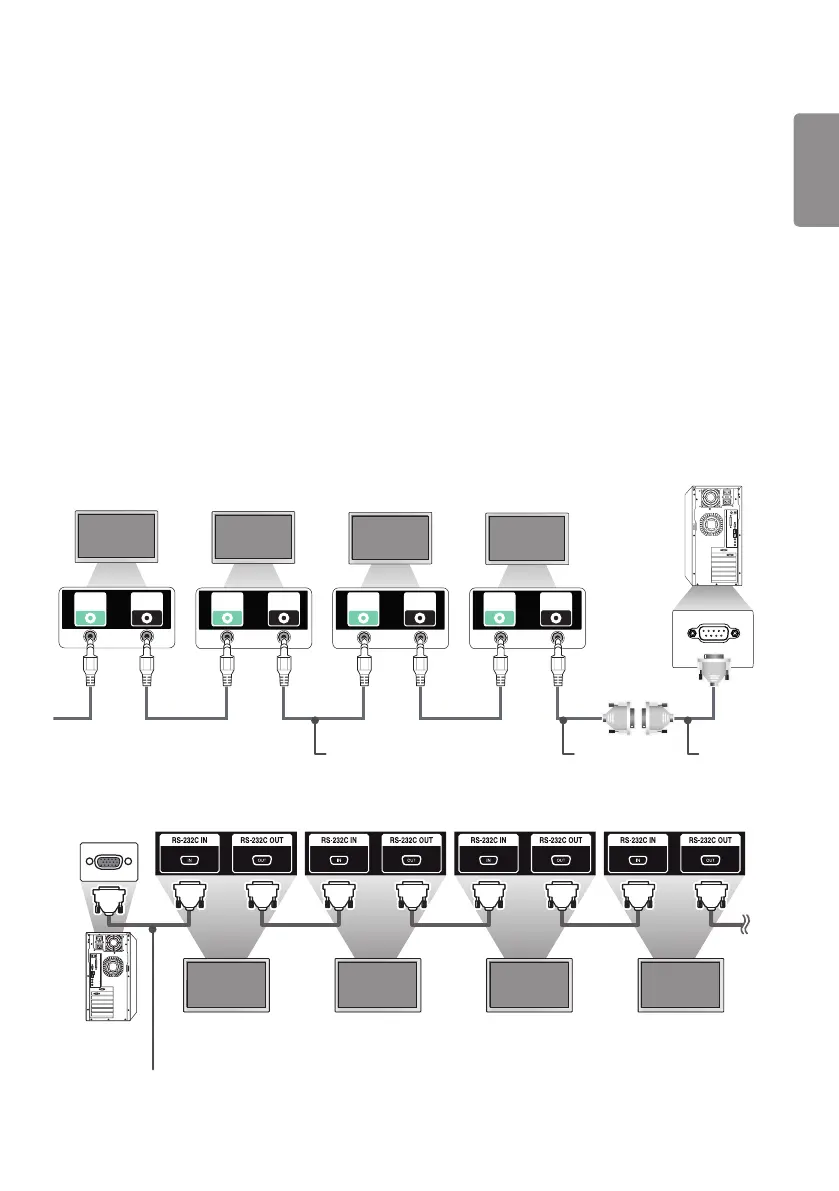
To Control Multiple Products
• The following method applies only to some models.
You can connect multiple products to a single PC by using this method. You can connect multiple products
to a single PC and control them at the same time.
In the General menu, non-repeated values between 1 and 1000 must be assigned as the set ID.
Cable Connection
• The image may vary according to the model.
Connect the RS-232C cable as in the figure.
The RS-232C protocol is used for communication between a PC and the product. It controls the power of
the product, selects an input source in a PC, or controls the OSD menu.
Monitor 1 Monitor 2 Monitor 3Monitor 4
PC
RS-232C
IN
RS-232C
OUT
RS-232C
IN
RS-232C
OUT
RS-232C
IN
RS-232C
OUT
RS-232C
IN
RS-232C
OUT
RS-232C
Gender
4P cable (optional)
RS-232C Cable
(optional)
Monitor 1 Monitor 2 Monitor 3 Monitor 4
PC
RS-232C cable (optional)



 To Next Page