ENGLISH
7
LED Assistant
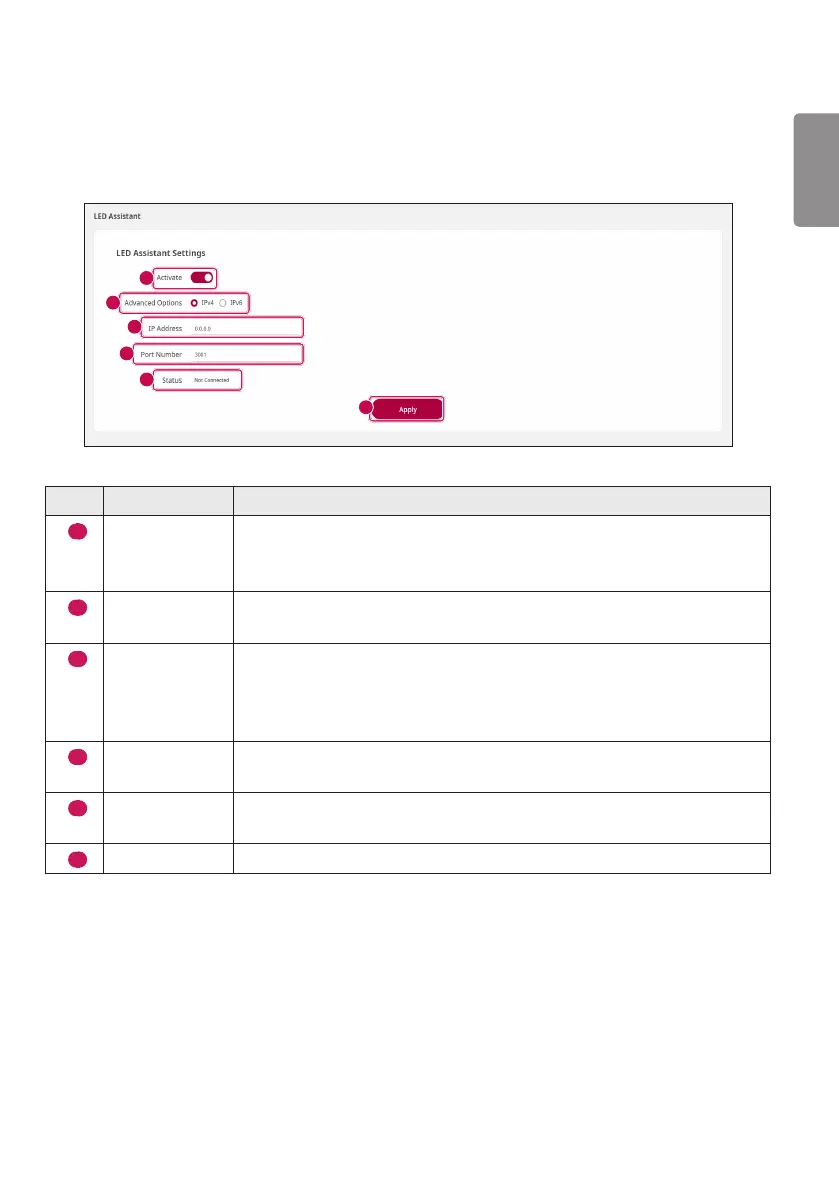
You can connect to the System Controller by changing the configuration environment of the network
connected to the LED Assistant page. You can access the LED Assistant page via the set value.
1
2
3
4
5
6
No. Item Description
1
Activate
You can activate/deactivate via the Activate button.
If you deactivate the Activate button, the connection with the server will be
lost.
2
Advanced
Options
You can select either IPv4 or IPv6 method for the LED Assistant Server’s IP
address.
3
IP Address
If you select IPv4 method for the LED Assistant Server’s IP address system,
you can enter four-digit decimal numbers separated by “.”.
If you select IPv6 method for the LED Assistant Server’s IP address system,
you can enter eight-digit hexadecimal numbers separated by “:”.
4
Port Number
You can set it by receiving an input of Port numbers in the decimal number.
The default port number is 3001.
5
Status
Displays the connection status. (When connected: Connected/when not
connected: Not Connected)
6
Apply
You can apply the set value via the [Apply] button.



 To Next Page