Home
LG
Cell Phone
KC910
Page 15
LG KC910 - Page 15
130 pages
Manual
Save Page as PDF
To Next Page
To Next Page
To Previous Page
To Previous Page
Loading...
13
01
02
03
04
05
06
07
08
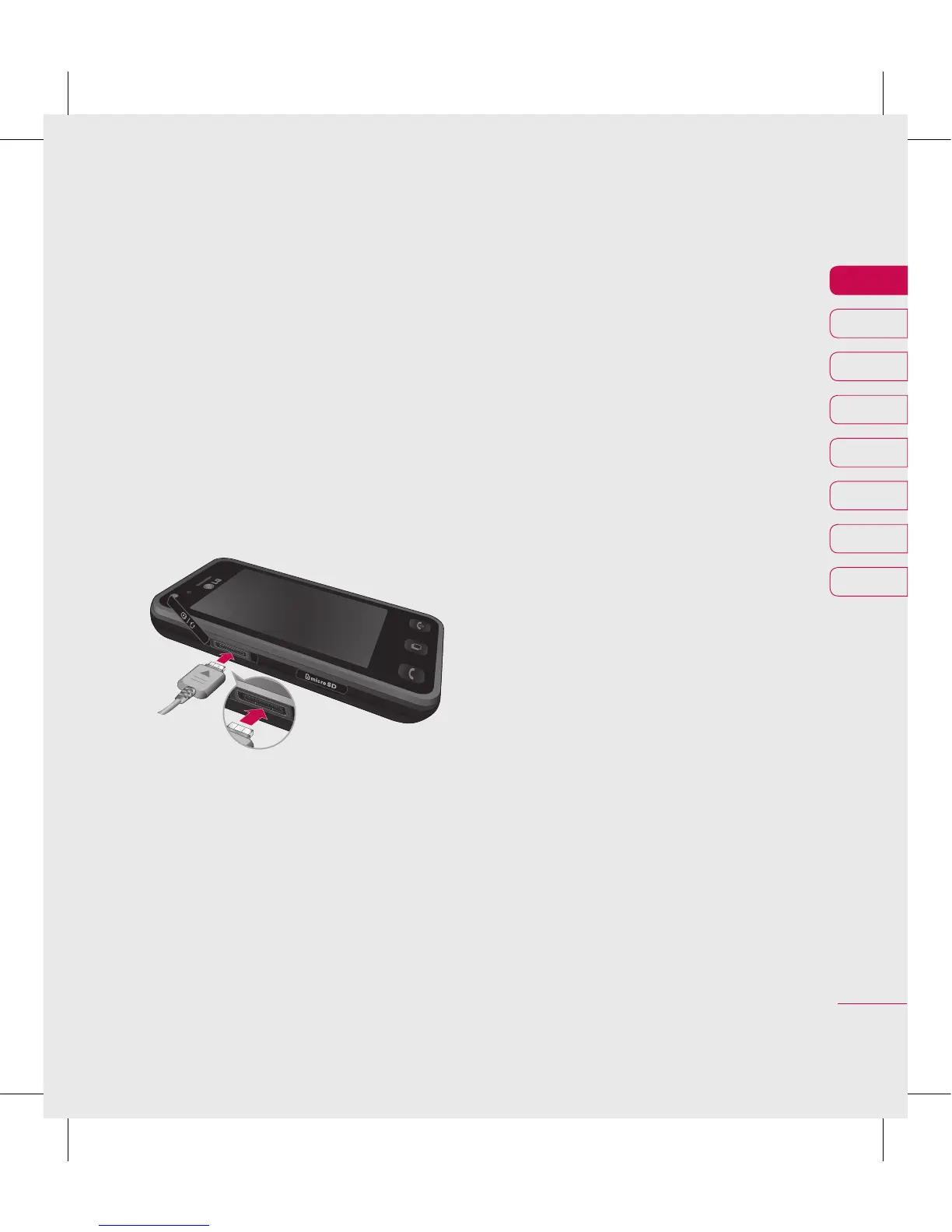
Set up
5
Cha
rgi
ng y
our
pho
ne
Sl
id
e bac
k th
e c
o
v
er of th
e
ch
ar
ger
so
ck
et on th
e side
of
y
ou
r KC
910
. Ins
er
t th
e ch
arg
er
an
d pl
ug in
t
o a ma
ins el
ectri
city
so
ck
et.
Y
ou
r KC
910
wil
l
ne
ed to
be
ch
ar
ged
un
til a me
ssa
ge
re
adin
g
“B
a
tt
ery full
”
ap
pea
rs
on sc
ree
n.
14
16
Table of Contents
Main Page
Default Chapter
6
Table of Contents
6
Set up
10
Getting to Know Your Phone
10
Open View
12
Installing the USIM and Battery
13
Memory Card
16
Transferring Your Contacts
17
Menu Map
18
Your Home Screen
19
Touch Screen Tips
19
The Quick Keys
20
The Status Bar
21
Changing Your Status from the Status Bar
22
Using the Multitasking Function
22
The Basics
23
Calls
23
Making a Call or Video Call
23
Making a Call from Your Contacts
23
Answering and Rejecting a Call
24
In-Call Options
25
Adjusting the Call Volume
26
Speed Dialling
26
Making a Second Call
26
Turning off DTMF
27
Viewing Your Call Logs
27
Using Call Divert
28
Using Call Barring
28
Lg Kc910
28
Changing the Common Call Setting
29
Changing Your Video Call Settings
30
Contacts
31
Searching for a Contact
31
Adding a New Contact
31
Contact Options
32
Creating a Group
33
Changing Your Contact Settings
33
Viewing Information
35
Messaging
36
Sending a Message
36
Entering Text
37
T9 Predictive
37
Abc Manual
37
Keyboard
38
Handwriting Recognition
38
Punctuation Marks
40
Setting up Your Email
41
Retrieving Your Email
43
Sending an Email Using Your New Account
43
Changing Your Email Settings
44
Message Folders
45
Managing Your Messages
45
Using Templates
46
Using Emoticons
46
Changing Your Text Message
46
Changing Your Multimedia Message Settings
47
Changing Your Other Settings
48
Get Creative
49
Camera
49
Taking a Quick Photo
49
After You've Taken Your Photo
50
Getting to Know the Viewfinder
51
Using the Flash
52
Choosing a Shot Mode
52
Adjusting the Exposure
53
Taking a Continuous Shot
53
Taking a Panoramic Shot
54
Using the Advanced Settings
54
Preview Settings
54
Other Settings
55
Changing the Image Size
57
Choosing a Colour Effect
57
Using the Inner Camera
58
Viewing Your Saved Photos
58
Video Camera
59
Shooting a Quick Video
59
After You've Shot Your Video
60
Getting to Know the Viewfinder
61
Adjusting the Exposure
62
Using the Advanced Settings
62
Preview Settings
62
Other Settings
63
Changing the Video Image Size
63
Choosing a Colour Tone
64
Using the Inner Video Camera
64
Watching Your Saved Videos
65
Watching Your Videos on Your TV
65
Your Photos and Videos
66
Viewing Your Photos and Videos
66
Using Zoom When Viewing a Video or Photo
66
Adjusting the Volume When Viewing a Video
66
Capturing an Image from a Video
67
Viewing Your Photos as a Slide Show
67
Setting a Photo as Wallpaper
68
Editing Your Photos
68
Adding Text to a Photo
69
Adding an Effect to a Photo
70
Crop a Photo
71
Morphing a Photo
71
Adding a Colour Accent to a Photo
71
Swapping the Colours in a Photo
72
Editing Your Videos
72
Trimming the Length of Your Video
72
Merging Two Videos Together
73
Merging a Photo with a Video
73
Adding Text to a Video
74
Overlaying a Photo
75
Adding a Voice Recording
75
Adding a Soundtrack to Your Video
76
Changing the Speed of Your Video
76
Adding a Dimming Effect
77
Multimedia
78
Pictures
78
My Images Options Menu
78
Sending a Photo
79
Using an Image
79
Marking up Your Images
80
Printing an Image
80
Moving or Copying an Image
80
Creating a Slide Show
81
Checking Your Memory Status
81
Sounds
81
Using a Sound
81
Videos
82
Using Options While Video Is Paused
82
Sending a Video Clip
82
Games and Applications
83
Downloading a Game
83
Playing a Game
83
Using the Games Options Menu
83
Flash Contents
84
Viewing an SWF/ SVG File
84
Using Options Viewing the SWF/ SVG File
84
Documents
84
Viewing a File
84
Transferring a File to Your Phone
85
Others
85
Creating a Movie
86
Music
87
Transferring Music Onto Your Phone
87
Playing a Song
88
Using Options While Playing Music
88
Creating a Playlist
89
Editing a Playlist
89
Deleting a Playlist
90
Using the Radio
90
Searching for Stations
90
Resetting Channels
91
Listening to the Radio
91
Organiser
92
Adding an Event to Your Calendar
92
Changing Your Default Calendar View
92
Adding an Item to Your to Do List
93
Sharing a to Do Task
93
Using Date Finder
93
Setting Your Alarm
94
Adding a Memo
94
Voice Recorder
95
Recording a Sound or Voice
95
Sending the Voice Recording
95
Using Your Calculator
96
Converting a Unit
96
Using the Stopwatch
96
Adding a City to Your World Time
97
Jogging Buddy
97
PC Sync
98
Installing LG PC Suite on Your Computer
98
Connecting Your Phone and PC
98
PC Internet-Use Your Phone as a Modem
98
Backing up and Restoring Your Phone's Information
99
Viewing Your Phone Files on Your PC
99
Synchronising Your Contacts
100
Synchronising Your Messages
100
Using Your Phone as a Mass Storage Device
100
DIVX Converter
101
The Web
102
Browser
102
Accessing the Web
102
Adding and Accessing Your Bookmarks
102
Using RSS Reader
103
Saving a Page
103
Accessing a Saved Page
104
Viewing Your Browser History
104
Changing the Web Browser Settings
104
Using Your Phone as a Modem
104
Your Home Screen
106
Changing Your Screen Settings
106
Personalising Your Profiles
106
Changing Your Phone Settings
107
Changing Your Touch Settings
108
Changing Your Connectivity Settings
108
Using Memory Manager
110
Using Flight Mode
111
Sending and Receiving Your Files Using Bluetooth
111
Pairing with Another Bluetooth Device
112
Using a Bluetooth Headset
113
Wifi
114
Settings
106
Accessories
115
Network Service
116
Technical Data
116
Guidelines for Safe and Efficient Use
118
Efficient Phone Operation
120
Road Safety
120
Blasting Area
122
Potentially Explosive Atmospheres
122
Emergency Calls
122
Battery Information and Care
122
Trouble Shooting
124
Limited Warranty
126
What this Warranty Covers
126
What this Warranty Does Not Cover
126
Guidelines
118
Other manuals for LG KC910
Manual
410 pages
Service Manual
256 pages
Related product manuals
LG KC550
186 pages
LG KC780
76 pages
LG K9
122 pages
LG K7
50 pages
LG K10
121 pages
LG K20
145 pages
LG K50
149 pages
LG K40
172 pages
LG K51
166 pages
LG K52
141 pages
LG K428
120 pages
LG K41S
154 pages



 To Next Page