STD. WALL-MOUNTED | 85
Standard Wall-Mounted
Due to our policy of continuous product innovation, some specications may change without notication.
©LG Electronics U.S.A., Inc., Englewood Cliffs, NJ. All rights reserved. “LG” is a registered trademark of LG Corp.
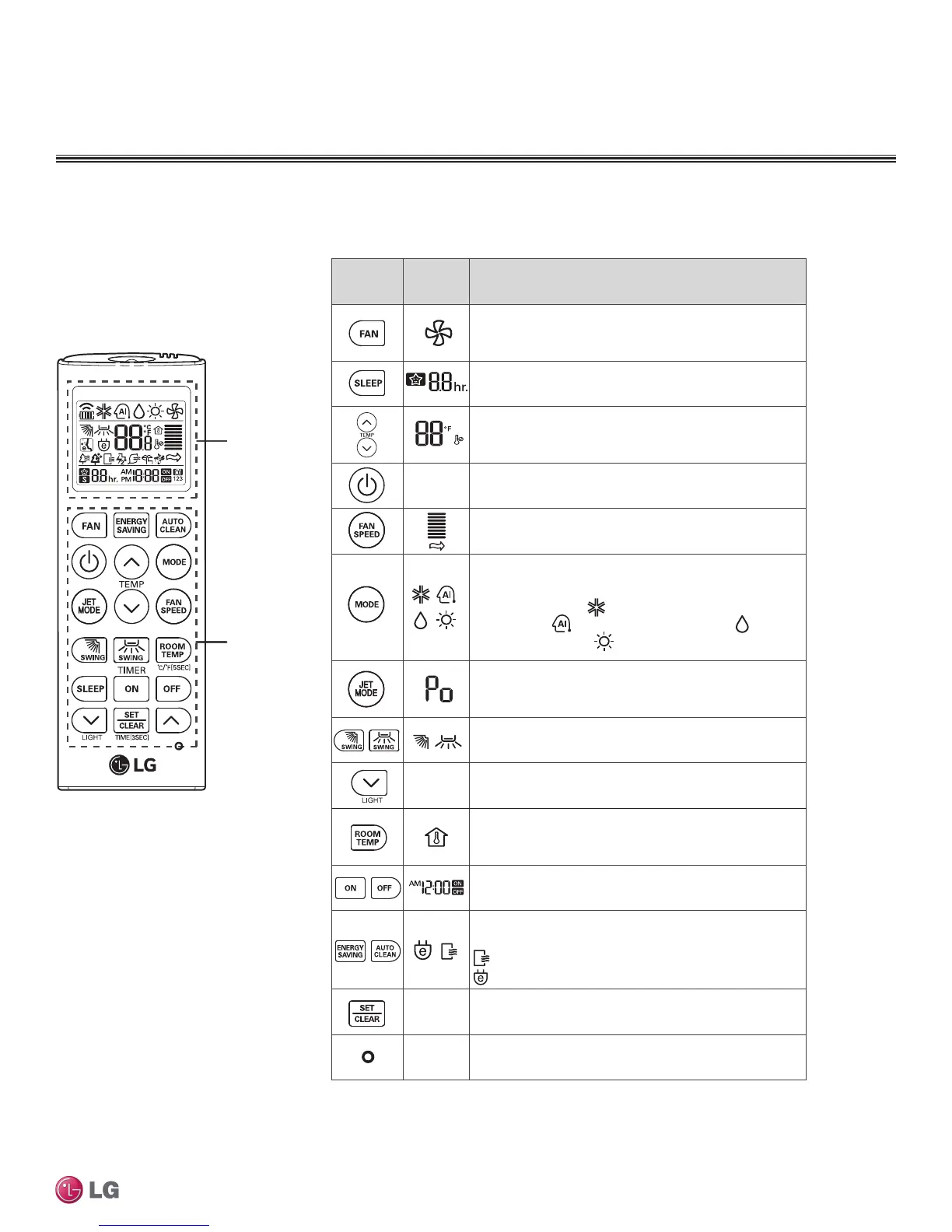
Figure 111: AKB73835312
Wireless Controller.
Table 40: AKB73835312 Wireless Controller Functions.
Wireless Controller
Display
screen
Control
panel
* Some functions may not be supported, depending on the model.
Control
panel
Display
screen
Description
Fan button : Air come out from the indoor unit
below to the room without air temperature
change.
Sleep mode auto button*:
Sets sleep mode auto
operation.
Temperature adjustment buttons:
Adjusts the room temperature when cooling
and heating.
- On/Off button: Turns the power on/off.
Indoor fan speed button: Adjusts fan speed.
Operation mode selection button*: Selects
the operation mode.
Cooling operation ( ) / Auto operation or auto
changeover ( ) / Dehumidifying operation ( )
/ Heating operation ( )
Jet cooling button: Cools the indoor temperature
within a short period of time.
Air flow direction button: Adjusts the air flow
direction vertically or horizontally.
-
Adjusts the brightness of the indoor unit display.
Temperature display button: Displays the
room temperature. Also changes unit from °C to
°F if pressed for 5 seconds.
Timer button: Sets current time and start / end time.
Navigation and functions button*
Selects special functions:
: Auto clean
: Activates energy saving cooling
-
Set/clear button: Sets or cancels functions.
-
Reset button: Resets the air conditioner settings.
STANDARD WALL-MOUNTED INDOOR UNITS
Installation and Best Layout Practices


 To Next Page
 Loading...