43
SMART APPLICATION FUNCTION
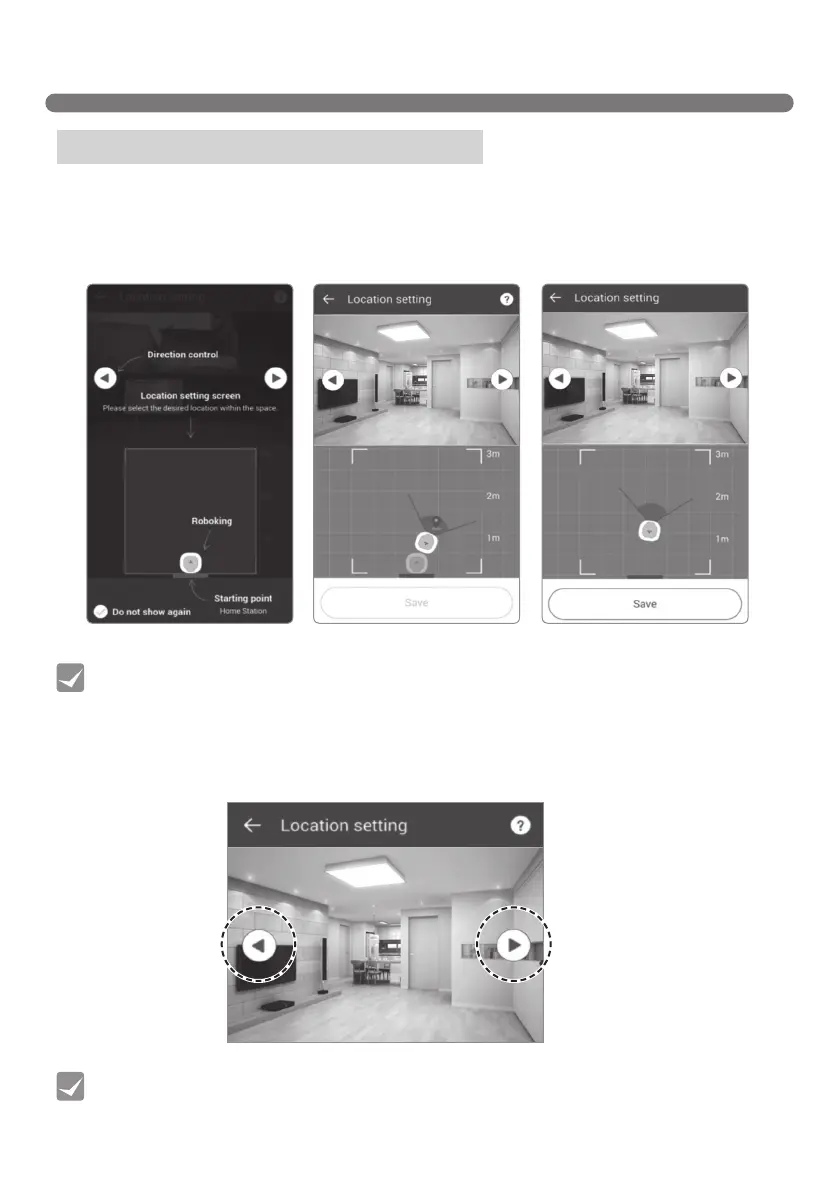
To start HomeGuard, first, you have to set the location where the Robot Cleaner will remain during the
HomeGuard mode. Select the location on the virtual map.
1. Click the target location on the map or drag the Robot Cleaner to the desired location within the
designated area. The monitoring location can be continuously changed before it is saved.
Menu - HomeGuard (Location setting)
2. Use the two arrows on both sides of the video feed to set the desired direction.
[Location setting1][Location setting] [Location setting2]
• The Home Guard monitoring location can only be within 1.5m to the right and left side and
within 3m from the front of the home station. If the Home Station is relocated, the Home
Guard position will always use the Home station as the starting point, and so the Home
Guard position will need to be set again.
• f the Home Guard mode has been terminated, or the mode is stopped due to low battery
level, the Robot Cleaner exits Home Guard mode and returns to the Home station where it
will remain on charge until further command.
Tip
Tip
[Location Setting]



 To Next Page