7200 Series UPS User Manual Chapter 3 - Installation Procedure
Single Module and 1+1 Parallel System Connecting the UPS power cables
document in response to "powersure ups"
Page 3-11
Issue 6
(03/98)
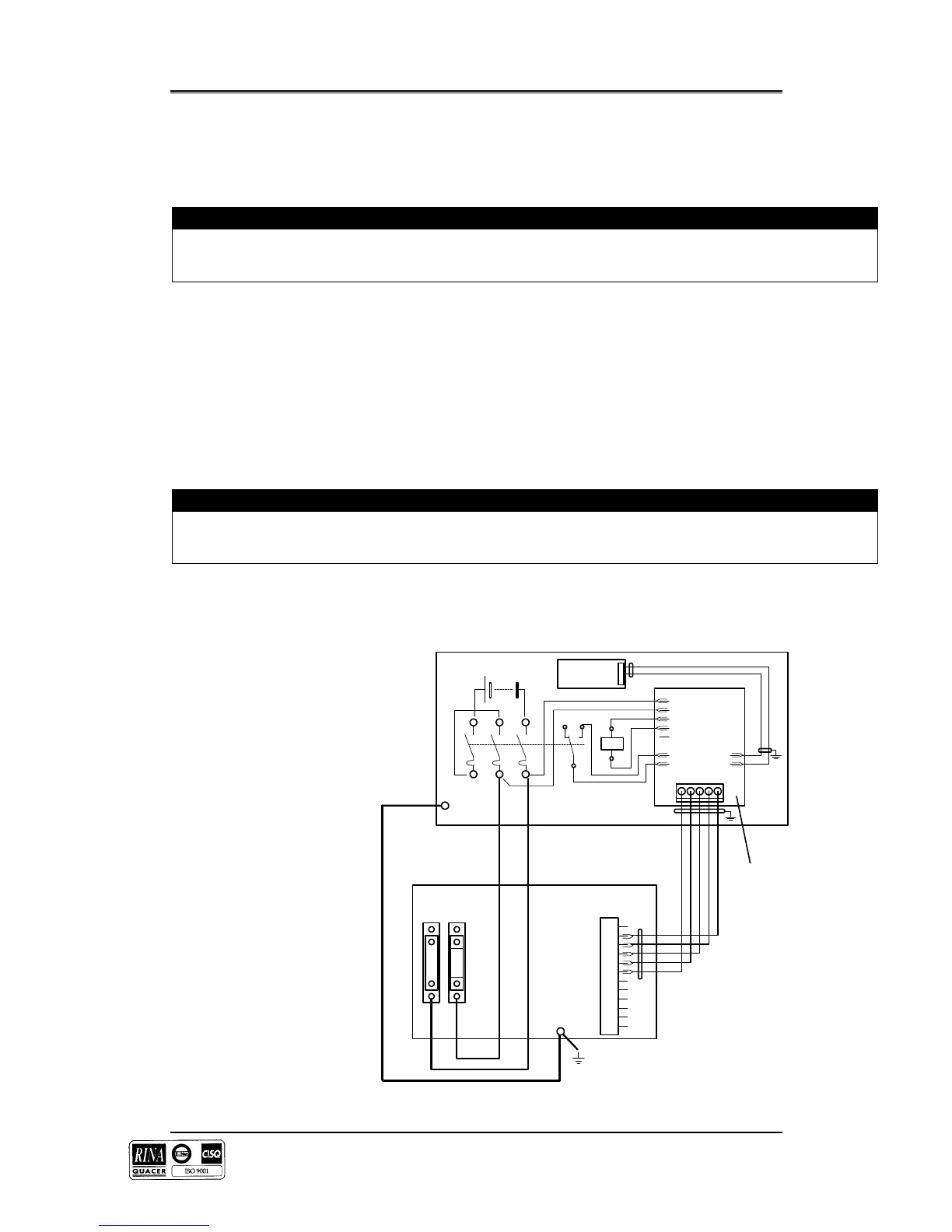
5. Connect the battery power cables between the UPS battery terminals and its associated battery
circuit breaker –see figures 3-5 and 3-6. As a safety precaution remove the battery fuse in the
module until the arrival of the commissioning engineer.
OBSERVE THE BATTERY CABLE POLARITY.
WARNING
Do not try to close the battery circuit breaker before the equipment has been commissioned
6. Connect the safety earth and any necessary bonding earth cables to the copper earth bus-bar
located below the battery power connections.
Note: The earthing and neutral bonding arrangement must be in accordance with local and
national codes of practice.
7. Connect the battery circuit breaker control and temperature compensation cables between the
UPS auxiliary terminal block and battery circuit breaker controller board as shown in figures
3-5 and 3-6. These cable must be shielded, shield should be connected at protective earth of
battery cabinet or battery breaker, not of UPS .
Caution
If battery temperature compensation is not used the system must be de-activated by the commissioning engineer.
8. If the remote emergency power off ( EPO ) facility is to be used then remove the link between
terminals 10 and 11 of the auxiliary terminal block and connect the `normally closed' remote
stop switch between these two terminals using shielded cable.
V<
+ -
3
2
1
X3
X4
X5
X6
X7
X8
X9
X 2
X10
1 2 3 4 5
X1
UPS CABINET
1
2
3
4
5
6
7
8
9
10
11
12
X3
- +
F
13
BATTERY
CIRCUIT
BREAKER
SENSOR
Battery C.B.
Controller
Board ( 4520067T )
TEMPERATURE
(OPTIONAL)
4532029V
Battery Power
connections
Cable < D >
Cable < E >
Figure 3-F .


 To Next Page