ORPHEUS User’s Manual
Light Conversion support@lightcon.com 33
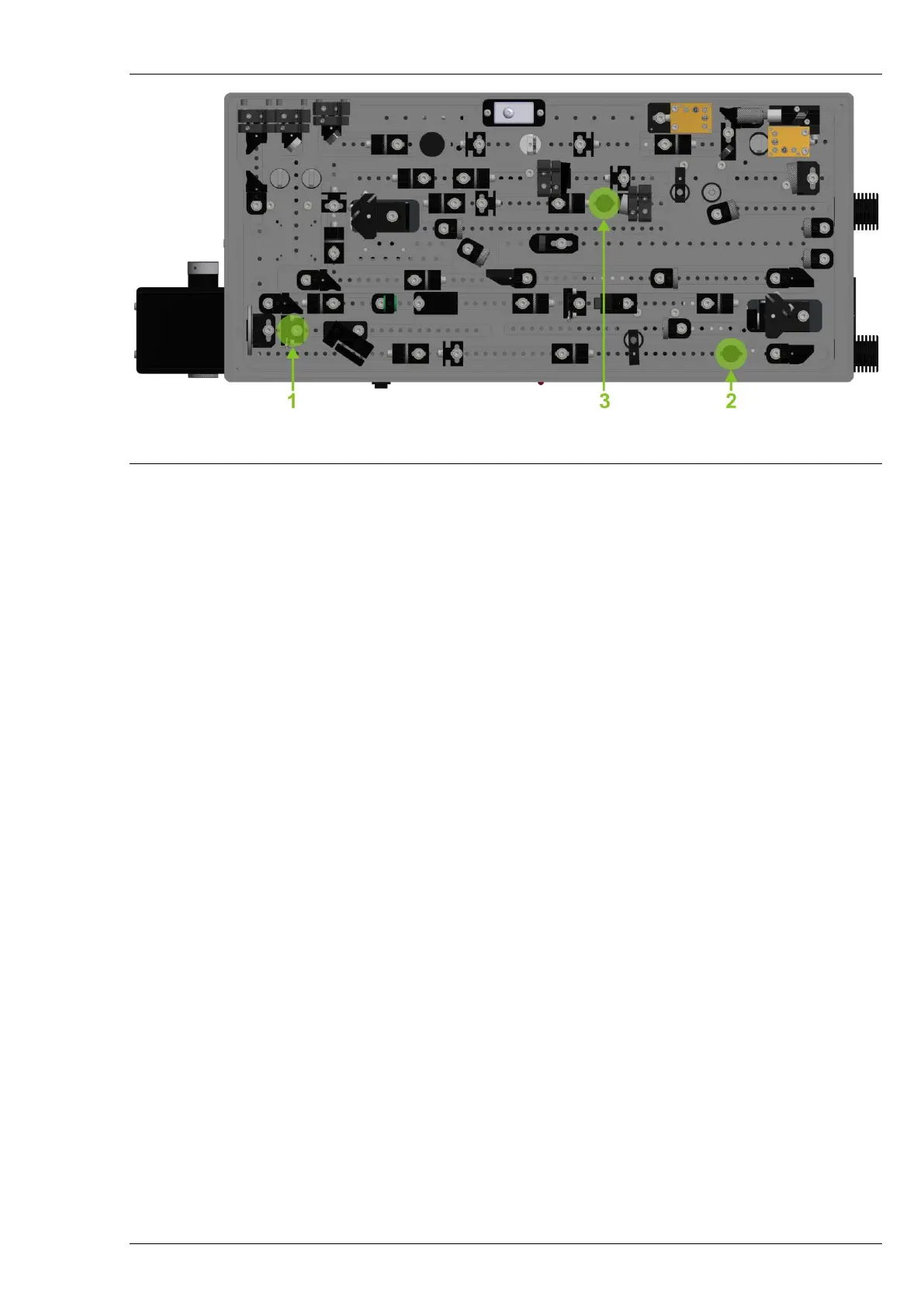
Figure 22. Apertures inside ORPHEUS and placement of beam alignment targets during
input beam alignment.
Once the beam is centered on the first two apertures, proceed to place the BAT in the position
marked as number 3 in the illustration and align the BRM2 mirror to center the beam on this aperture.
When it is done, remove the BAT and start to increase the pump power. Final alignment should be
performed while monitoring the output power of ORPHEUS, attempting to achieve the installation value.
At the output of ORPHEUS Signal and Idler beams should be collinear. It is most convenient to check
that with an IR beam viewing card, which is sensitive to radiation near 1550nm wavelength. (For example,
Thorlabs VRC4 card, or Edmund Optics #55-292). If you set ORPHEUS to 770nm wavelength, you should see
three beams exiting ORPHEUS (515nm pump as green, 770nm Signal as red and ~1500nm Idler as yellow
spots would overlap on the card, when ORPHEUS is aligned properly)
7.4 Damage of Sapphire Substrate in White Light Generation Path
Depending on the intensity and repetition rate of pump used for white light generation, the
substrate itself can be damaged. Quite usual indicator of the damage is the scattering of white light on
surfaces of substrate: normally look like dust particle stuck to the surface of substrate right on the beam
position. The damage might occur on the first or second surface of substrate.
If it is not possible to generate white light at all having the same parameters from the pump laser –
that might also indicate the damage of the surface or bulk of substrate.
In both cases the damage spot can be avoided rotating the sapphire substrate around the axis. Please
note that sapphire substrate is glued on the pin which is fixed in the holder with a nylon tipped set screw.
Do not release this screw while rotating the sapphire! Axial shift of sapphire might affect the
stability/strength of white light signal as well as the focusing conditions of the beam into the nonlinear
crystal.
To rotate the sapphire substrate:
1. Block the Second Harmonic Generation beam path of ORPHEUS
2. Insert HEX 1.5-2mm key in the hole on the opposite end of pin of sapphire
3. Rotate the pin around the axis slightly
4. Check if there is no scattering on the surfaces of sapphire while generating white light


 To Next Page