LITE-CHECK INSPECTOR 930
38
Switch to Inspection Mode
Tester Input Voltage
Tablet Diagnostic Mode Features
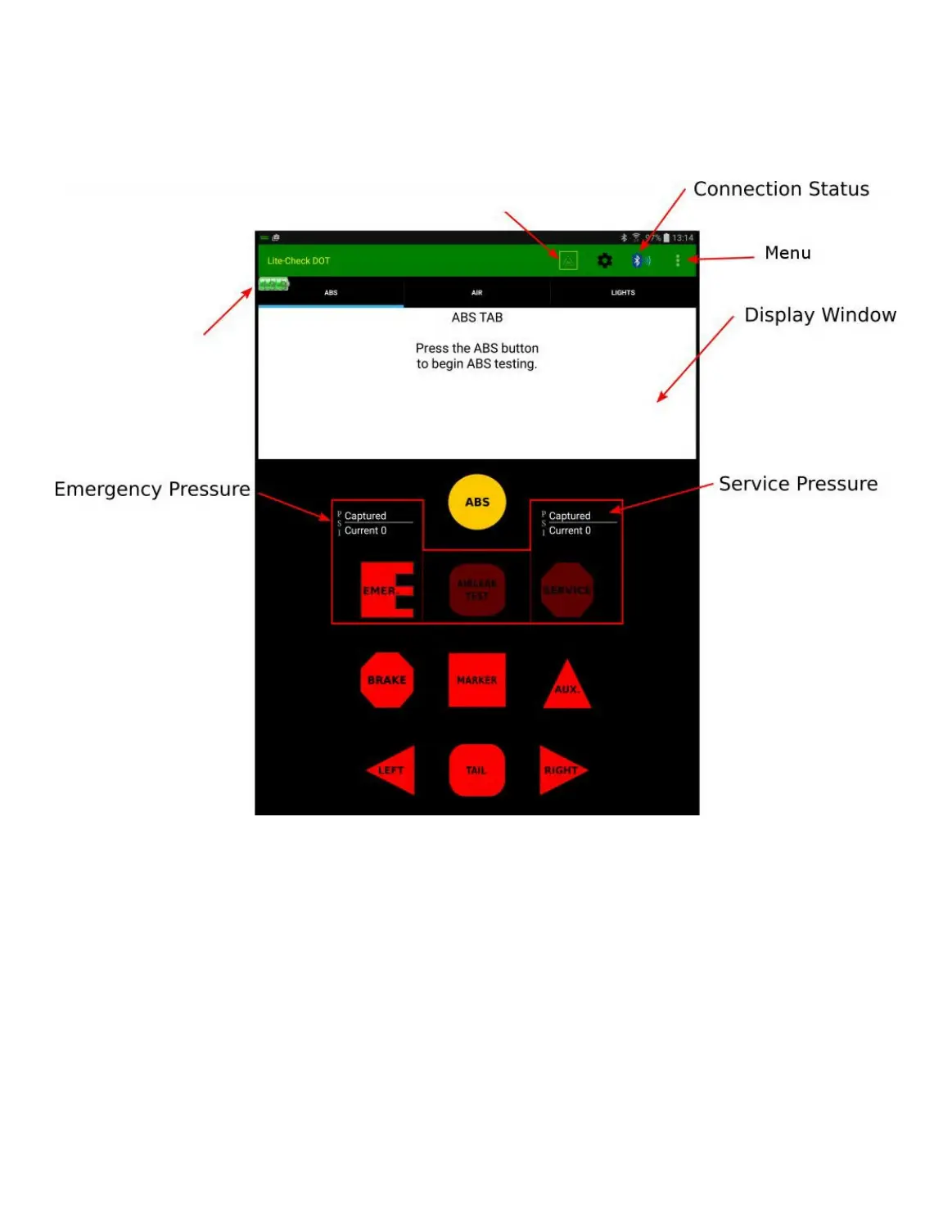
The image and notes below reference the diagnostic mode of the Lite-Check DOT app found on the Lite-Check
supplied tablet. Touching the indicated “buttons” will activate the desired function.
NOTE: Only “Lit” icons (buttons) are available for use. Above is the “ABS” tab; notice that the ABS,
Emergency, and Electric function buttons are illuminated; these buttons are available for use. Selection of any
“Lit” feature will automatically change the current tab to the feature you are working with.
Lite-Check Recommended Operation Procedures
The following pages illustrate the Lite-Check recommended operating procedure. This involves first applying
Emergency air to the trailer to release the spring brakes, then inspecting all of the electrical circuits and ABS.
1. If a report is desired, switch back to DOT mode via the icon in the toolbar and enter the values for all of the
fields for the inspector, carrier, and the trailer screens that you wish to appear in the report, then switch back
to diagnostic mode.
2. Select the “Emergency” button to charge the emergency air.



 To Next Page