CHAPTER 7: OPERATION 7-6
ALPHA 538/552
2.5. Guiding elements change over
Don’t move the pusher by hand. Always use the remote control and the dedicated
functions.
Not following these instructions could result in damaging the barfeed.
1. Bring the pusher in home position by pressing
2. Open the guiding zone by pressing on the remote control
3. Remove the pusher and the pusher supports by loosening them.
Then remove the flag.
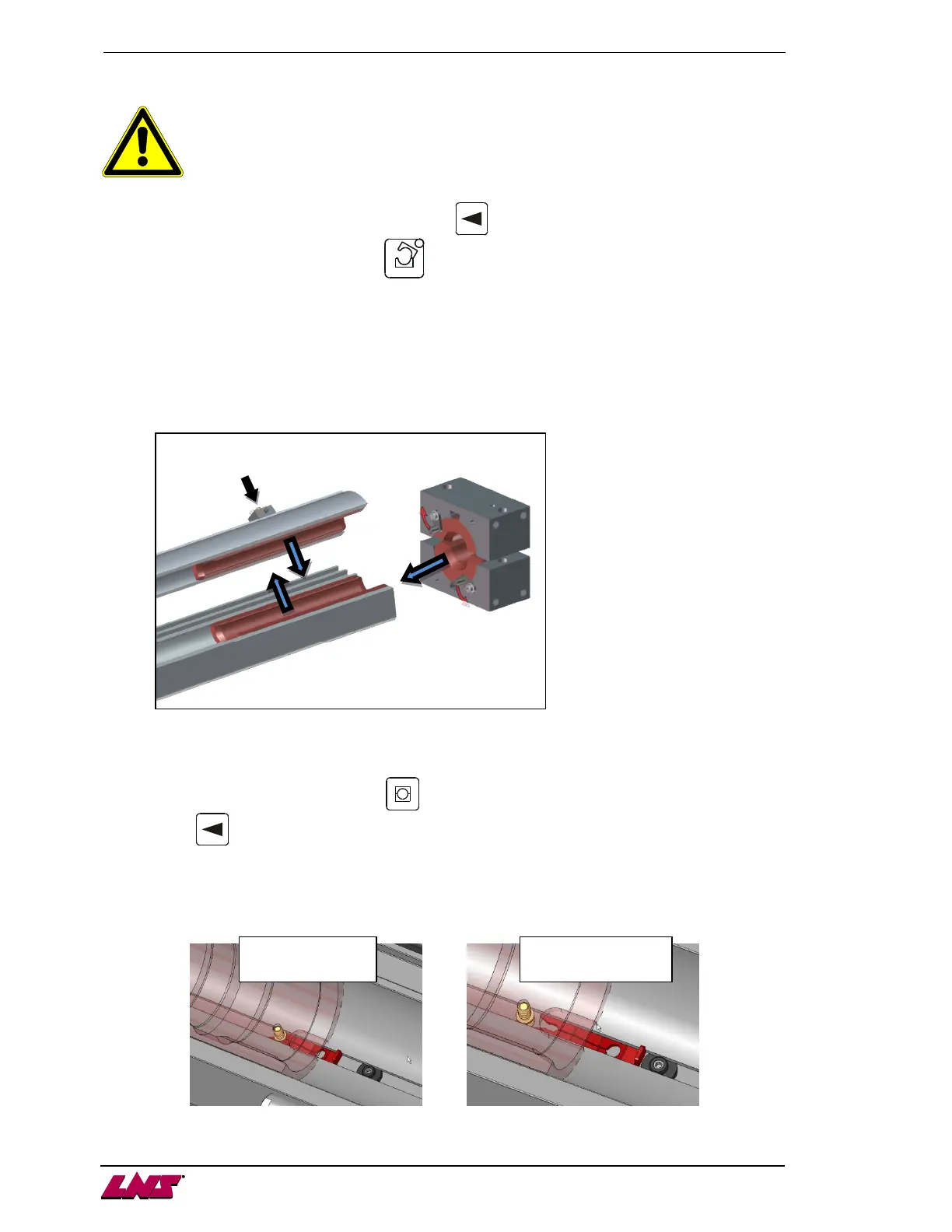
4. Remove the guiding elements in the following order:
A. Remove all the lower elements by simply lifting them up.
B. Remove all the upper elements by pressing the button of the Quick Change system.
C. Turn the locks in the way shown on the picture, then slide the upper and lower elements out of
the front rest
5. Mount the new elements by following the #4 in reverse order (C, B, A), the flag, the pusher and
the pusher supports. Pay attention to guiding elements direction (not symmetric).
6. Close the guiding zone by pressing on the remote control
7. Press to move the pusher backward until the flag is in reference position, fully backwards.
2.6. Guiding element locking system
For guiding elements with diameter over 43mm, a pin is added to avoid the guiding element to stick to the
pusher.
Guiding element
Guiding element











 To Next Page