CHAPTER 8: OPERATION 8-8
ALPHA 538/552
5. OPERATION PARAMETERS
Please read the safety instructions provided at the beginning of this manual before
handling the following devices.
The operation parameters are most frequently changed parameters for controlling the bar feeder when it’s
in AUTOMATIC mode. All the operation parameters could be changed according to the machining
requirement. To achieve the best performance, the operator is strongly recommended to read this chapter
before proceeding to any modification.
5.1. Accessing and editing parameters
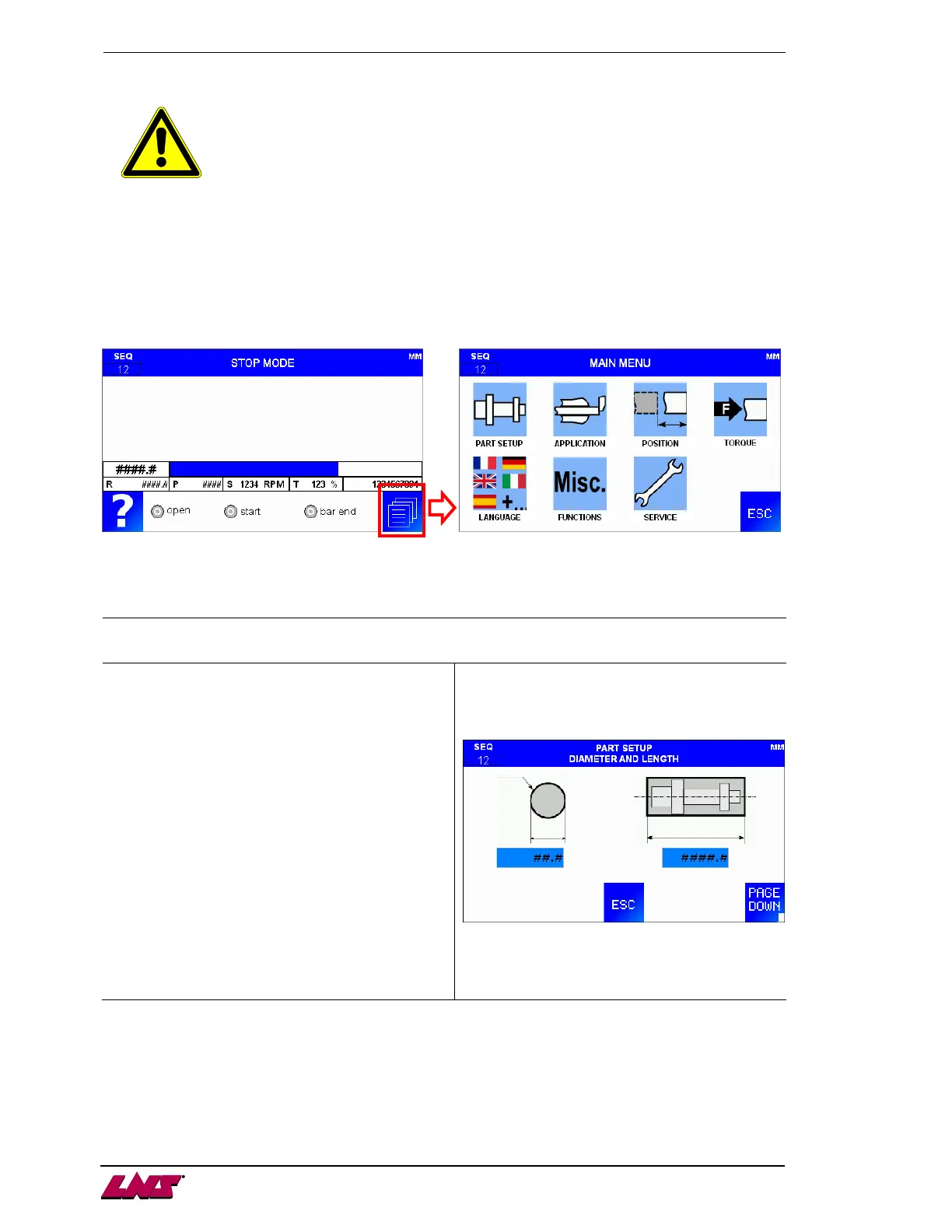
After selecting the operation parameters the following screen will be displayed:
5.2. Part setup parameters
Part setup: Diameter & Length
Bar diameter
This parameter decides the basic pushing force.
Enter the bar stock diameter currently loaded inside
the channel.
.
Part length
Overall feeding length needed for making a part.
Part length plus cut off tool width.
This value is for calculation of BAR END position
and timing of sending CYCLE START signal. The
bar feeder will not stop at this distance during
feeding. The lathe must place a stopper inside the
lathe for positioning.
Example: If the part is 100mm and the cut off tool
width is 3mm. The value entered here
is 100+3=103.











 To Next Page