Laser Technology, Inc. LTI 20/20 TruSpeed User’s Manual
Page 4
About the TruSpeed
Laser Technology's LTI 20/20 TruSpeed is part of the Laser Technology family of
handheld laser speed and ranging devices. Compared to our other
laser speed measurement products, the TruSpeed includes:
• Simplified menus and options.
• Built-in Weather Mode that is an alternate speed measurement mode. It
is a simplified gating option. This factory-defined gate ensures that
targets are beyond the range where rain and snow can affect the laser's
ability to capture a speed reading.
• Continuous Mode that is an alternate speed measurement mode. It
displays one speed reading after another until you release the TRIGGER.
• Liquid Crystal Display (LCD) screen for instant access to measurements
and options.
• Sighting scope with in-scope aiming reticle and in-scope
speed measurement display.
• Seven-button keypad that provides quick and easy access to the
instrument functions.
• Sounds and visual indicators that ensure confidence of positive target
acquisition.
• Test port for verifying reference timing.
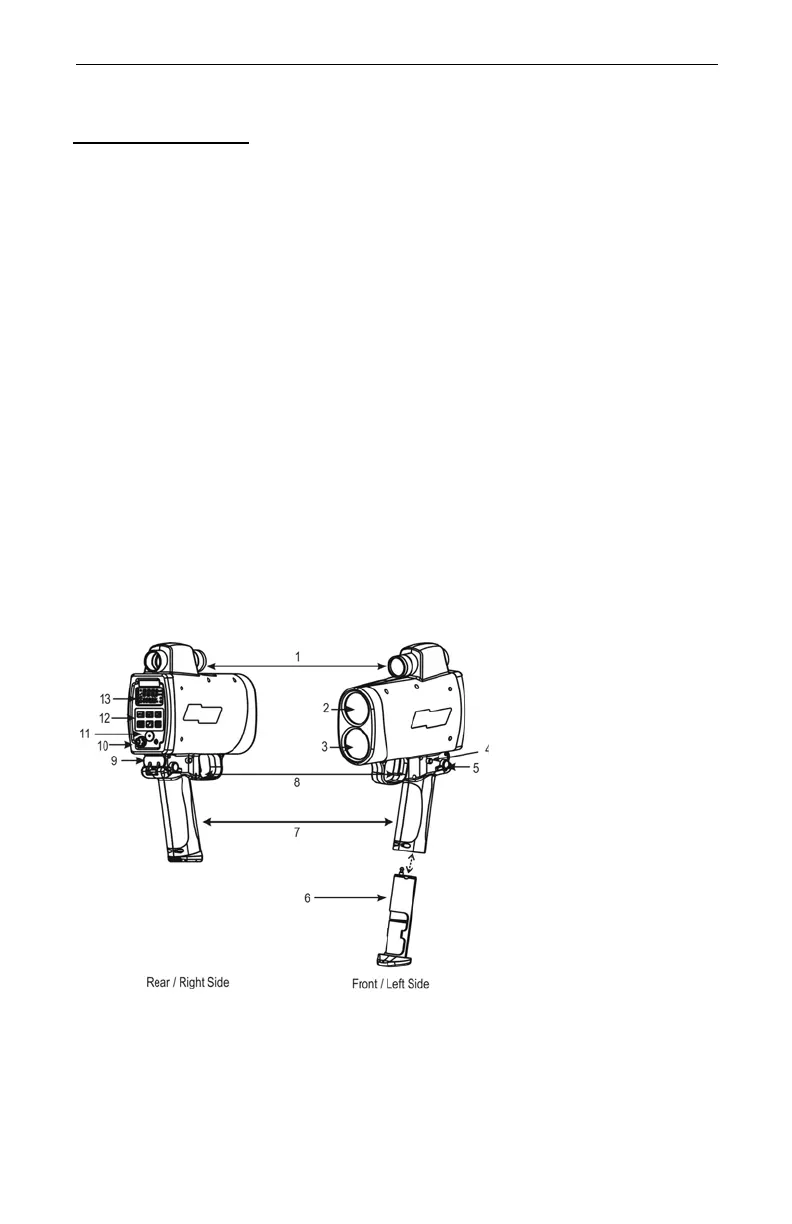
Figure 1 shows the TruSpeed's front and rear panels.
1. Sighting Scope
2. Transmit Lens
3. Receive Lens
4. Battery Release
5. Shoulder Stock
Release
6. Battery Tube
7. Handle / Battery
Compartment
8. TRIGGER
9. Shoulder Stock
Attachment
Point
10. Test Port
11. Speaker
12. Keypad
13. LCD Screen
Figure #1



 To Next Page