M–reddiode–fullinternalmemoryindicatororwritingfile
to SD/SDHC memory indicator, when the internal
memory usage exceeds 95%, the diode is
constantly on, if the transducer operates
withaninstalledmemorycard,thentheLEDflashes
whendataisbeingwrittenonthecard.
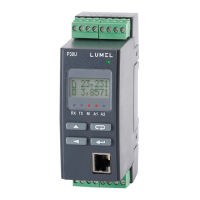
A1–reddiode–indicatorofswitchingonthefirstalarm
A2–reddiode–indicatorofswitchingonthesecondalarm
or24Vd.c.powersupply
Powerindicator–greendiode.
5.2. Messages after switching on the power
After connecting external signals and switch the power supply
on which is signalled with a green LED (power indicator), the transdu-
cer displays the type, current firmware version and the serial number.
If the transducer is equipped with Ethernet interface (P30U-X2XXXXXX)
IP address is displayed after serial number (stored in memory or recei-
ved from the DHCP server).
Fig.5. Fig.5. Start-up messages of a transducer not equipped
with an Ethernet interface.
Fig.6. Start-up messages of a transducer equipped with an Ether-
net interface.


 To Next Page
 Loading...