SETUP
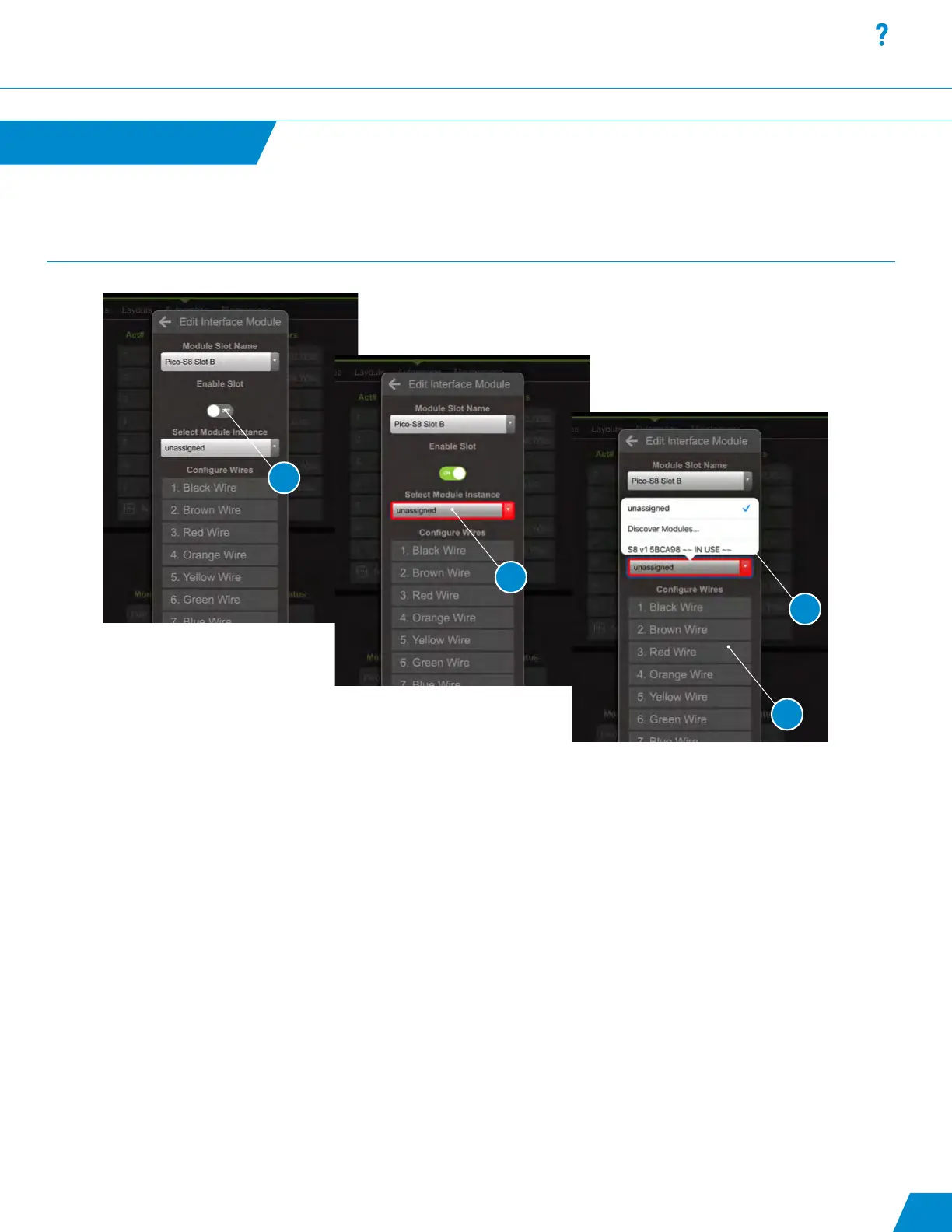
Edit Interface Module Dialog Box:
4. To congure a Pico-S8 slot in the “Edit Interface Module dialog box” toggle “Enable Slot” switch to ON position.
5. Open the “Select Module Instance” dropdown menu and select the entry “Discover Modules” to begin a search for all
Pico S8 modules connected to the Poco Accessory Bus (blue wire).
6. Open the dropdown menu again and select one of the discovered modules to assign it to the slot. The slot is congured
by default for 8 momentary switches with illumination.
7. Optional Step: To change the defaults select an entry in the “Congure Wires” table.
Within the Edit Wire dialog, you can:
• Rename the wire.
• Select the Input Signal Type as Momentary (Push-Button), Latching (Toggle), or No Input
(to use wire as illumination output only).
• Select the Output Signal Type as Normal (State), or No Output (to use wire as input-only,
i.e. with a latching switch or 3rd-party system).
Automation
continued...
25
5
6
7
4
Automation continued...



 To Next Page