70
Swing
The Swing setting determines the amount of swing—a "shuffle" or triplet-based feel—that is
applied to the Sequence.
Important: The Swing setting is affected by the Time Division. Furthermore, if your Time
Division is triplet-based, Swing will not be applied.
To set the Swing of a Sequence:
1. Enter Sequence Mode by pressing the Sequence Mode (Seq) button.
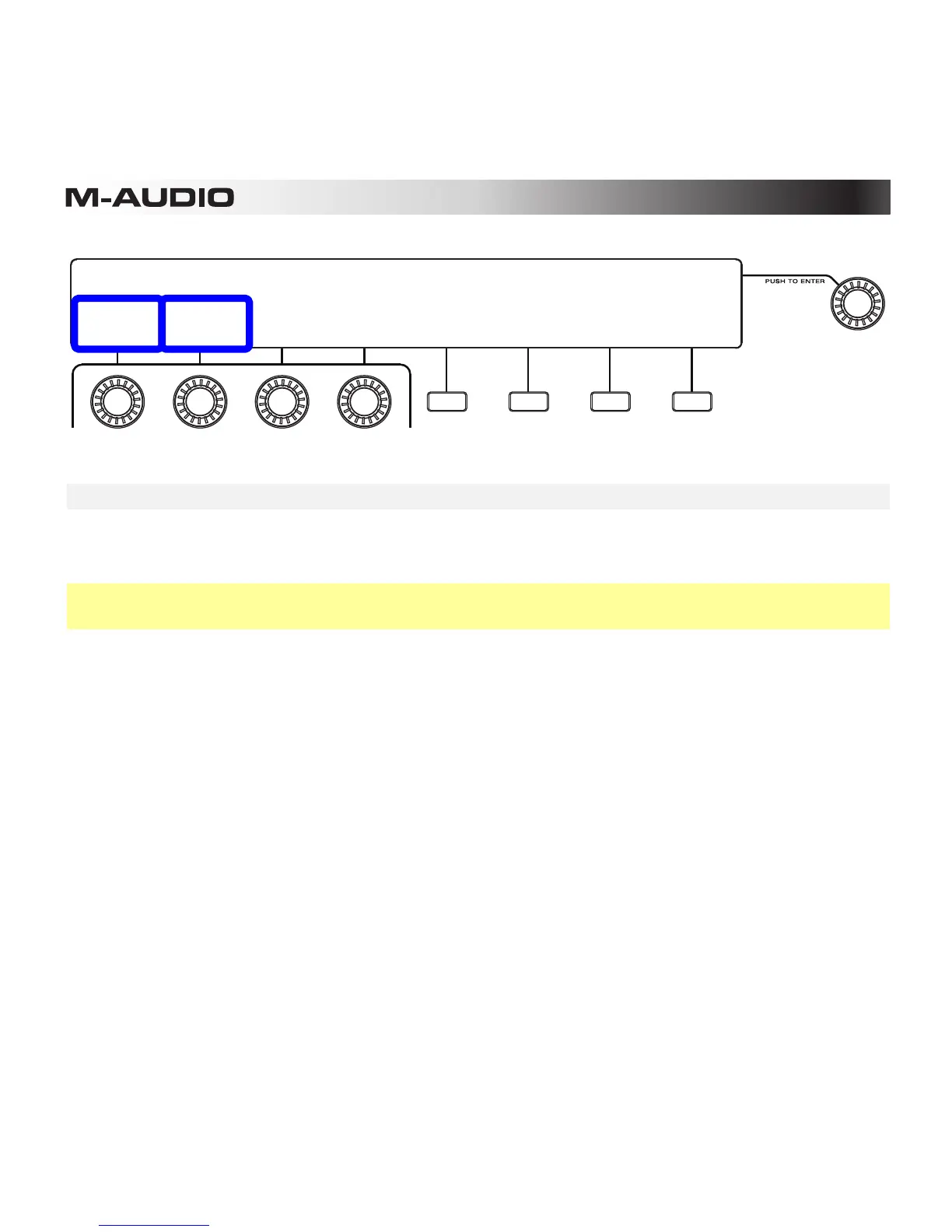
2. Turn the second Knob (Swing) to adjust the value:
• 75% is the maximum setting (completely swung)
• 50% is the minimum setting (no swing; this is the default setting)
3. Exit Sequence Mode by pressing the Sequence Mode (Seq) button or fourth Function
Button (Exit).
SEQUENCER 01: Sequence
TEMPO:
120
SWING:
50%
GATE
50%
FIX VEL:
127
EDIT
VELOCITY
PAGE:
1 of 2 EXIT
BANK:A BAR:01 PAD:A01
CHANGE->
SEQUENCE
BARS:
02










 To Next Page