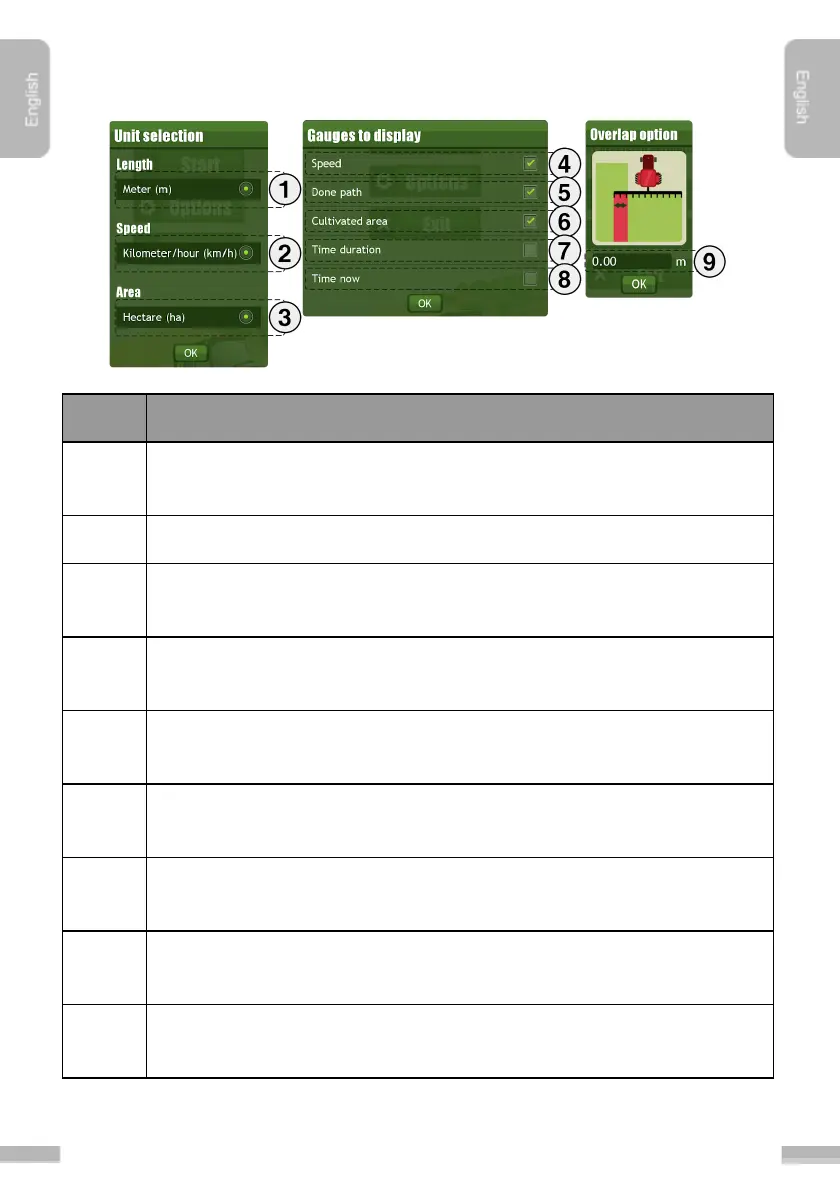
Units, Gauges to display and Overlap option menu
Unit for length can be set here. Supported formats are Meter, Feet, Inch
and Yard
Unit for speed can be set here. Options are Kilometer/hour or Mile/hour.
Unit for area measurement can be set here. Options are Hectare, Acre and
Square miles
Set Speed gauge to be displayed on the Navigation screen. Displays the
actual speed of the agricultural machinery.
Set Done path gauge to be displayed on the Navigation screen. Displays
the covered distance since the start of the session.
Set Cultivated area gauge to be displayed on the Navigation screen.
Displays the area of the cultivated field since the start of the session.
Set Time duration gauge to be displayed on the Navigation screen. Displays
the elapsed time since the start of the session.
Set Time now gauge to be displayed on the Navigation screen. Displays the
actual time.
You can set the width of the allowed overlap. The distance between the
navigation lines are calculated based on the values given here.


 To Next Page