37
ELECTRICAL ACCESSORY SOCKET
ELECTRICAL ACCESSORY SOCKET - USB C
Caution: Make sure that the USB C socket’s waterproof cap
is fitted correctly to prevent moisture/water from entering
the socket. Moisture/water in the USB socket could lead to an
electrical problem, resulting in electrical damage.
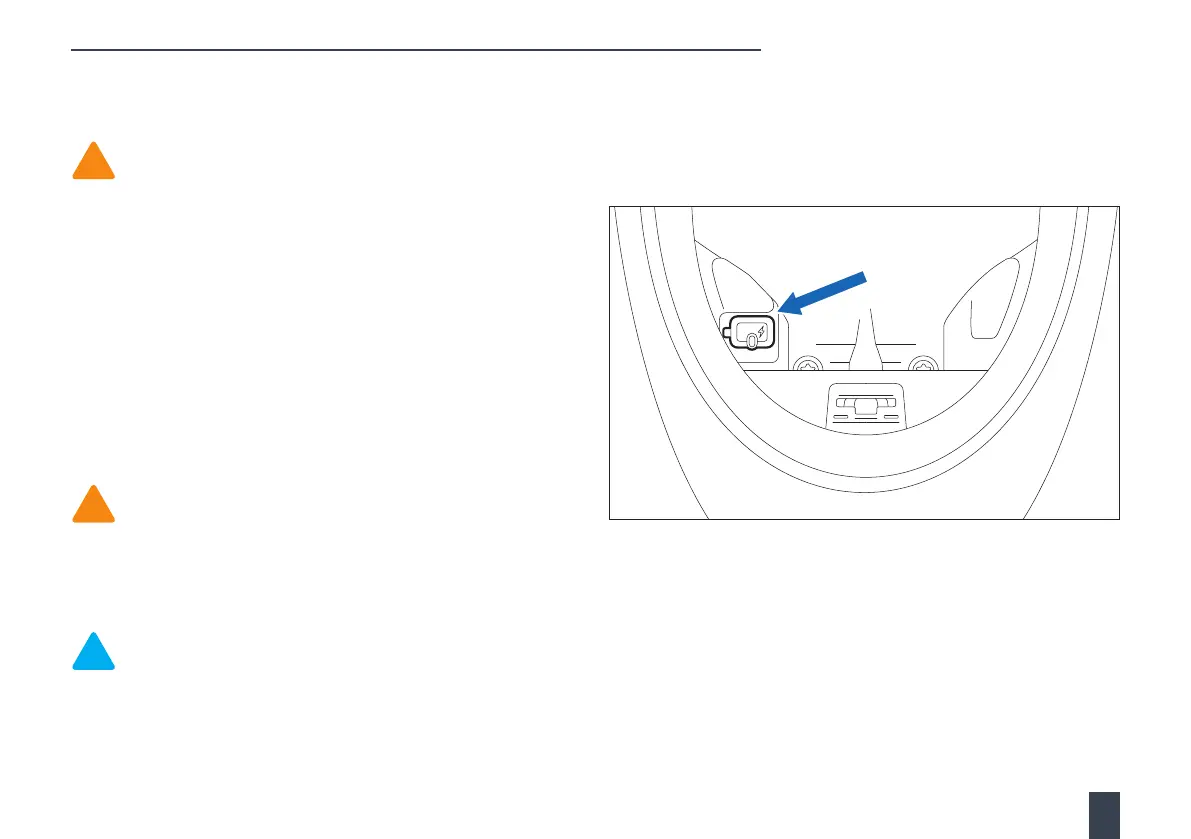
The USB C socket is located inside the storage compartment and is
fitted with a protective waterproof cap.
The connector provides a 5 volt, 2 amp, power supply, which is
suitable for charging electronic devices such as mobile phones and
cameras.
To access the USB C socket, open the storage compartment. For
further information, see Storage compartment on page 36.
To use the USB C socket, remove the protective cap and connect your
device using a suitable USB cable. Stow the device and cable in the
space available inside the storage compartment.
Caution: Make sure that any electronic devices and cables
are safely secured inside the storage compartment. Make
sure that there is sucient space surrounding any electrical
device. Make sure that the storage compartment lid can be
closed without trapping the USB cable or causing damage to
the electronic device or the motorcycle.
Note: Do not leave the ignition switch in the ON position
for extended periods of time, as this will result in battery
discharge.
When your electronic device is fully charged, open the secondary
battery storage compartment and disconnect the electronic device
and USB cable. Refit the waterproof cap and close the secondary
battery storage compartment lid.


 To Next Page