10 MAGICFX
®
ECO2JET
®
- User and Installation Manual
1.6. DMX CONTROL
1.6.1. STANDARD PERSONALITY
When connected to DMX the ECO2JET
®
is controlled with 1 safety address and 1
operational addresses in the standard personality:
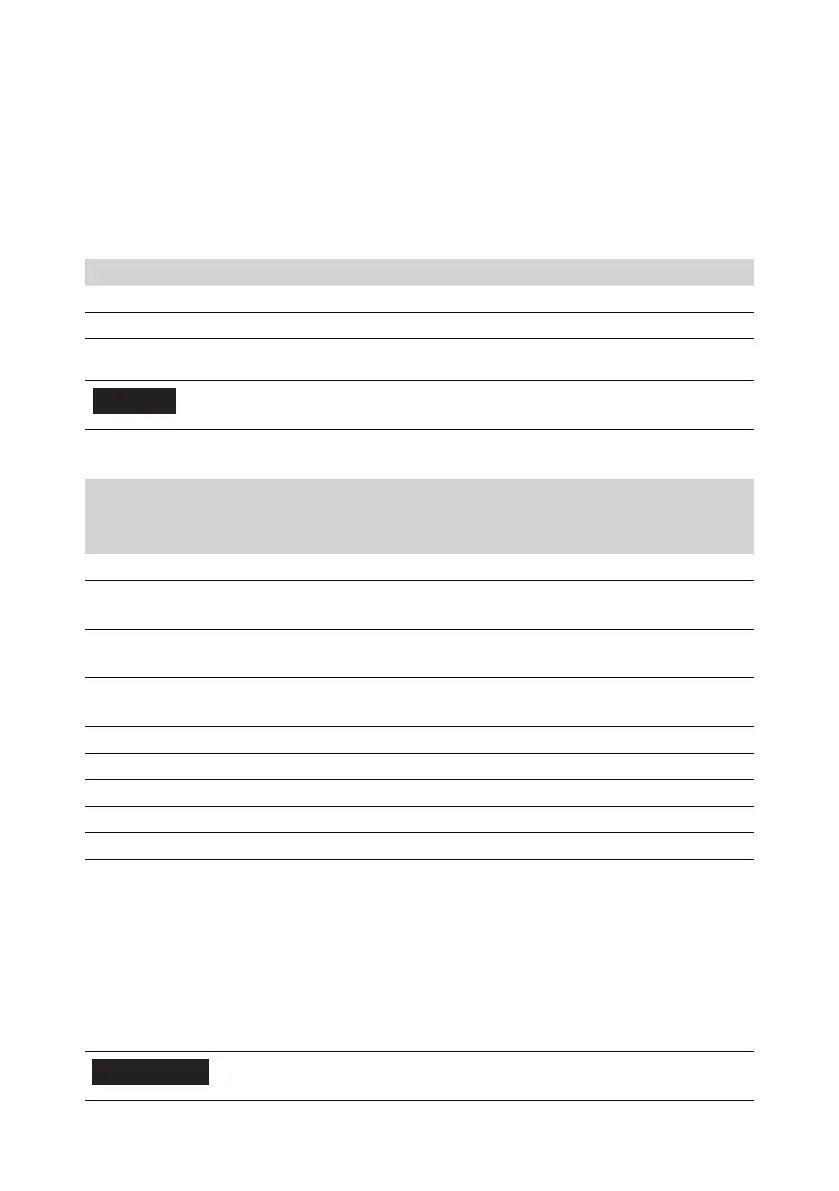
DMX Address Address range Control
Enable address 1-512 Device enable / disable
Start address 1-512 Eect trigger
DMX Addresses
NOTICE
The enable address cannot be the same as the
operational address.
Operating of these addresses results in the following:
DMX Value Enable Ch. DMX Value Start Ch. Result
Lower
bound
Upper
bound
Lower
bound
Upper
bound
0 24
25 64 Hold ≥ 3s:
Reset locking errors
65 99 Device pre-enabled
System pressurised
100 154 0 199 Device enabled
System pressurised, fan spin-up
200 255 Output eect
155 199
200 255 0 99
100 154 Prime
155 255
It is advised to use prime mode in the following situations:
• A new or empty 2m ECO2JET
®
Fluid Extension Hose (MFX1805) is used in the
setup.
• The device is at a +1m height dierence with the fluid can.
When you link multiple machines with DMX, we advise you to use the same enable
address for all machines.
6
CAUTION
The system is pressurized when pre-enabled, enabled
and during eect output.



 To Next Page