User Settings
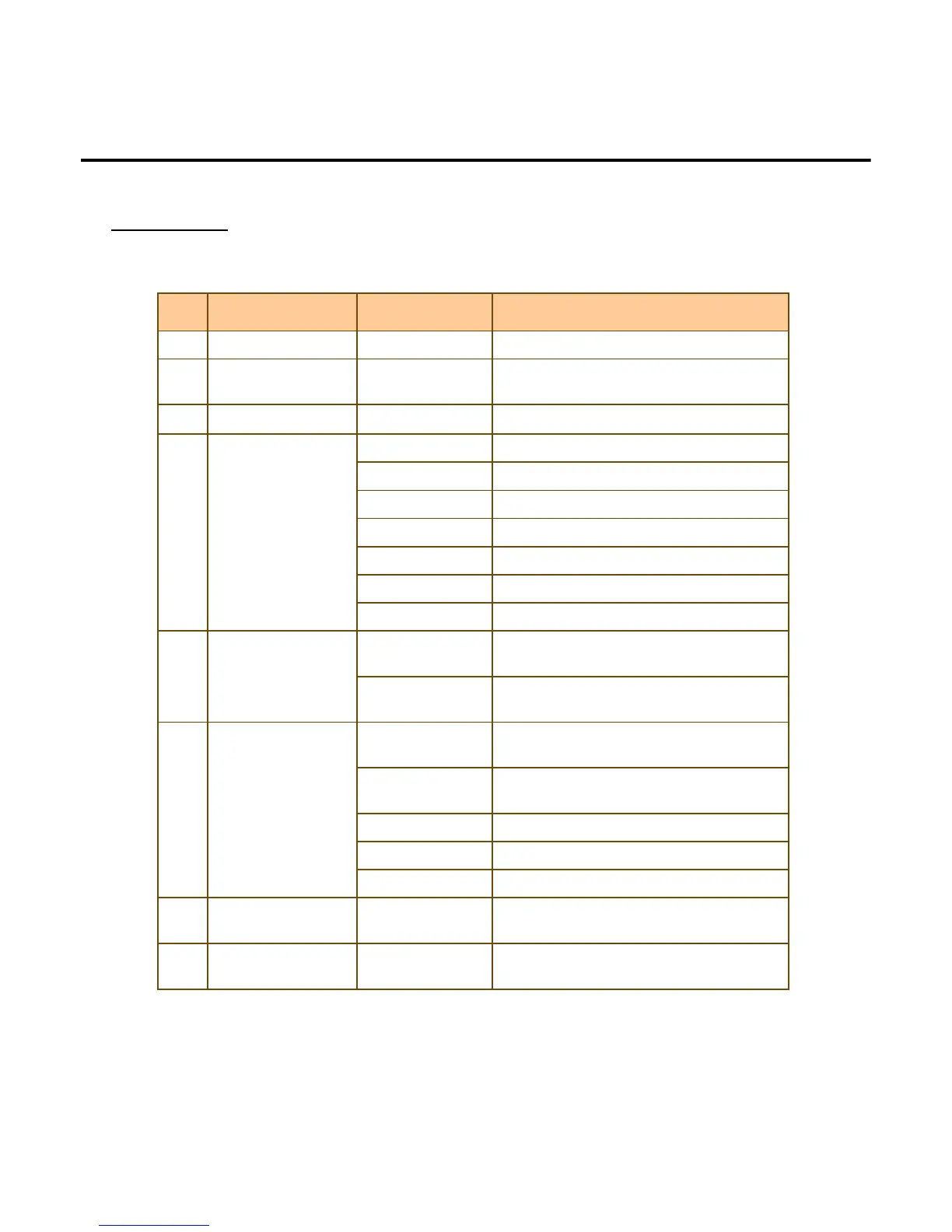
No.
No.No.
No. Service Menu
Service MenuService Menu
Service Menu Sub Menu
Sub MenuSub Menu
Sub Menu
1 Template Version To obtain Template Version
2 Black Box Display the history of this machine
since factory shipment.
3 Sensor To check sensors state
4 Calibration CIS CIS Calibration
CIS-R CIS Calibration
MR
UV UV Sensor Calibration
Tape Tape Sensor Calibration(FS,FSD-only)
Sonar Sonar Sensor Calibration(VS,VSD-only)
Touch screen Touch screen Calibration
5 SNR Mode Normal Displays the more accurate of the serial
numbers in the banknote
Compare Make sure that the serial numbers in the
banknote are the same
6 Recognition Data Image Data To obtain Image Data using USB
(100DPI)
Dimage Data To obtain saved Image Data using
USB(25 DPI)
MR Data To obtain MR Data using USB
Tape Data To obtain Taped Notes Data using USB
UV Data To obtain UV Data using USB
7 Recognition
On/OFF
Turn on/off for CF,MR,UV,IMAGE
8 Recognition Level To set MR, UV, Image, Double, Fitness
Level from 1 to 100 Levels
Service
-
--
-22
2222
22-
--
-


 To Next Page