36
BE57-646 ECLIPSE Guided Wave Radar Transmitter - FOUNDATION fieldbus
™
This password will be provided, when necessary, by Factory
technical support.
Factory Password
Calibration-related and other factory settings are further
protected by a Factory Password.
4.4 Model 706 Menu: Step-By-Step Procedure
The following tables provide a complete explanation of the
software menus displayed by the ECLIPSE transmitter. The
menu layout is similar between the local Keypad/LCD
interface, the DD, and the DTM.
Use these tables as a step-by-step guide to configure the
transmitter based on the desired measurement type from the
following selections:
• Level Only
• Interface & Level
• Level & Volume
• Flow
HOME SCREEN
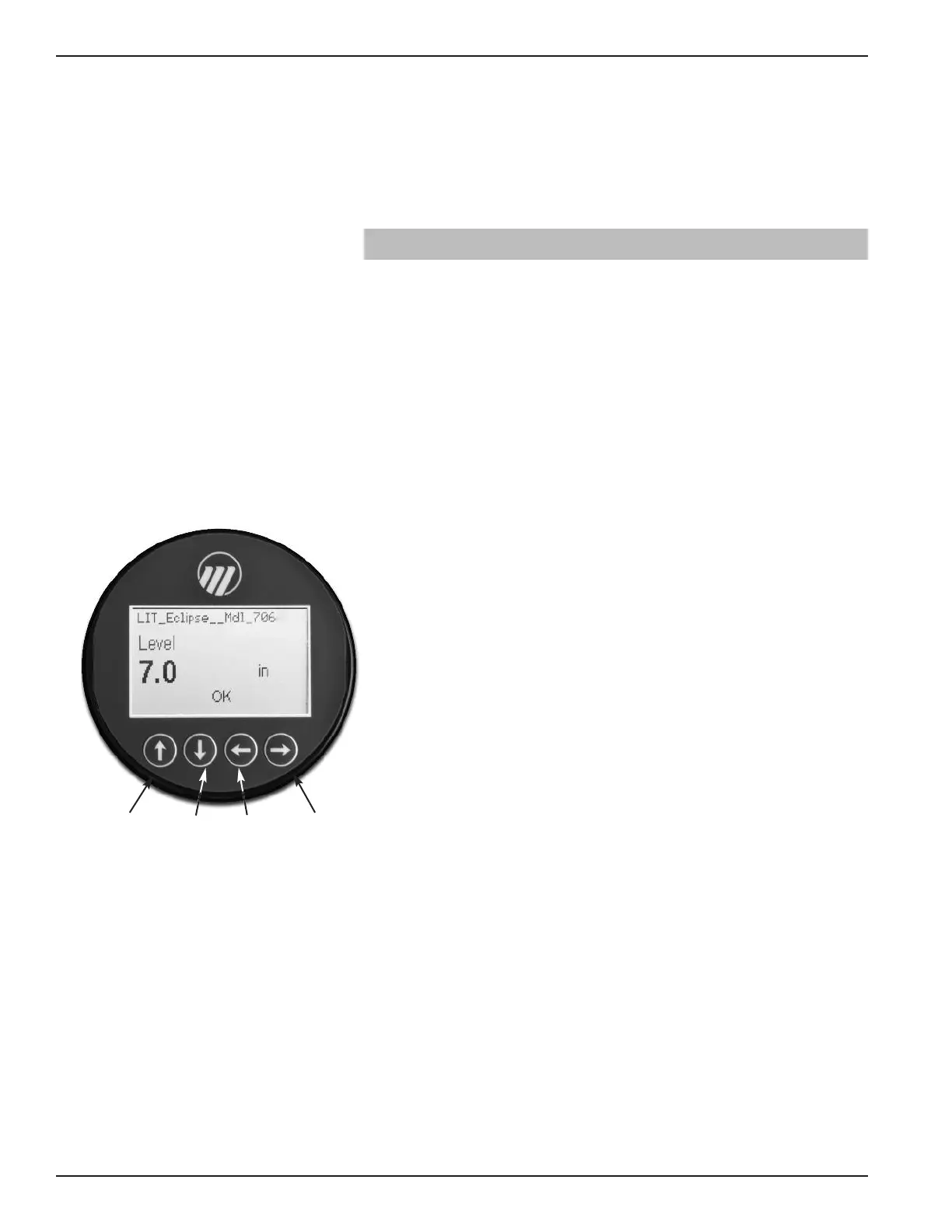
The Home Screen consists of a “slide show” sequence of
Measured Values screens which are rotated at 2-second
intervals. Each Home Measured Value screen can present up
to four information items:
• Physical Device Tag
• Measured Value
Label, Numerical Value, Units
• Status
Will be displayed as text
• Bar Graph (shown in %)
Bar graph is only displayed on AI_OUT screens shown in
% based on XD scale configuration.
The Home Screen presentation can be customized by view-
ing or hiding some of these items. See DISPLAY CONFIG
under the DEVICE SETUP menu in Section 4.5 —
Configuration Menu.
At left is an example of a Home Screen for a Model 706
configured for a Level Only application.
Up Down Back Enter





 To Next Page