EasyManua.ls Logo

Maico easyTone - Page 44

Maico easyTone
65 pages
Print Icon
To Next Page IconTo Next Page
To Previous Page IconTo Previous Page
Loading...
Operation Manual easyTone
8529689 Rev. 2
42
10/05/2022
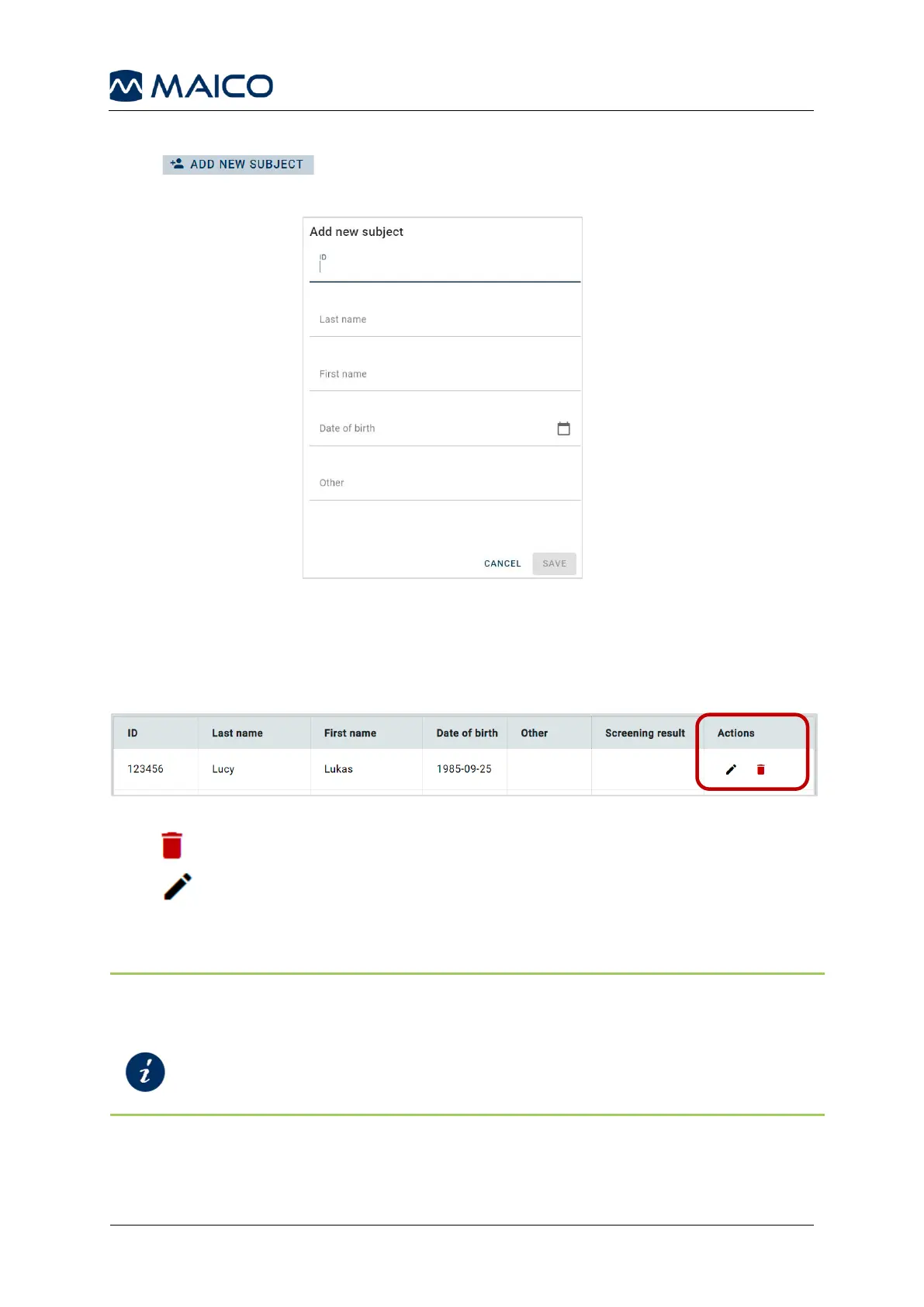
5.9.6 Add New Subject
Press to add a subject to the Screening List. Enter at least one field
and press Save (Figure 44).
Figure 44
5.9.7 Edit or Delete a Subject from the Screening List
It is possible edit or delete subjects by pressing the icons in the Actions column (Figure 45).
Figure 45
Press to delete a subject after further confirmation.
Press to edit the subject in the Edit Subject window which is structured like the
Add New Subject window.
NOTE: You can also delete a subject in the Screening List in the easyTone App.
Furthermore, it is possible to start a Quick Test and save the result to the Screening List.
Section 5.6.3.3
Selecting a Subject from the Screening List
Section 5.6.3.5
Quick Start

Related product manuals