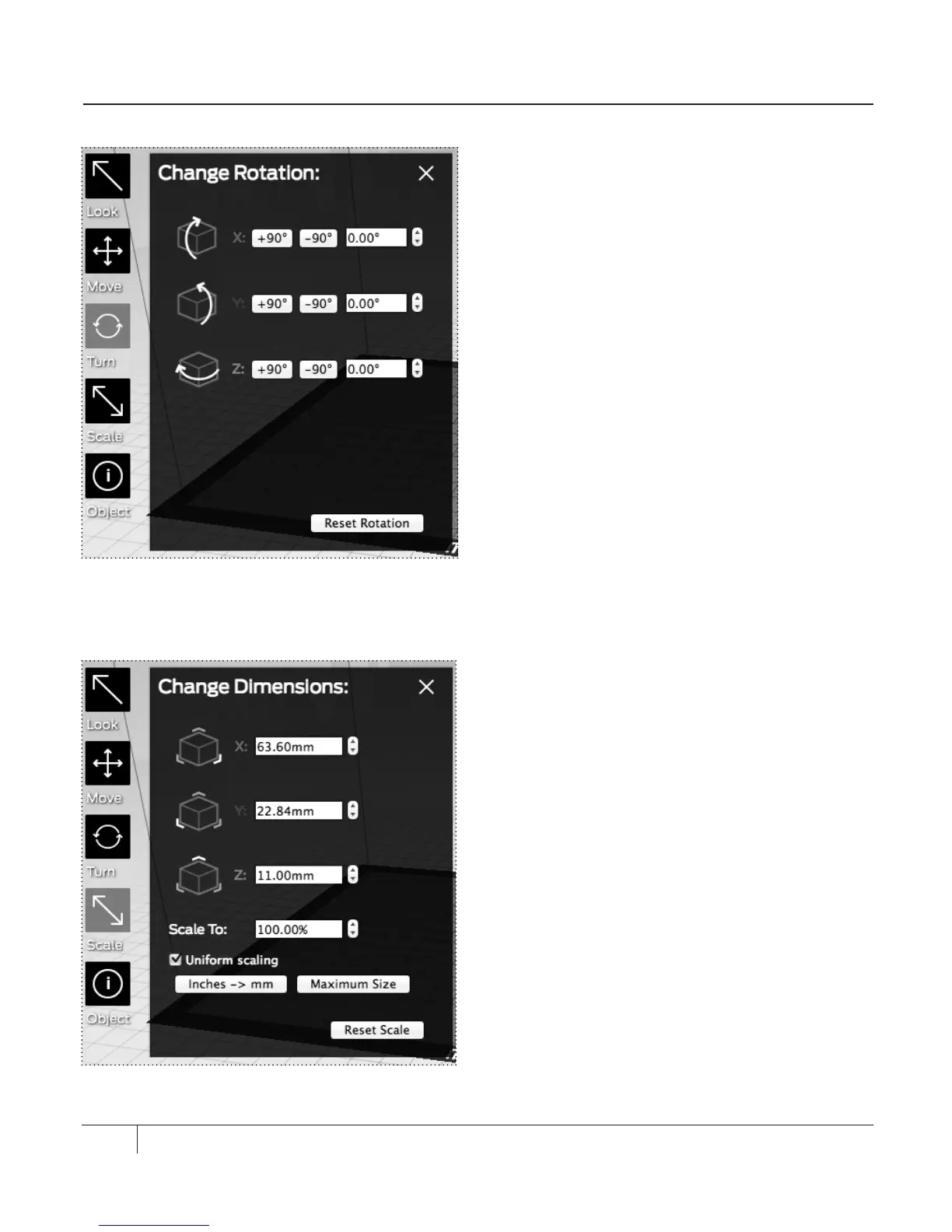
TURN [Fig. 7.5]
Click the Turn button or press the T key to
enter Turn mode. In Turn mode, you can:
• Le-click and drag the mouse to rotate the
object around (0, 0, 0) the X,Y, and
Z-axes.
• Click the Turn button again or press the T
key to view the Change Rotation submenu.
X: Specifies rotation around the X-axis,
in degrees.
Y: Specifies rotation around the Y-axis,
in degrees.
Z: Specifies rotation around the Z-axis,
in degrees.
Reset Rotation. Resets the rotation
around (0, 0, 0).
Reset Scale. Resets the object to the last
saved scale.
SCALE [Fig. 7.6]
Click the Scale button or press the S key to
enter Scale mode. In Scale mode, you can:
• Le-click and drag the mouse to change the
scale of the object.
• Click the Scale button again or press the S key
to view the Change Dimensions submenu.
X: Specifies size along the X-axis, in millimeters.
Y: Specifies size along the Y-axis, in millimeters.
Z: Specifies size along the Z-axis, in millimeters.
Uniform scaling. Maintains the proportions
of the object. If you change a dimension,
the other two dimensions maintain their
relative size.
Inches -> mm. Converts a model that has
been sized in inches to millimeter scale.
EXPLORING MAKERWARE CONTINUED
50
Fig. 7.5
Fig. 7. 6





 To Next Page