mangOH Yellow User Guide
Rev 2 10/21/19 16 41113427
3.3 SIM, SD, and IoT Expansion Cards
3.3.1 Inserting a micro-SIM Card
To establish a mobile network connection with a CF3 module, you must install a micro-SIM in the connector on the
bottom side of the mangOH Yellow. Use either of the following:
• SIM card with activated account, or
• Test SIM card for use with a call box (for example, an Agilent 8960 or Rohde & Schwarz CMU200)
To install a SIM card:
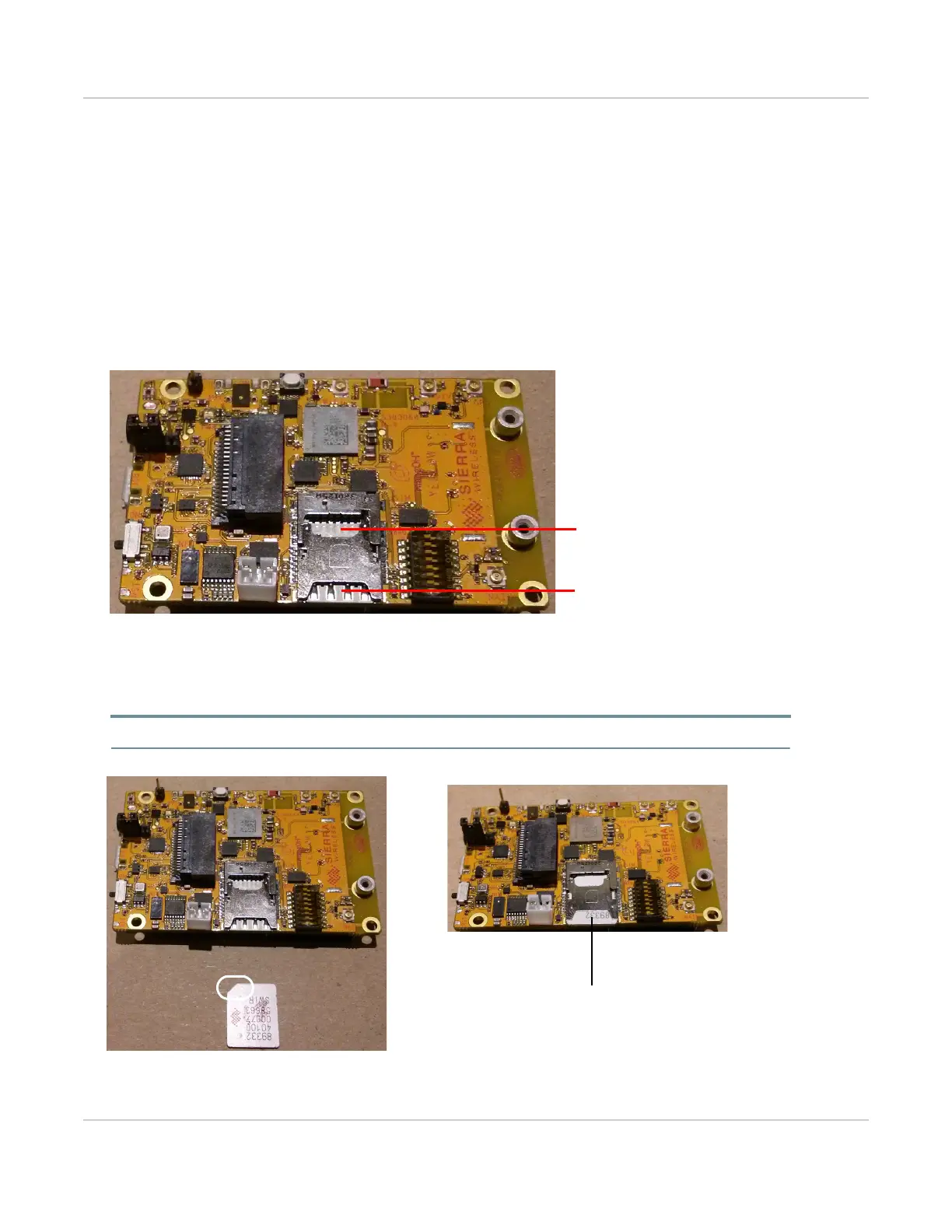
1. Place the mangOH Yellow with the dip switch block facing up (as shown).
Figure 3-7: SIM Connector and micro-SD Locations
2. Insert the SIM card with contacts face-down into the desired slot—note the location of the notched corner of
the card in Figure 3-8.
Note: CN602 is a dual-connector—the lower slot is for the micro-SIM, and the upper slot is for a microSD card.
Figure 3-8: SIM Insertion
micro-SIM (CN602—bottom)
micro-SD (CN602—top)
Note the location of
the notched corner.
Inserted in bottom slot of the tray


 To Next Page