3.4.2: Audio Connection
Rev 2 10/21/19 19 41113427
5. Turn the power back on—slide the power switch toward the center of the board.
To remove an IoT Expansion Card:
1. Turn off the mangOH Yellow’s power—slide the power switch toward the edge of the board.
2. Remove the two screws.
3. Pull the expansion card straight out, using safe ESD-handling practices (such as wearing proper ESD straps).
For detailed IoT Expansion Card slot interface information, refer to the mangOH Yellow Hardware Architecture
Guide. For detailed information about expansion cards, refer to the IoT Expansion Card Specification.
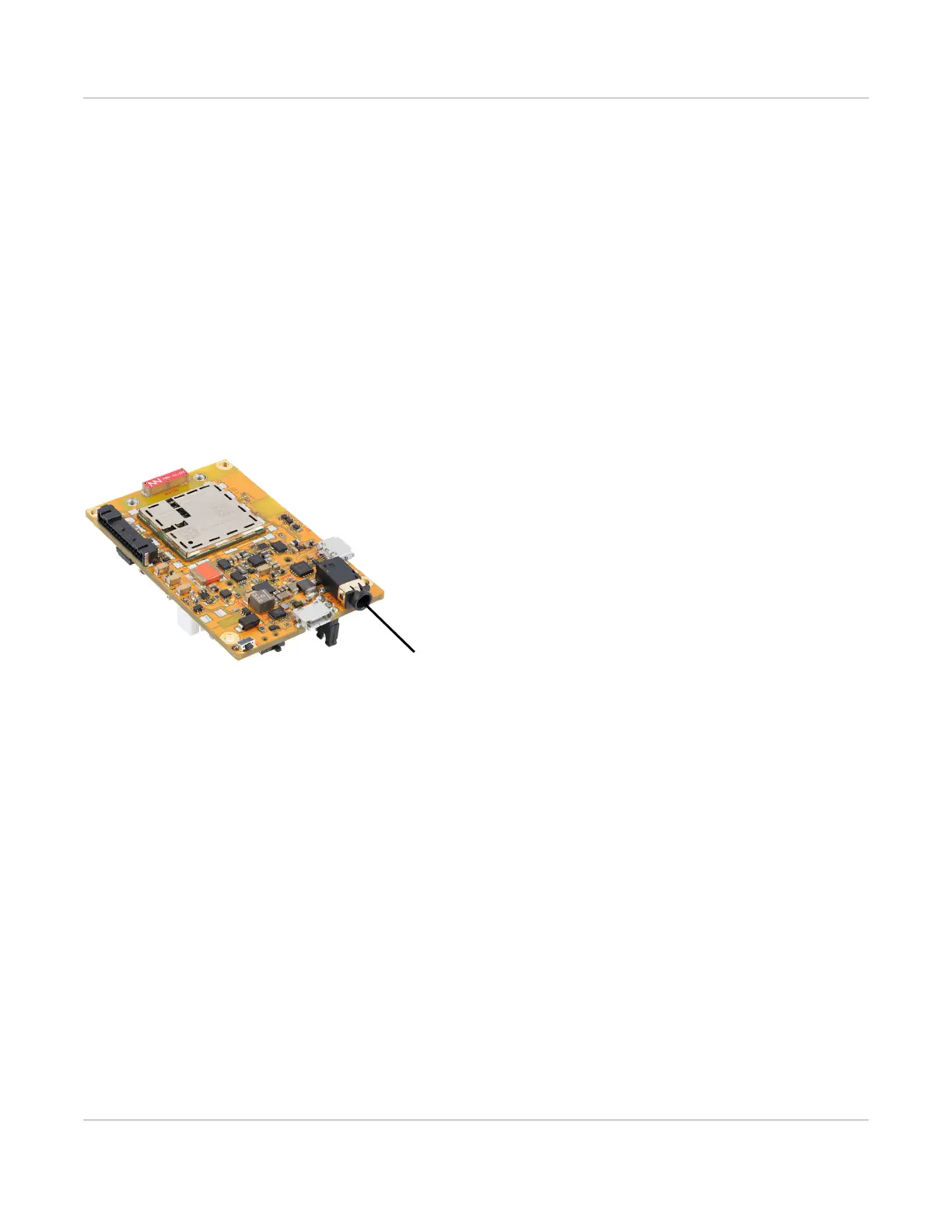
3.4.2 Audio Connection
The mangOH Yellow includes a 3.5 mm audio jack (CN701) for use with audio-enabled CF3 modules. If supported
by the CF3 module, the jack can be used to make a voice call.
By default, the audio jack is connected to the onboard mangOH codec, and is configured for use with a CTIA/
AHJ-compatible headset.
Figure 3-13: Audio Output Jack
3.5 Control Connections
3.5.1 CON (Console) Connector
The mangOH Yellow includes a micro-USB 2.0 connector (CN800) for console access.
By default, this port is enabled and configured to connect to the CF3 module’s four-wire UART interface (UART2).
The connection can be used to access the CF3 module’s Linux console.


 To Next Page