11N Mini Wireless AP
18
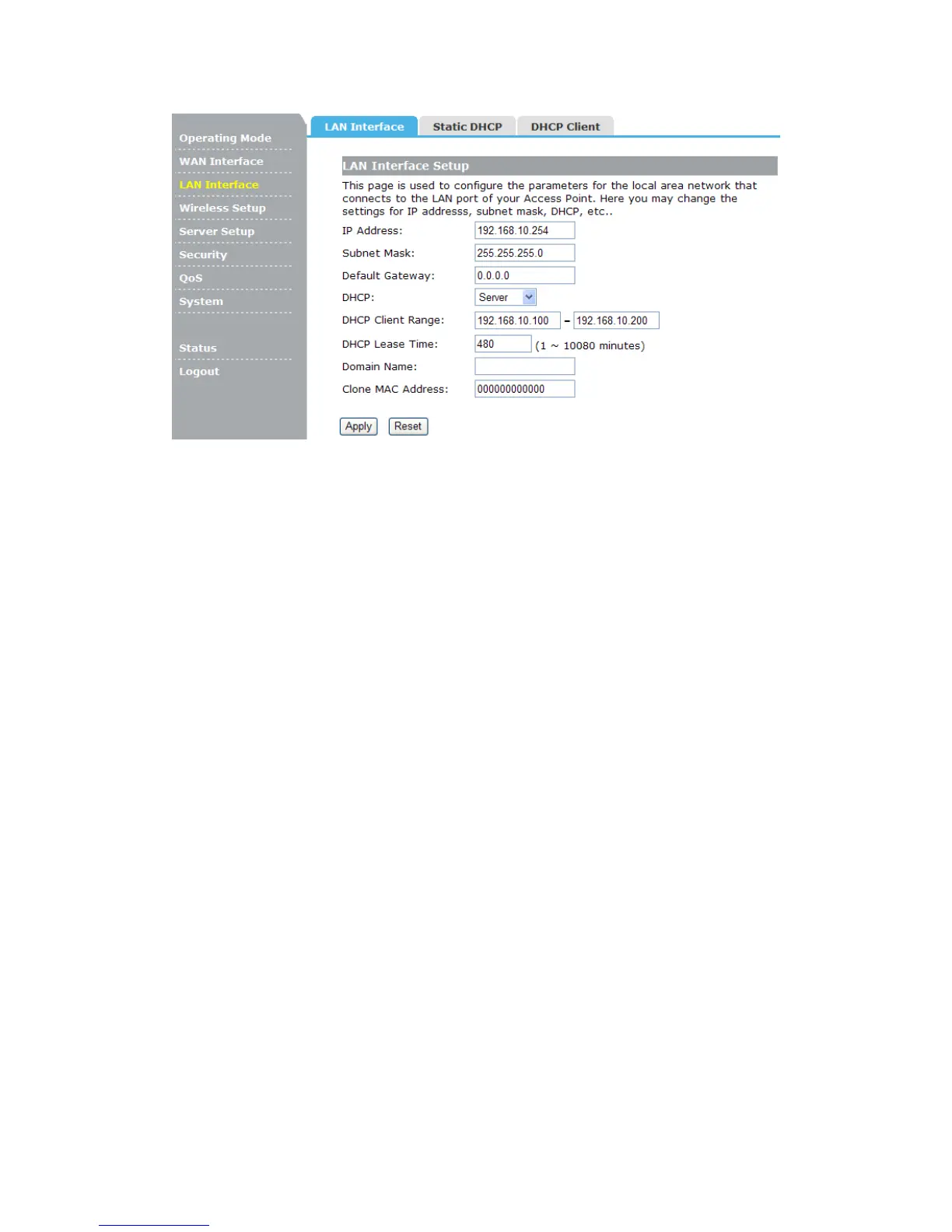
IP Address: Enter the IP address of your AP (factory default: 192.168.10.254).
Subnet Mask: An address code that determines the size of the network. Normally use
255.255.255.0 as the subnet mask.
Default Gateway: Enter the gateway IP address.
DHCP: Enable or Disable the DHCP server. If you disable the Server, you must have
another DHCP server within your network or else you must configure the computer
manually.
DHCP Client Range: Specify IP address for the DHCP Client Range.
DHCP Lease Time: The DHCP Lease Time is the amount of time a network user will be
allowed connection to the AP with their current dynamic IP address. Enter the amount of
time, in minutes, that the user will be "leased" this dynamic IP address.
Clone MAC Address: Input your MAC address should be cloned.
4.3.2 Static DHCP
This page allows you reserve IP addresses, and assign the same IP address to the
network device with the specified MAC address any time it requests an IP address.


 To Next Page