11N Mini Wireless AP
23
4.4.5 WDS
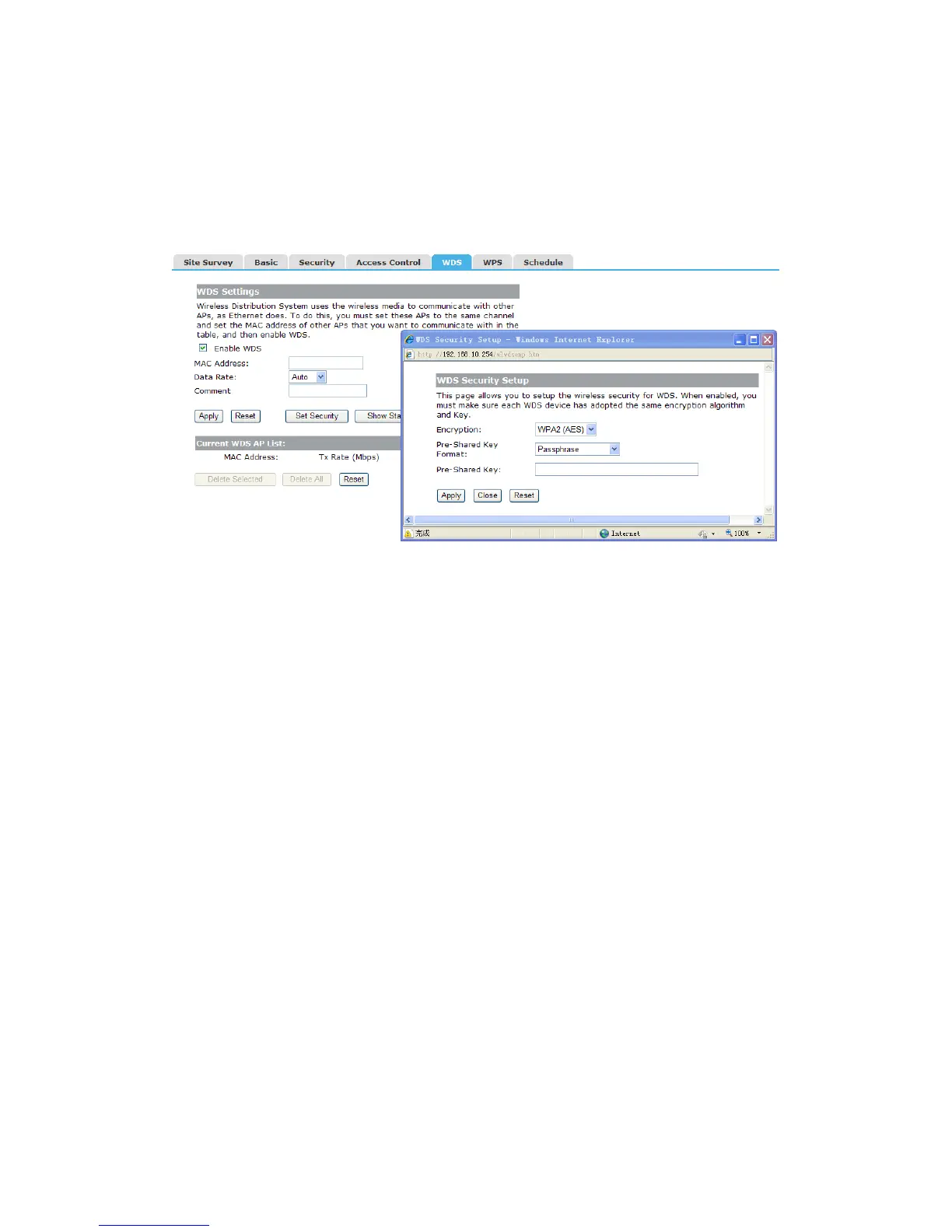
Wireless Distribution System uses wireless media to communicate with other APs, like the
Ethernet does. To do this, firstly you must set AP Mode to WDS or AP+WDS in basic
setting, then enable WDS function and set another AP MAC which you want to
communicate with. The WDS supports PSK security mode. Of course in order to make
APs work, you have to keep them the same channel and security mode.
Enable WDS: Check this box to enable WDS function.
MAC Address: Enter the remote AP MAC address.
Comment: You can add some comment for this item.
Set Security: Set WDS security.
Encryption: You may select None or WPA2 (AES).
Pre-Shared Key Format: You can select Passphrase or HEX(64 Characters).
Pre-Shared Key: Pre-shared key(PSK) is a method to set encryption keys. Commonly
used in Wi-Fi Protected Access.
4.4.6 WPS
WPS is designed to ease set up of security Wi-Fi networks and subsequently network
management. This AP supports WPS features for AP mode, AP+WDS mode, and
Infrastructure-Client mode.


 To Next Page