11N Mini Wireless AP
6
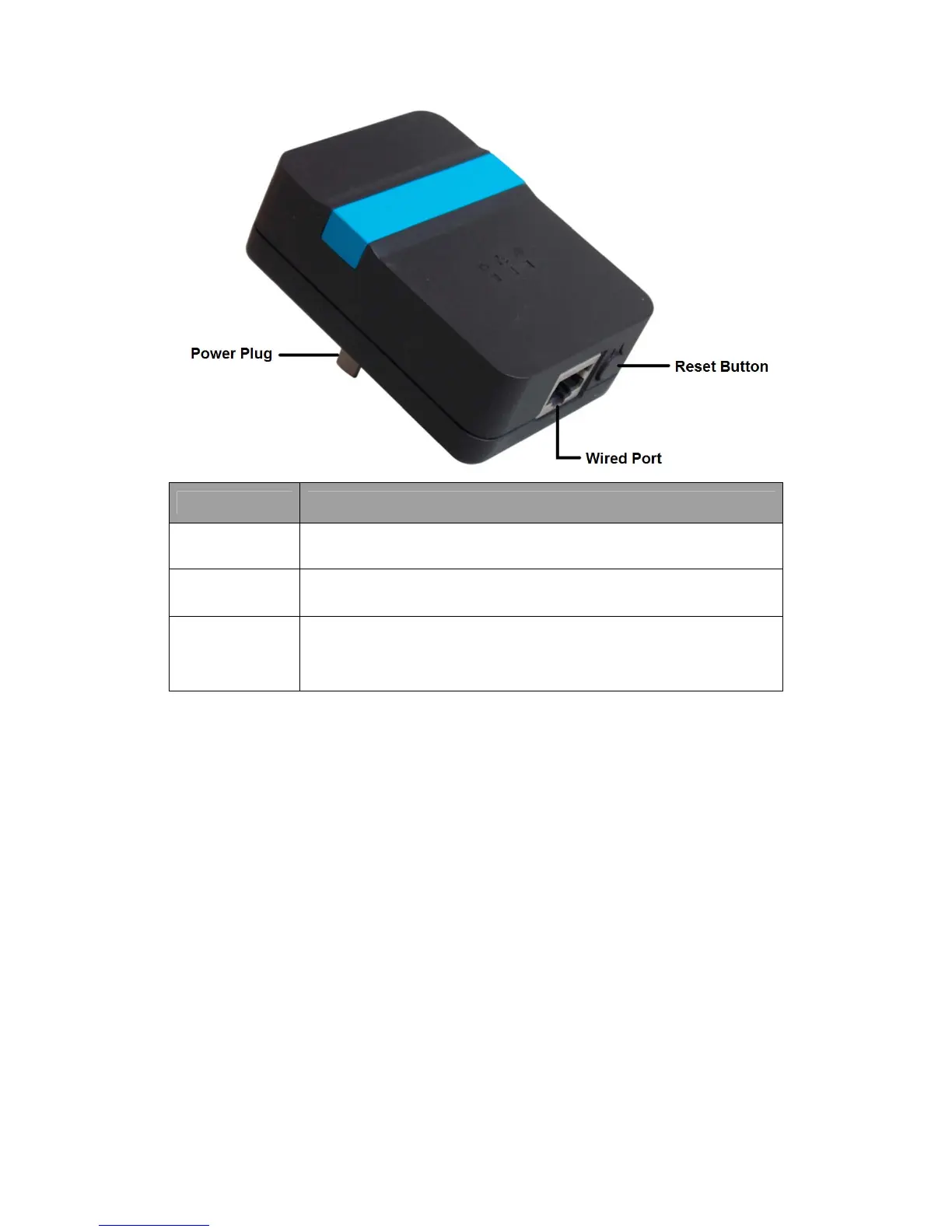
Interface Description
Power Plug
A Power Plug for connecting the AP to a 100V~240V AC power
socket.
Wired Port
A 10/100Mbps LAN/WAN Port for connecting the AP to the PC or the
broadband device with a network cable.
Reset(WPS)
Button
The Reset Button has two functions, WPS and Factory Default.
When press it less than 2 seconds, it is WPS function, more than 5
seconds, the AP will restore to factory default.
2.3 Typical install
AP Mode:
As the supplement of wired LAN, Wireless AP enables the wired LAN to connect to the
Internet wirelessly.
The default mode of Wireless AP is AP. Plug the power plug of Wireless AP in electrical
wall socket and connect the Ethernet cable correctly, you can surf the Internet by
connecting your PC(s) to The Router wirelessly.
To avoid the conflict of DHCP service with front-end devices, the DHCP server is default to
be closed on this mode. If you want to login in the management page, please set your
computer’s IP address manually.
As below picture, under this mode, wired port works as LAN, connects wired signal
directly and turns the wired into wireless via AP device for the using of terminal wireless
equipment.


 To Next Page