11N Mini Wireless AP
30
Time Zone select: Select your local time zone from this pull down list.
NTP Server: Select the NTP Server, then the AP will get the time form the NTP Server
preferentially.
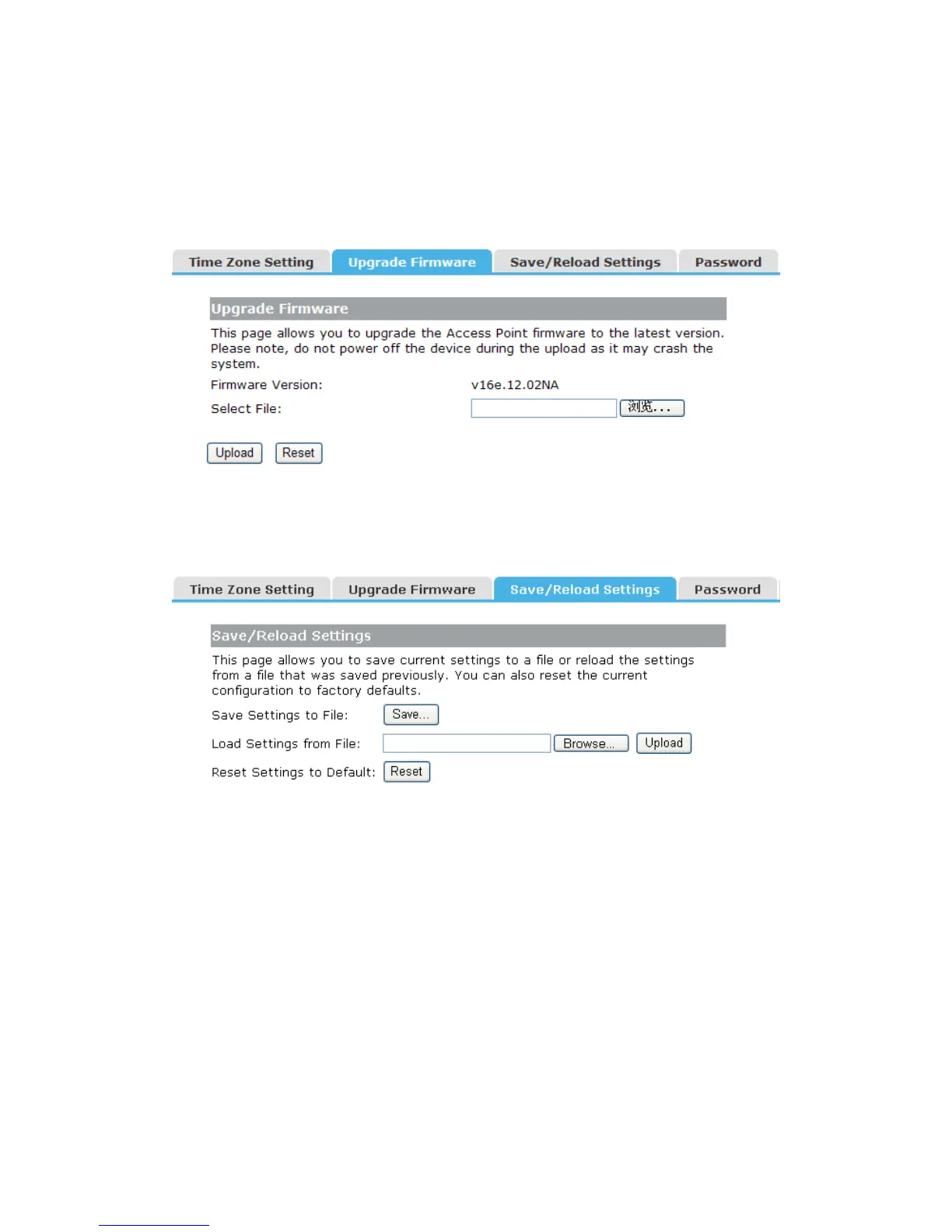
4.8.2 Upgrade Firmware
You can upgrade latest Firmware in this page.
Firmware Version: This displays the current firmware version.
4.8.3 Save/Reload Settings
You can backup or restore the system configuration in this page.
Save Settings to File: Get the AP’s settings and store it in your local computer.
Load Settings from File: Restore the settings from the file you backup before from your
local computer, the AP will go to the former settings.
Reset Settings to Default: Restore the system settings to factory default.
4.8.4 Password
To ensure the AP’s security, you will be asked for your password when you access the
AP’s Web-based Utility. The default user name and password is “admin”.
This page will allow you to add or modify the User name and password.


 To Next Page